I had a steep learning curve when I switched from Adobe to CaptureOne several years ago, but this is way more difficult, because the difference is bigger.
If I could, I’d stay with CaptureOne, but there is no Linux version and it doesn’t really work on Wine et al, and they switched to a subscription model too.
I moved from Capture One to darktable completely about a year ago. (I had been playing with darktable many times before). I think it is hard to give specific advice because so much is depending on your specific workflow. But a couple things:
Masking in darktable is the opposite workflow of C1. In C1 you create one mask and apply multiple adjustments. In darktable every module has its own masks. (Yes you can reuse masks, but they are copied)
The concept of the pixel pipe is completely hidden in C1. It helps to spend effort and time to learn about it and understand it.
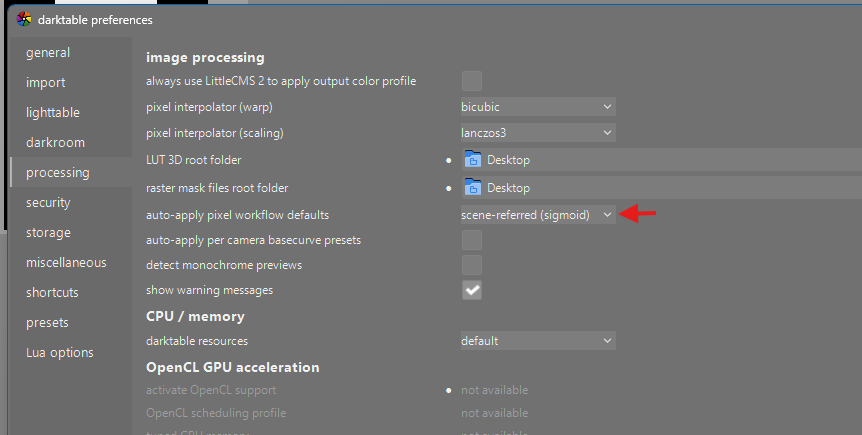
there is a lot of talk on display vs screen referred in darktable. Ignore all that. Just go for scene referred and check if the modules you want you use work properly in scene referred.
coming from C1, use the AgX tone mapper. IMHO it is the easiest to learn and closest to the C1 look. Since I tried AgX I have not looked back on Filmic or Sigmoid.
What is your main type of photography? That can help to be more specific in tips.
I think that’s a minor change and I won’t have issues with that.
As it was hidden in C1, it just worked and I never had an issue because I didn’t know about it. I got the results I wanted. So, not being aware and not having to deal with it was much simpler
The manual says " Selecting the scene-referred workflow enables the v5.0 module order and automatically enables the [exposure] and [filmic rgb] modules …". so I have rto replace the [filmic rgb] with [AgX]?
I personally recommend for Sigmoid for a new user to DT. When you become comfortable with DT then explore AgX which is my tone mapper of choice. Also read the manual about which ever tone mapper you pick.
AgX combines features of a tone curve with the essential tone mapping. For a user coming from Capture One, I would recommend Sigmoid instead, which is mostly focused only on tone mapping. AgX’s added complexity would be a distraction in the beginning.
I consider that a serious defect in other editors. Of course, it does give YouTubers the opportunity to make videos about the best order to wiggle the sliders in
I would say that understanding it is essential to working with darktable. If you don’t, you will likely be spending way too much time shooting yourself in the foot and undoing the damage in various convoluted ways.
@CDR0224 My advice is to leave everything behind, and start with an open and curious mind. If you try to use darktable the way that you would use C1, you will be frustrated and disappointed. If you learn the darktable way and lean in, you will see that it’s very powerful and, after you get used to it, not more complicated to use.
darktable has a steeper learning curve, and gives you a lot of control that you can use to your advantage if you know what you are doing.
I’m ready to learn, did it when I switched from Adobe to CaptureOne.
But I want similar results as in C1, and that’s why I’m asking here. I don’t want to spend a lot of time on each image when I can have a good result with default settings. But to get that, I need to know those default settings, or at least how to get them as I want
While others recommend Sigmoid, since you’re coming from C1, I would indeed recommend AgX. And indeed this is the way to set it up.
The reason I recommend this is:
Out of the box, AgX some closer to C1. I struggled with both Sigmoid and Filmic.
I do agree that AgX is a more complex module then Sigmoid. However, when you just focus on the basic curve parameters and leave the primaries tab for with it is, I argue that it is easier then Sigmoid!
I am a proponent of Sigmoid for new users but I do agree that Agx is rather simple to use if you avoid trying to use every slider. I find that using auto tune levels does 99% of the required work in AgX. The other sliders might then be viewed as optional. I do tend to use pivot target output slider to do a final brightness/brilliance adjustment if the image is just a little light or dark after the auto tune levels.
Hello and welcome to the dark side of the Force
If you miss the colors of the Capture One UI, you should try this theme I created, inspired by Capture One
P.S.: This isn’t an official theme, so use it at your own risk
I’m afraid there are no real shortcuts and that spending some time in bootcamp, drilling the basics, is unavoidable. But when you do understand those basics, the rest becomes much easier and faster. Often, when I see beginners struggle, it’s because they tried to skip ahead.
As a side-note, this discussion gave me some ideas for improvements to my beginner guide
Also scene referred editing can take a little more work…you are defining your exposure for each image to get that nice midtone or perhaps subject focussed exposure and then you tonemap…
Certainly you can use styles and streamline things but each image is going to need some tweaking to optimize this…
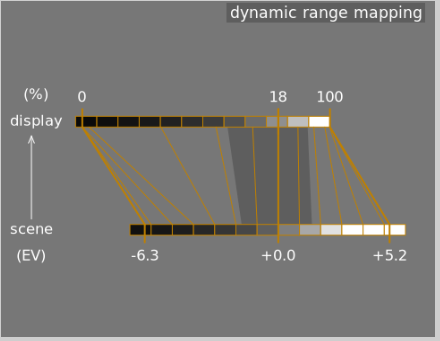
Filmic has a display mode to visualize the settings but the concept in DT is the same…you set your middle gray with exposure to look good on your display…this will then be the 0EV point and then you tonemap around that with your “relative” white and black to bring the data down to the DNR of your display…