As I’m trying to move away from Windows (because of the bloat, AI push,US politics, etc), so I had to find a replacement for CaptureOne (which I used in session mode only, as I have a dedicated DAM for the management of my photos). Also, because CaptureOne switched to a subscription only model.
Darktable seems to be the most capable, although it lacks some functions which I use quite a lot, like stitching panoramas and blending HDR images directly in C1.
Right now, my biggest battle is with the user interface and the workflow. I tried to reproduce the look of some of my images from C1 in Darktable and couldn’t get anywhere close to it …
The DT Manual is quite good, but doesn’t really reduce the complexity of DT. So my question is: Is there anyone who also recently made the switch and how did you get your workflow to get similar results in DT as in C1?
Any tips and experiences to share? I found some posts here about C1 vs DT, but those are relatively old already, hence this new post.
Also, I noticed that my “CaptureOne Pro 23” version 16.2.6 is faster and more responsive in a W11 VM in Virtualbox than DT in Ubuntu with KDE Plasma (Tuxedo OS) running natively on the same machine (AMD Ryzen AI 9 HX 370 w/ Radeon 890M - 12 cores, 24 threads, 32GB RAM; the W11 VM getting only 12GB and 8 single cores when running).
You really need to forget your C1 workflow, since darktable’s is so fundamentally different. Pretend you’re a complete beginner. I have collected the best tutorials and other useful advice in my beginner guide:
You will also have to accept that you will probably not get the same level of results for at least a little bit, due again to differences in how they work.
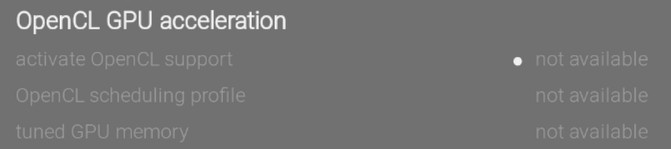
Make sure OpenCL is enabled in the preferences, because otherwise only the CPU will be used. But if the GPU isn’t very fast or doesn’t have much VRAM, it may be better to run on the CPU.
Not sure why OpenCL doesn’t work, but first verify you have the right drivers installed. Another thing is that Ubuntu often doesn’t have the latest releases in their repositories, so if your darktable version isn’t 5.4.1, you may want to look into alternative ways of installing it, such as AppImages.
Welcome to Darktable and the forum. I am not a CaptureOne user. I was a lightroom user and a user of other programs as well. I am stuck on Windows because I use Microsoft Image Compositor as my preferred panorama stitching program. I tend not do HDR merging because I have found HDR merging was an essential skill when I processed JPG captures but is of limited or no benefit to my RAW captures. However, Linux programs to tackle both types of merging are available.
As for Darktable I would forget your past workflow and learn to develop your new workflow. The playraw category can be very helpful in my view for learning and engaging with this forum.
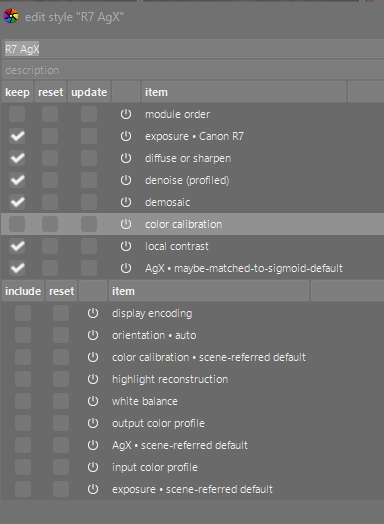
My latest camera is a Canon R7. It produces a pretty nice out of camera JPG so I used a suitable image from the camera that included skin tones, black clothing, grey road, and bright colors including red, green and blue. I took a snapshot of this JPG and then opened the raw file. I created a style to apply to my raw file that closely matched the look of my camera’s jpg. But the raw had more detail in the shadows and was sharper for fine details in the image. So while not a prefect match to the JPG it was in my view better.
I then used this style to open many hundreds of pictures and made small tweaks to the style because I discovered the style needed for people shots was a little different to landscapes and other genres. But having this initial style was helpful to me developing a fast and efficient method of working with DT.
My basic style for the R7 includes customizing the exposure module to match the specific camera, initial sharpening in the diffuse or sharpen module, denoise (profiled) module for initial denoising, capture sharpen activated in the demosaic module, AgX as the tone mapper, and local contrast at default values. The unticked modules are important to remain unticked as these are set per specific image depending on white balance set in camera, ISO used etc.
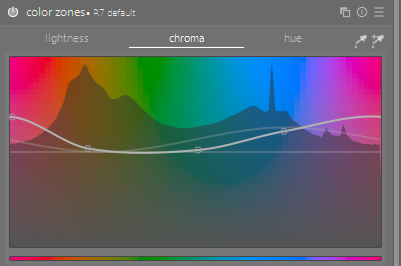
I also found it important to make a customised preset for color zones to produce pleasing skin tones that matched my cameras JPG. This was also included in my style for a long time but at some stage I dropped it from my style but use it extensively with people shots. Similar adjustments could be made in the color equalizer module.
The main reason I settled on darktable as my #1 editing program is the incredible masking ability available in all modules that can benefit from it. Masking includes, drawn, parametric. details threshold and now even AI masking (which is still to win me over).
OK, I was replying to… “Right now, my biggest battle is with the user interface and the workflow” more than any other questions… BTW, too many questions in this thread for me.
I’d recommend watching e.g. Bruce Williams tutorial series and then reading the documentation for a few select modules you learned about. Then you can try starting to match older edits from C1 and maybe post some of them as playraws to learn how others tackle them.
As someone who transitioned from lightroom/windows about 1,5 years ago: it will take time but you will get there. It will require really re-wiring your brain - at least that was my experience. My whole thought process about editing was formed by LRs toolset and letting go of that took a conscious effort and sometimes didn’t feel great. But now I feel like I have a completely new understanding of colours and contrasts. I heavily customized my work flow with loads of keyboard shortcuts to bounce around between modules which also considerably sped up my editing.
Switching to Linux/dt will bring some discomfort with it. But there is also a huge payoff in my opinion and it is very much worth making that effort (also this community rocks).
OpenCL can not be used inside a virtualbox. At least that what I was told in virtualbox forum. I tried to run DT for linux in virtualbox for osx_intel and did get the same dialog box.
I used to use Capture One in version 20 and 21 if memory serves. I even wrote a review of it on this very forum.
I’d recommend getting to grips with Color Balance first and foremost, and stick with Sigmoid instead of Filmic or AgX for the time being. Color Equalizer is your color panel, and Tone Equalizer is your HDR panel.
A few notes:
You don’t need to fear “exposure” in Darktable. It won’t blow out your highlights. Thus you don’t need the “highlights” to save the highlights, and don’t need “Shadows” to raise your midtones. Just use exposure for the midtones, and adjust with tone equalizer for your desires tonal balance.
You can easily build your own “speed edit keys” with Darktable’s shortcuts.
Once you have a rendering you like, save it as a style. Darktable doesn’t start with punchy colors by default, but with a flat profile. So build a style you like, and use it as a starting point. In particular, increase contrast and saturation (in color balance to start). Darktable does not have default styles, but each module can have a default preset (per camera setting!). You can use that to make yourself an automatic starting point.
If you need specific film simulations, build them with a color checker, a tone curve, and the color lookup table module. (This can be done manually or automated, but that’s perhaps for later). There are more sophisticated methods, but this one is quick and easy.
Thank you for your description.
I haven’t used styles yet. Never needed any presets/styles until now. In C1, when the base processing from C1 wasn’t enough, I edited pictures individually and, if necessary, copied those settings to other similar images (haven’t found out how to do that in DT yet). That was quick and easy to do.
Well, the OS, even more than DT, is quite complicated compared to W11. Took me about three weeks of 5-6 hours per day to get where most things work as intended, and I tried 4 different distros.
So many things that just worked out of the box on W11 required lots of research and tinkering on Linux.
Just one example: My printer. Epson ET-2825 (not really an old or very new model). The OS found it allright. Scanning worked without issues. But printing … It appeared as ready under the printers, but when I wanted to print anything it said it couldn’t communicate with it …
After a day of research, I finally found out that the OS was automatically adding the .local domain to the address … stupid. How is an average user supposed to know/find that?
And searching for solutions to problems nearly allways requires to exactly specify the exact distro type and version, window manager version (didn’t even know what that was before using Linux), and several other things … quite messy and complicated for a Linux beginner.
 (also this community rocks).