Here’s the link to the latest weekly build of darktable 4.3, https://drive.google.com/file/d/1vDnhsQ56MPANgsV9tlJRCJoD6arurXyn/view?usp=share_link. The list of latest changes is at Comparing a5c82f32b…8471c8b72 · darktable-org/darktable · GitHub
5 Likes
Quick question: Can I use “-d all” in a Windows shortcut for darktable (or in a bat file)? It only seems to update the log file when I use a command prompt…
It should work from a .bat file and I would think it would work from a shortcut. I’ll try and report back.
Did you get a chance to take a look Bill? Also, I was having a lot of stability problems with the full release of 4.2.0, but the problems seemed to get better when I enabled -d all. That seems surprising. Is it possible or is it more likely to be a coincidence?
It works from a bat file, but I didn’t get it working from a shortcut
1 Like
Thanks Bill!
And nice to see sigmoid now uses opencl.
Did you do a migration… if so you might want to run your currently installed version using --configdir “path” and specify a folder for path… this will give you clean config files and databases…you could run a few test images and scenario’s that are giving you issues… if all is good then its not 4.2 perhaps but some corruption or migration issue when you upgraded… when ever I have issue I always try this to see if the system behaves the same way as my installed version…
Hi Todd, no I don’t think it’s a migration issue because I haven’t done one. Sadly, the issues returned so it was nothing to do with -d all, as I suspected. After disabling openCL, I haven’t had a crash since, so it’s looking like the culprit is openCL, maybe specific to AMD cards. It’s a pain because disabling openCL really slows down darktable to something bordering on unusable for me. And I haven’'t had a problem with openCL at all over the last 3 years until 4.2.0.
There’s an issue on Github for it, but if no one else is experiencing the problem, I don’t how easy it will be to find out what exactly is going on.
What are your settings in preferences are you using a tuning option?? You could also delete all your OPENCL kernels and let them rebuild again?? No idea if it would help…
I had turned openCL off to troubleshoot, but before that, I was getting crashes with tuning turned off and with the various tuning options on. Not sure how to delete openCL kernels, is that a Linux thing? Because I’m on Windows…
Will be in your config folder… in AppData…
Looks like this…

These ones in local/Microsoft/Windows/INetCache/darktable ?
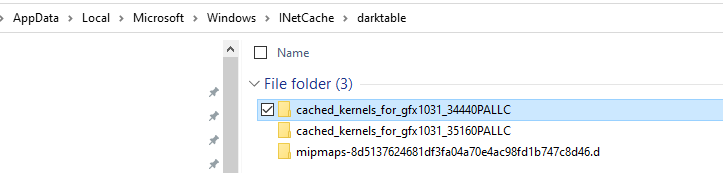
So, the idea is you delete both of those “cached” folders, and darktable will auto rebuild them when it next starts? Any risks to this or anything else I should be aware of?
I don’t think so but you could just rename the folders by adding something to the name and then rerun DT…if you think it went sideways just revert…but I think you should be fine to do so…
Edit and…
Ya sorry I forgot that I redirected all my config and cache files to anther directory so they are much easier to find if needed…