Darktable applies it’s own tag’s like ‘changed’, ‘no-samples’ etc. Both in the manual and on this forum I could not find - maybe did not find the proper search - more info about which tag’s are applied and when. Where can I find some extra information?
Besides that I notice darktable’s tag’s in a hierarchy under ‘collections’ > ‘tag’ in the left panel of the lighttable On the right I may choose to show or not show the tags in the upper ‘tagging’ space. But I do not see these tags in the lower ‘hierarchy’ tree. Is that normal behaviour?
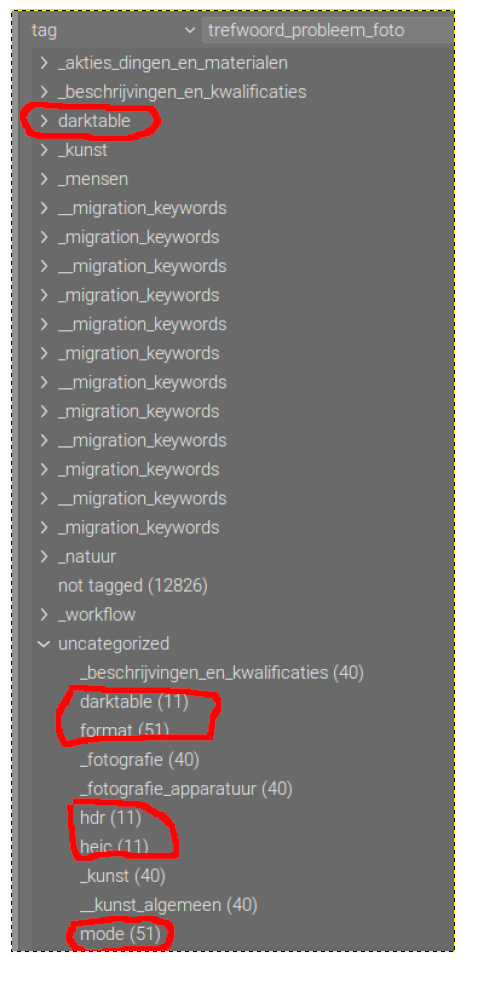
I ask this as I have a couple of tags that seemingly ‘broke’ the regular structure - see the screen grab below (first time using GIMP ). Presumably I have in a couple of .xmp files both dc:subject and lr:hierarchicalSubject filled giving me this when importing in darktable. I unfortunately cannot be sure which software did this, how and when. Might very well be my ignorance / lack of knowledge.
I think so: those tags are appied by darktable under specific conditions. If users can apply them as well, you can no londer be sure that the presence of a tag means the condition was fulfilled (when the tag was applied, at least). That would make the tags less valuable.
That said, some of those tags may not be all that useful for normal users. But as they don’t influence normal use, I find that a non-issue (and they may come in handy for some debugging situations, or when you want to replace some modules with newer ones).
@Jetze Some time ago I had imported a batch of about 20 JPG photos that over the years would show up every time I searched for DNG photos in darktable. I could not figure it out and just ignored that batch when I searched for DNGs. A few months ago I decided to get to the bottom of it and discovered that at some point in time dt had tagged the JPG photos with the dt tag for DNG as well as for JPG. But within dt itself I could not remove the offending DNG tag. So I opened the XMP file for one of the images where there was this section:
The photos in question had both DNG and JPG info. In a batch edit of the folder of offending tags I deleted the incorrect references to DNG and changed the tag ‘darktable|format|dng’ to ‘darktable|format|jpg’. Upon reopening dt, I immediately updated that folder’s images from the newly saved XMP files.
I’m not saying you should do this, but that is how I solved my problem.
OK I surrender… I just hoped someone would know or have a list of keywords.
But then again, if I want to check the coding, where to look and how to find the proper piece of software. I’m still quite new to FOSS.
Kind regards, Jetze
And I do realize that - as we say in dutch - “one madman may ask more questions then 100 wise-men may ever answer…” And that a few knowing people out there try to support a lot of darktable users. For which I’m very grateful!
The code is freely available in darktable GitHub. dt uses c programing language. You can try using the GitHub web search feature to search for the tag name. VS code might be a better search functionality.
Thanks for sharing this experience! I will keep an eye on the involved files. Marked them with a keyword. When needed will use exiftool or exiv2 to see what I can do.
 ). Presumably I have in a couple of .xmp files both dc:subject and lr:hierarchicalSubject filled giving me this when importing in darktable. I unfortunately cannot be sure which software did this, how and when. Might very well be my ignorance / lack of knowledge.