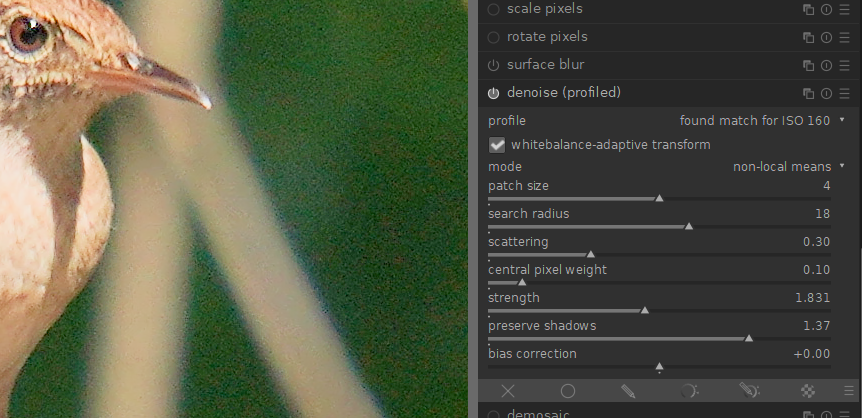
Not a lot of experience with darktable. Started using it mostly for JPG because of the lighttable mode.
Windows 10 x64. Just upgraded from 3.4 to 3.6.
I have a photo taken at ISO 160 that has quite a bit of noise in solid-colored areas that are out of the focus plane. Turning on denoise (profiled), DT says “found match for ISO 160”. But I don’t see any change toggling the module on and off. In 3.4, the module defaults would give a visible noise reduction.
I messed with the sliders and the amount of noise doesn’t change.
Screen shot was taken at 100% zoom.
Can anyone confirm that this is broken in 3.6?
Go to the hamburger menu at the bottom right. Click on it and select which display space to blend in. That got it working for me.
You mean the hamburger menu in the denoise (profiled) module?
flipping back and forth between RGB (display) RGB (scene), and reset didn’t help. No visible change toggling the module off and on.
When I first tried it, it didn’t work. Then I went to wavelets mode and switched from Y0U0V0 to rgb and got a change. Then I switched back to non-local means and didn’t see a change so I went to the blending modes and got it working. I might have turned on global (the circle), but after I turned it off it was still working. I’ll see if I can figure out a way to make it happen. It does work fine on raw images.
I did the steps you mentioned. I am seeing the histogram change when I toggle the module. But the display is not changing (100% zoom). Still looks like the original.
Reset denoise (profiled) to defaults, we’re back to no change (display or histogram) when toggling the module.
Could you open an issue on github?