RawTherapee, ART, GIMP, and darktable use GTK which does not handle fractional scaling (scaling that isn’t exactly 100%, 200%, 300%, etc.) well. On Wayland, GTK programs round up the scale factor and render at that resolution, then downscale to achieve the fractional scale factor.
RawTherapee 5.12 doesn’t do any scaling for the preview and lets GTK+Wayland handle it. With a 125% scale factor, the preview gets scaled up to 200%, then downscaled to 125%. At 100% zoom, the preview is blurry and actually shows the image at 125%.
RawTherapee dev (and the future 5.13) fixes the blurriness by handling the upscaling itself. The 200% scaling step is skipped since the preview shouldn’t be scaled at all. The downscaling step is mandatory, so the resulting preview is sharp, but actually shows the image at 62.5%. I’m guessing this applies to darktable too.
Last time I checked, GTK does not allow programs to have any UI elements that bypass scaling. Recent GTK versions (I think it’s also limited to GTK 4, which none of these programs use) have a way for programs to get the fractional scale factor. This allows programs to show the correct the zoom, but there will always be scaling involved, even at 100%. At 100% zoom and 125% scaling, the program would have to scale the preview up to 160%, which then gets downscaled back to 100%.
digiKam and Gwenview are Qt programs. Qt allows bypassing scaling on Wayland. digiKam and Gwenview probably do just that.
GTK programs on Windows, macOS, and X11 behave differently. Fractional scaling is not supported at all. The scale factor is rounded down to a whole number. A GTK program will look the same whether you use 125% or 100% scaling.
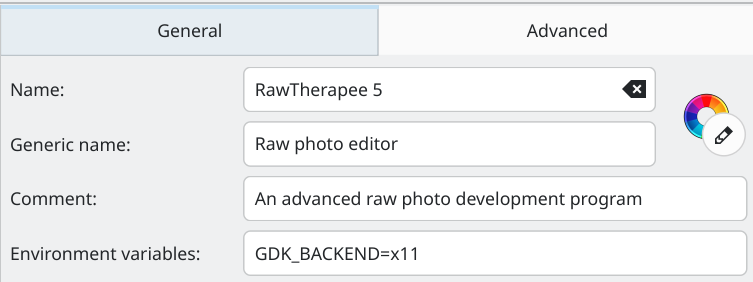
There is no proper fix for the incorrect zoom until the programs upgrade to GTK 4 or implement a manual scale correction. You can, however, work around the issue by using X11 instead of Wayland. KDE offers Plasma on X11. You can also run individual programs on X11 mode with xwayland. To do this in KDE, search for the program in the launcher, right-click, Edit Application, find Environment variables, add GDK_BACKEND=x11, and save.
The program will not be scaled, but you can increase the font size (RawTherapee, ART, darktable, GIMP) and icon size (GIMP).