The complie fails with multiple errors, of which I just need to concentrate on the first at this time, starting at about line 65 of the output from the build command:
"CMake Error at src/external/rawspeed/cmake/compiler-versions.cmake:38 (message):
GNU C compiler version 11.3.0 is too old and is unsupported. Version 12+
is required.
Call Stack (most recent call first):
src/external/rawspeed/CMakeLists.txt:189 (include)
CMake Error at src/external/rawspeed/cmake/compiler-versions.cmake:41 (message):
GNU C++ compiler version 11.3.0 is too old and is unsupported. Version 12+
is required.
Call Stack (most recent call first):
src/external/rawspeed/CMakeLists.txt:189 (include)"
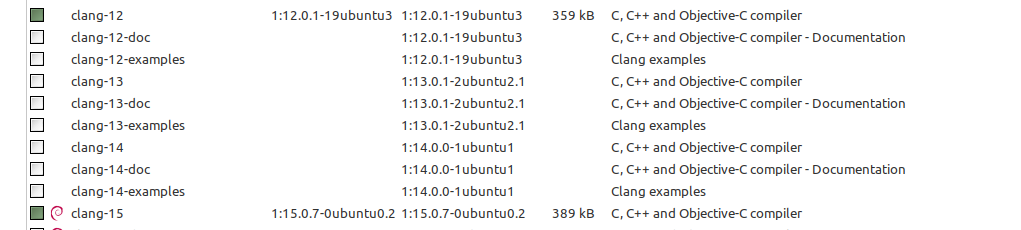
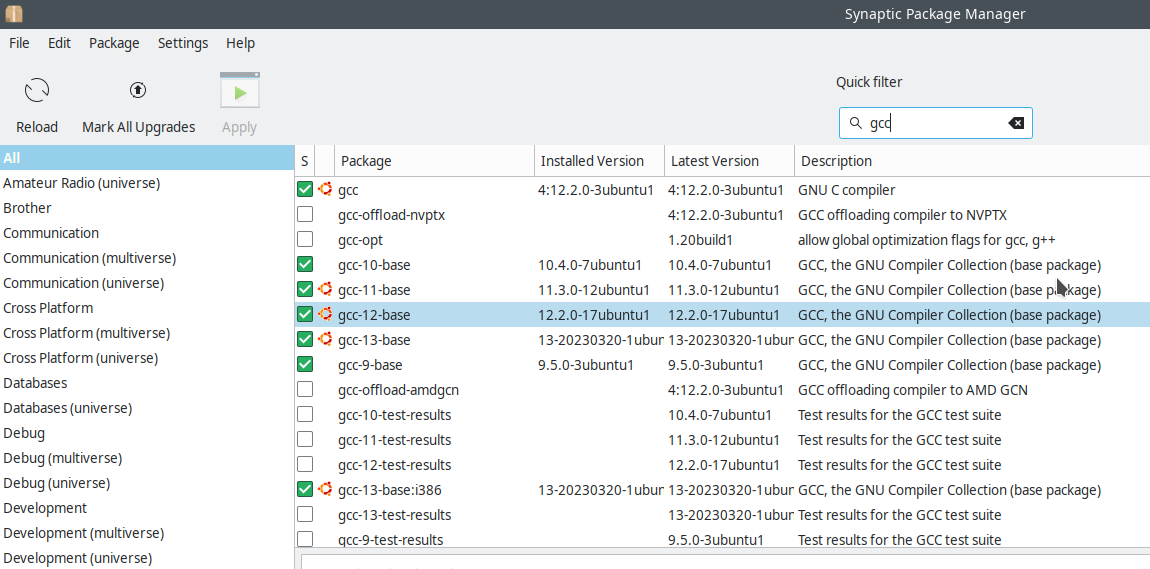
But when I check Synaptic, I find that both clang12 and clang15 are installed. What causes the build process to fail to recognise that the necessary level of GCC is installed?
As an ancillary question I don’t understand how yhe build process finds the tar.xz source file - which I downloaded into my Downloads file, which build doesn’t necessarily know about. Does the git clone process result in the source being made available to build in a place it knows about ?
What i can think of on the top of my head (but i dont know your distro ):
Clang and GCC are not the same thing (or a lot has changed since i was paying attention to compiler versions …)
The configure process of building probably uses whatever is ‘gcc’ on your system. It doesn’t ‘scan’ for available programs, every system is different so this would be an impossible task in the end. gcc -V or gcc --version will probably show you the version that is available as default on your system.
You can tell the exact name of the program to use like @Phil_Smith mentioned. It could be you need a lot more of those lines though (maybe for LD for instance ,but I’m absolutely not sure ). You’ll see the errors and keep addressing / asking them one by one.
I don’t really understand your question about a .tar.gz you downloaded. If you have the Darktable build helper script , that means you have downloaded and extracted a Darktable source , because that file is in it, right ? It doesn’t need to find your downloaded .tar.gz file, since it was in it already…m like i said, i don’t get your question here. Probably my fault:).
That is probably because the question was posed by a complete ignoramus when it comes to compiling. The darktable.org web-site says you can try darktable 4.4.0 quite easily by installing it. Sadly, if you are a Linux user (like most of the developers), there is no binary version of 4.4.0. So, one has to compile it - for which purpose there is an obvious link to download the source code file darktable-4.4.0.tar.xz - with some admonition (which is incomprehensible to me in my current state of ignorance) to download only the darktable developer created ‘tarball’ rather than that produced by Git. I don’t know which is which so I just downloaded the source file linked to on the darktable.org install page. By default this source file is placed in my Downloads directory.
What I then expected to see somewhere is an instruction to move that source file to a location which is known to the compile process - either through a suitably modifyed a path variable, or moving the source file to a specific folder. There are no such instructions, so I am confused as to how the compile process finds the right source file to compile.
“tony@FTS-Red:~/darktable$ gcc --version
gcc (Ubuntu 11.3.0-1ubuntu1~22.04.1) 11.3.0
Copyright (C) 2021 Free Software Foundation, Inc.
This is free software; see the source for copying conditions. There is NO
warranty; not even for MERCHANTABILITY or FITNESS FOR A PARTICULAR PURPOSE.”
So, Synaptic tells me I do NOT have gcc version 11.3 installed; the system tells me I DO and I do NOt have verion 12 or 15 installed. Who do I trust/believe? And why put the burden of deciding on the ignorant users? Surely the developers involved could have agreed this among themselves? Further more, I don’t know of any more effective way of installed a version of GCC other than through Synaptic… Isn’t this a bug?
kofa@eagle:~$ apt show clang
Package: clang
Version: 1:15.0-56~exp2
Priority: optional
Section: universe/devel
Source: llvm-defaults (0.56~exp2)
Origin: Ubuntu
Maintainer: Ubuntu Developers <ubuntu-devel-discuss@lists.ubuntu.com>
Original-Maintainer: LLVM Packaging Team <pkg-llvm-team@lists.alioth.debian.org>
Bugs: https://bugs.launchpad.net/ubuntu/+filebug
Installed-Size: 19.5 kB
Depends: clang-15 (>= 15~)
Breaks: clang-3.2, clang-3.3, clang-3.4 (<< 1:3.4.2-7~exp1), clang-3.5 (<< 1:3.5~+rc1-3~exp1)
Replaces: clang (<< 3.2-1~exp2), clang-3.2, clang-3.3, clang-3.4 (<< 1:3.4.2-7~exp1), clang-3.5 (<< 1:3.5~+rc1-3~exp1)
Download-Size: 2688 B
APT-Manual-Installed: yes
APT-Sources: https://ubuntu.ethz.ch/ubuntu lunar/universe amd64 Packages
Description: C, C++ and Objective-C compiler (LLVM based), clang binary
 Clang project is a C, C++, Objective C and Objective C++ front-end for the
 LLVM compiler. Its goal is to offer a replacement to the GNU Compiler
 Collection (GCC).
 .
 Clang implements all of the ISO C++ 1998, 11 and 14 standards and also
 provides most of the support of C++17.
 .
 This is a dependency package providing the default clang compiler.

kofa@eagle:~$ apt show gcc
Package: gcc
Version: 4:12.2.0-3ubuntu1
Priority: optional
Build-Essential: yes
Section: devel
Source: gcc-defaults (1.203ubuntu1)
Origin: Ubuntu
Maintainer: Ubuntu Developers <ubuntu-devel-discuss@lists.ubuntu.com>
Original-Maintainer: Debian GCC Maintainers <debian-gcc@lists.debian.org>
Bugs: https://bugs.launchpad.net/ubuntu/+filebug
Installed-Size: 54.3 kB
Provides: c-compiler, gcc-x86-64-linux-gnu (= 4:12.2.0-3ubuntu1)
Depends: cpp (= 4:12.2.0-3ubuntu1), gcc-12 (>= 12.2.0-1~)
Recommends: libc6-dev | libc-dev
Suggests: gcc-multilib, make, manpages-dev, autoconf, automake, libtool, flex, bison, gdb, gcc-doc
Conflicts: gcc-doc (<< 1:2.95.3)
Task: ubuntustudio-audio, ubuntustudio-publishing, ubuntu-mate-core, ubuntu-mate-desktop, ubuntu-unity-desktop, edubuntu-desktop-gnome
Download-Size: 5160 B
APT-Manual-Installed: yes
APT-Sources: https://ubuntu.ethz.ch/ubuntu lunar/main amd64 Packages
Description: GNU C compiler
 This is the GNU C compiler, a fairly portable optimizing compiler for C.
 .
 This is a dependency package providing the default GNU C compiler.
You have to unpack (extract) the tar file to a directory of your choice. Then open a shell (‘command prompt’, ‘terminal’, ‘console’), navigate to that directory, and build. There is no pre-determined path to place the files. The PATH variable is related to executables, not to source files.
I always build the master version. To do that, I’ve used git clone and git submodule init. Then, the source is in my ~/darktable directory. I use the following script to update and build the source. The result is placed in ~/darktable-master.
#!/bin/bash
# the following commands are not necessary;
# they make the build process run at a low priority, allowing the computer
# to assign more resources to other tasks, so you can keep browsing, etc.
# while the build is running
renice -n 19 -p $$
ionice -c 3 -p $$

# get rid of old compiled OpenCL kernels
rm -rf ~/.cache/darktable/*kernel*

# change to the directory holding the sources - modify as needed
cd ~/darktable
# remove all generated files, so we start with a clean slate
git clean -d -f -x
# update from GitHub
git pull --rebase
git submodule update
# remove the old compiled version
rm -rf /home/kofa/darktable-master
# build and install
./build.sh --prefix /home/kofa/darktable-master --build-type Release --install
I installed g+±12 via synaptic, invoked the two export commands referred to earlier in this topic, added the option for a clean build and invoked the build script again. After much wheezing and moaning from the fans in my computer I ended up with a working dt 4.4.0.
I regard this as nothing short of a miracle, created by you unknown smart people out there, in places quite unknown to me, of cultures quite different to mine, but always ready to help, with no prospect of financial gain.
Simply: thank you. Now I can get back to work with dt
Easy enough, indeed, once you learned to recognise the signs of missing dependencies and realise you also need the corresponding development packages for those dependencies (not the source packages).
And of course, with older sources you can get errors due to changes in the language.
That’s where the real fun starts