If it’s about the logs in general, then I can create a parsing script for this (or extend the DT-PA script) if you tell me which information is important and which is unimportant.
With pleasure.
I’m currently using the nightly build. I’ve never compiled it myself, but I’ll give it a try. I’d be happy to help you this way.
I run an “extra” Arch Linux via distrobox, which gives me a fresh “test environment”.
If it’s “only” about AMD, then I can currently offer Strix Halo, RX9060XT and RX7900XT.
Otherwise, I also have a tablet with Iris XE and RTX3050 Mobile 4GB.
Checked both rusticl and rocm on strix halo and can’t confirm any late regression.
Your “analysis” about rusticl vs rocm is at least partly (but strongly) misleading. rocm offers more memory to opencl so dt is allowed to take more thus does not tile in some modules. That’s simply your OS setting. The advice would be to offer as much opencl ram as you can afford without restricting system mem too much.
The main difference i can see is related to atomic_floats, that’s also where nvidia shines.
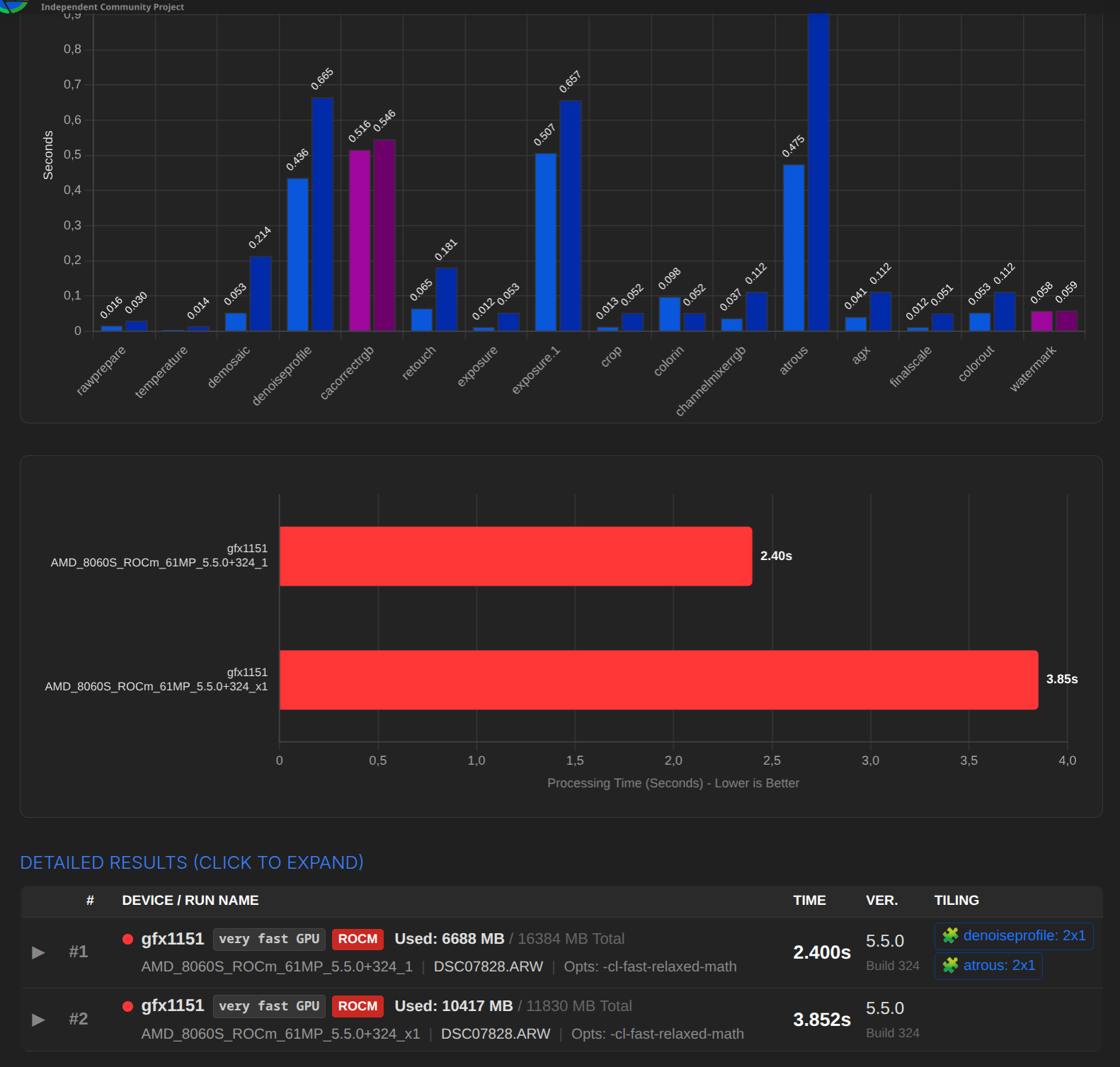
I was just about to redo all the logs with 16GB in the BIOS and got stuck at the following point.
Previously, 8GB was set in the BIOS, and ROCm showed 12GB to dt and 11gb were used.
With the 16GB setting, ROCm showed 16GB to dt, but i only could use 6GB (regardless of the settings in darktablerc). Despite tiling, it was significantly faster.
shared memory fraction was set to 0.5 in each case. Just tried it again to be on the safe side.
If I increase the value of shared memory fraction to above 0.5, the value is reset to 0.25.
Bios 16GB:
GLOBAL MEM SIZE: 16384 MB
MAX MEM ALLOC: 13926 MB
UNIFIED MEM SIZE: 7810 MB reserved
amdacceleratedparallelprocessinggfx1151 using 6688MB
Bios 8GB:
GLOBAL MEM SIZE: 11830 MB
MAX MEM ALLOC: 10055 MB
UNIFIED MEM SIZE: 11830 MB reserved
amdacceleratedparallelprocessinggfx1151 using 10417MB
Interesting We have had several reports that rocm sometimes reports wrongly with unified mem. No idea if this something BIOS related or how/why rocm reports what.
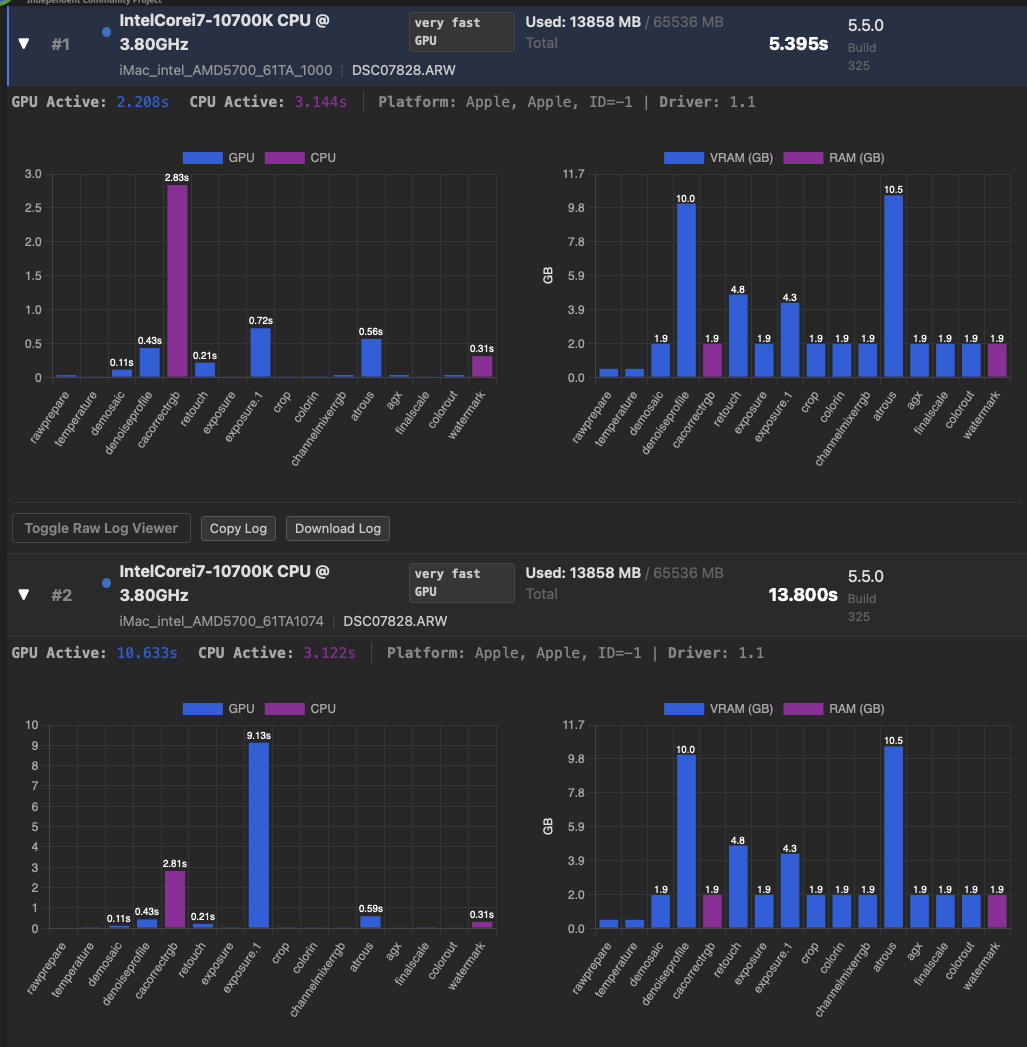
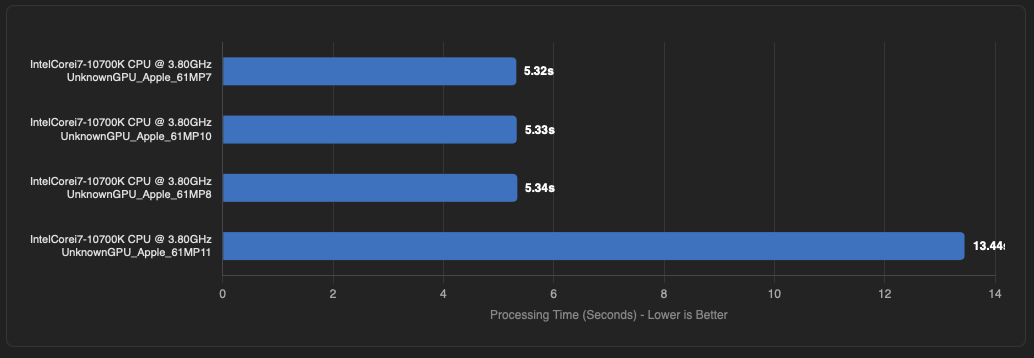
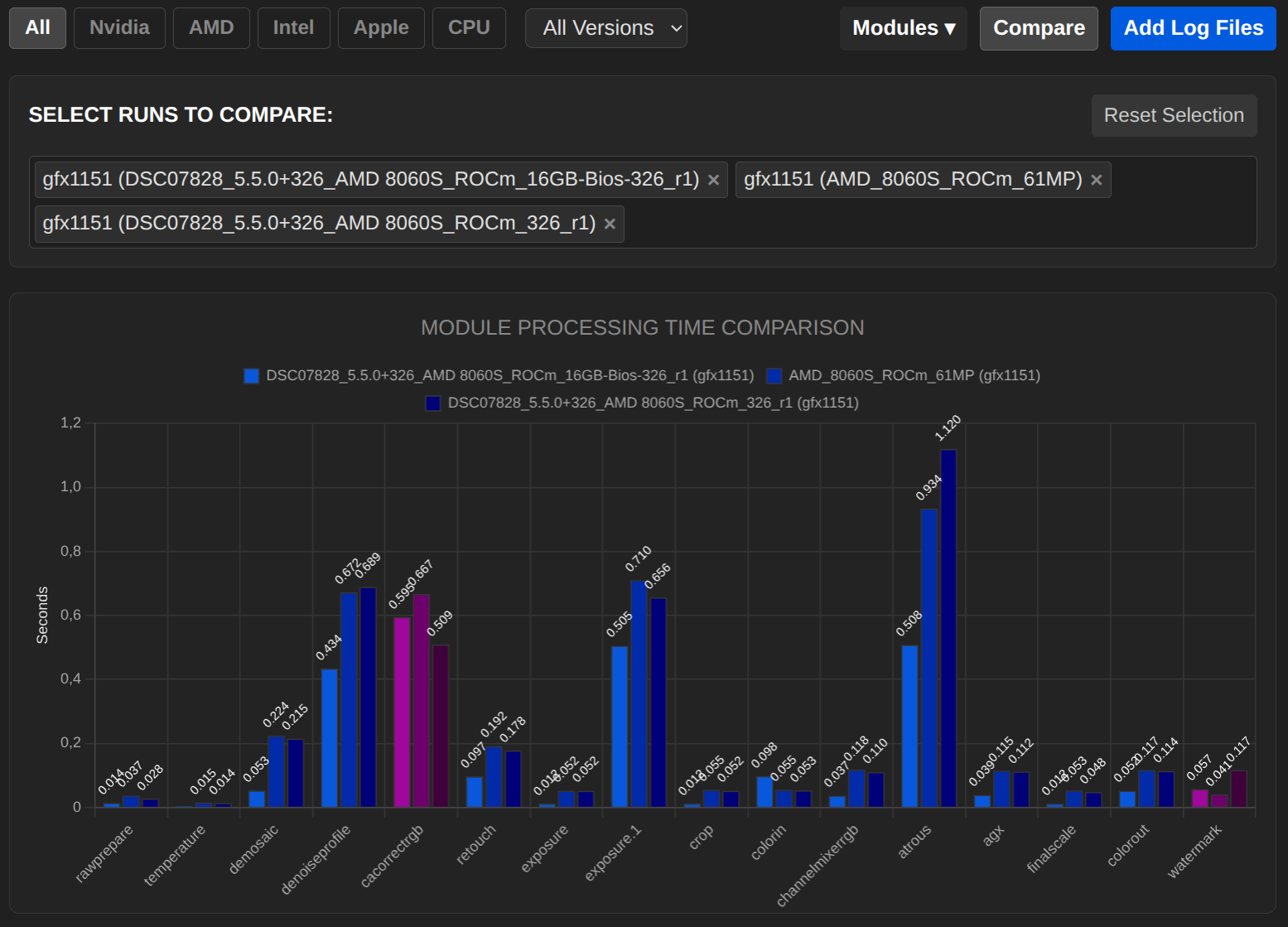
Hi guys, I do not know if is related to the discussion here about tiling but when testing the iMac intel AMD 5700, I realised that in the darktablerc file I had for (unknown reasons to me) a tiling advantage of 1.074. When I change to 1.000 I got a big surprise. Here are the results.
First with tiling 1 and second with 1.074
And here is the new file, which may replace the previous one that I sent for the benchmark table iMac_intel_AMD5700_61TA_1000.txt (16.9 KB)
Well I think the test , as said before, can help optimise parameters.
Thank you again for the test, and thank you also Jens-Hanno for the optimisation of OpenCL, many other things in dt.
Thank you very much for your information. That’s VERY exciting. I’ll take a look and see if I can reproduce it here (with different hardware).
Have you tried tilling advantage 0.0?
I did some fresh tests on my Fedora 43 (all drivers with latest updates) based StrixHalo Framework aimax 395 desktop having 128GB of memory.
The results are with BIOS settings using 32GB for graphics memory (did 5 runs each and took the best result - for both drivers results could be up to 5% worse) so we never have to tile and get what the system currently can deliver.
Repeated this BIOS graphics memory setting to 8GB only, results show expected tiling with rusticl but the relative advantage didn’t change. Similar when using the --conf resourcelevel="common2026" or “reference” switch.
Also tested using the --bench-module option - which does some “pre-heating” , nothing different.
I don’t want to advocate for/against any platform but certainly i absolutely disagree with your conclusion published on dt.info. I also checked for a rocm boost from 5.4.1 to early 5.5 and can’t confirm that either (also i would have absolutely no idea how that could be).
Some final comments:
BTW there is a pending OpenCL related PR giving improved logs for all sorts of clmem-read/write/copy, let’s see if we can avoid any of that code but that’s clearly not the bottleneck.
Not sure but hopefully we can do better in the future with OpenCL 3.0 features made available for platforms supporting that and drivers offer atomic floats …
In some cases we can likely do better for cached pipe data but that won’t affect export performance
Currently investigating if/how we can make use of OpenCL for mask distortion code.
I certainly like the visualizing of your “performance analyser”, it’s something everyone can use, it’s fun, it might give a clue for people planning a new system but …
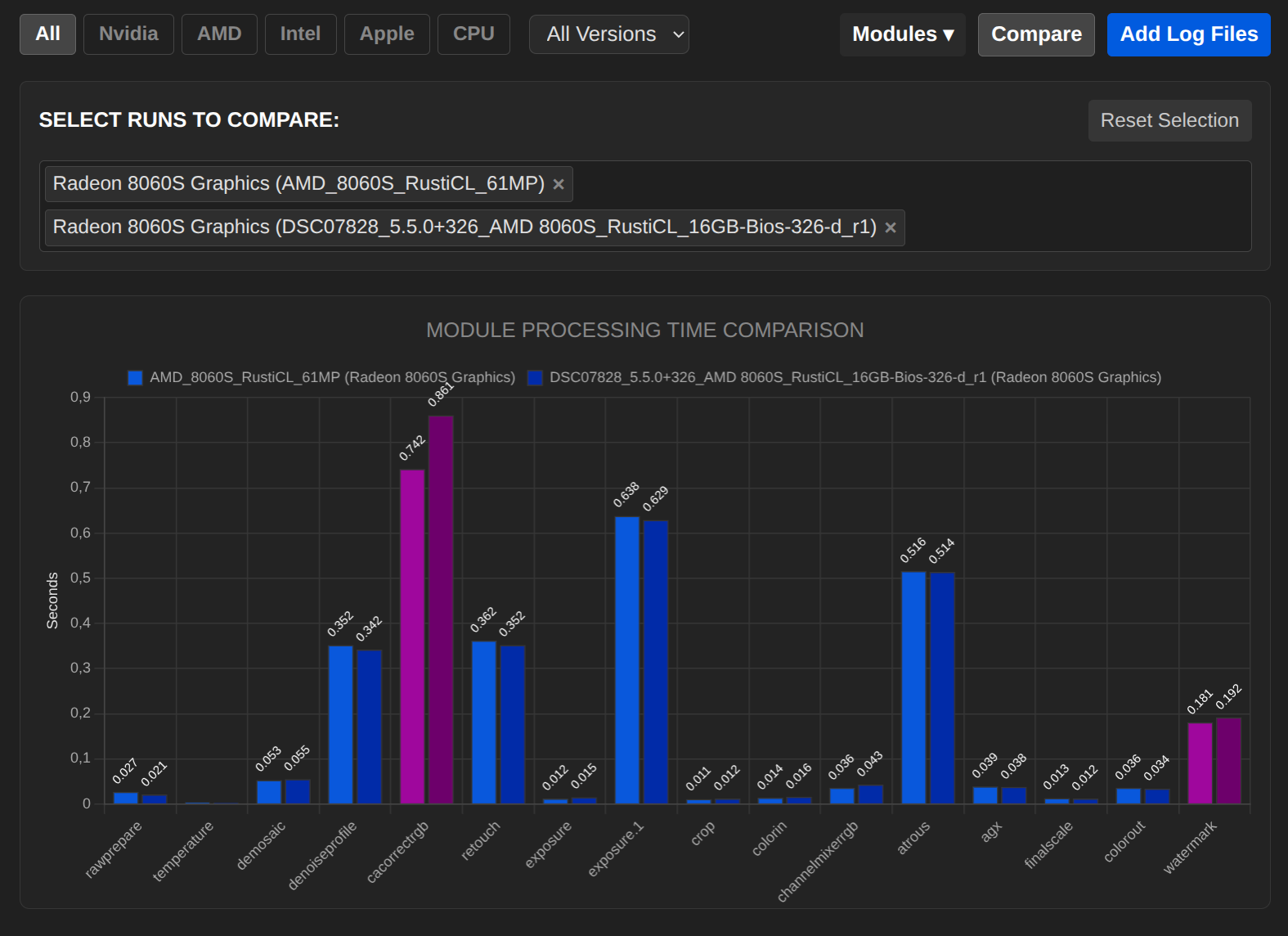
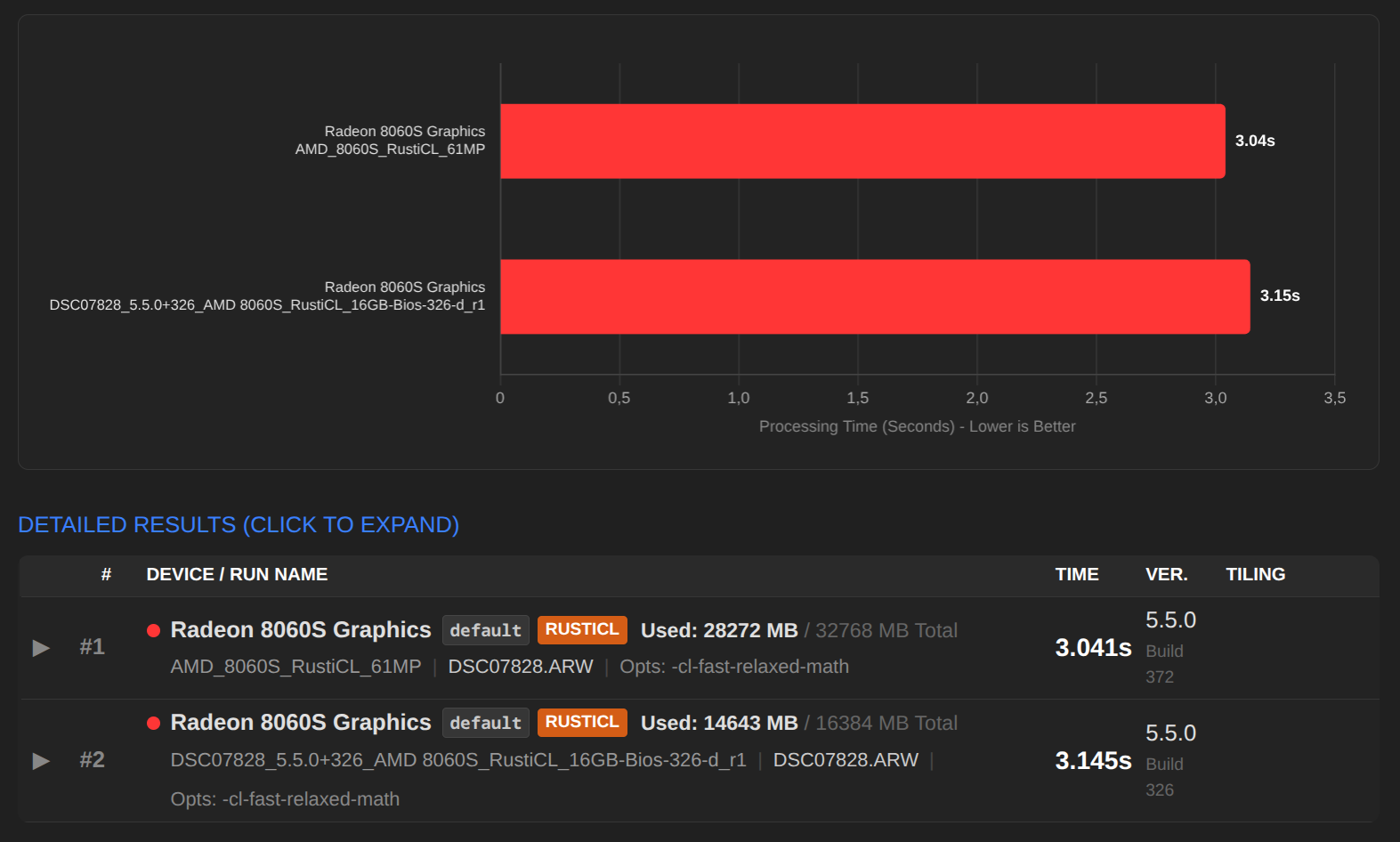
I tested everything again today. Except for a few percent, we have the same values for RustiCL.
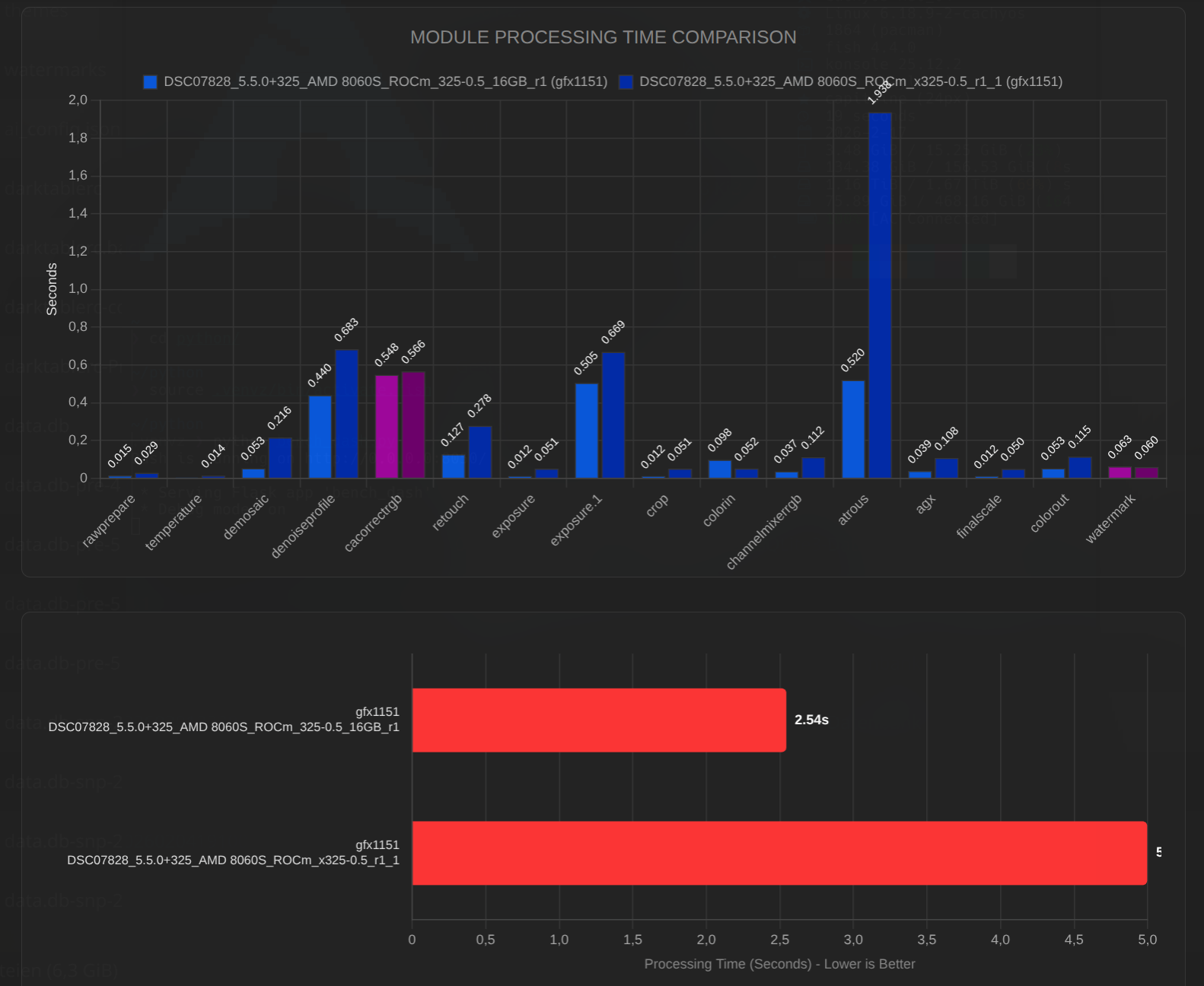
Here is the comparison of RustiCL (16GB BIOS) with your values. My iGPU is slightly faster, yours is slightly faster, probably due to the higher power limit, but it’s all pretty insignificant because they’re virtually the same:
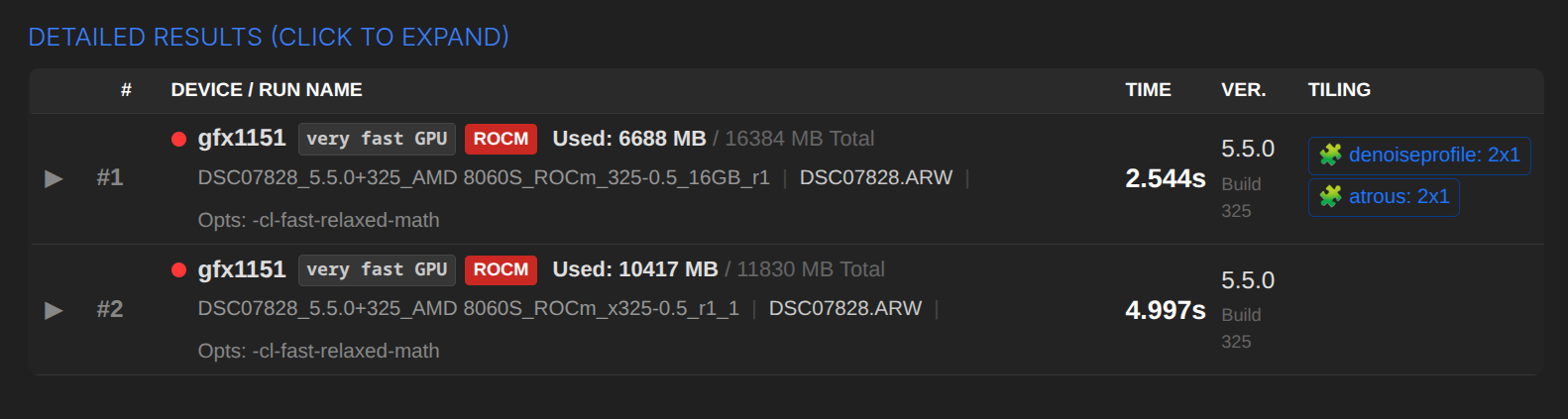
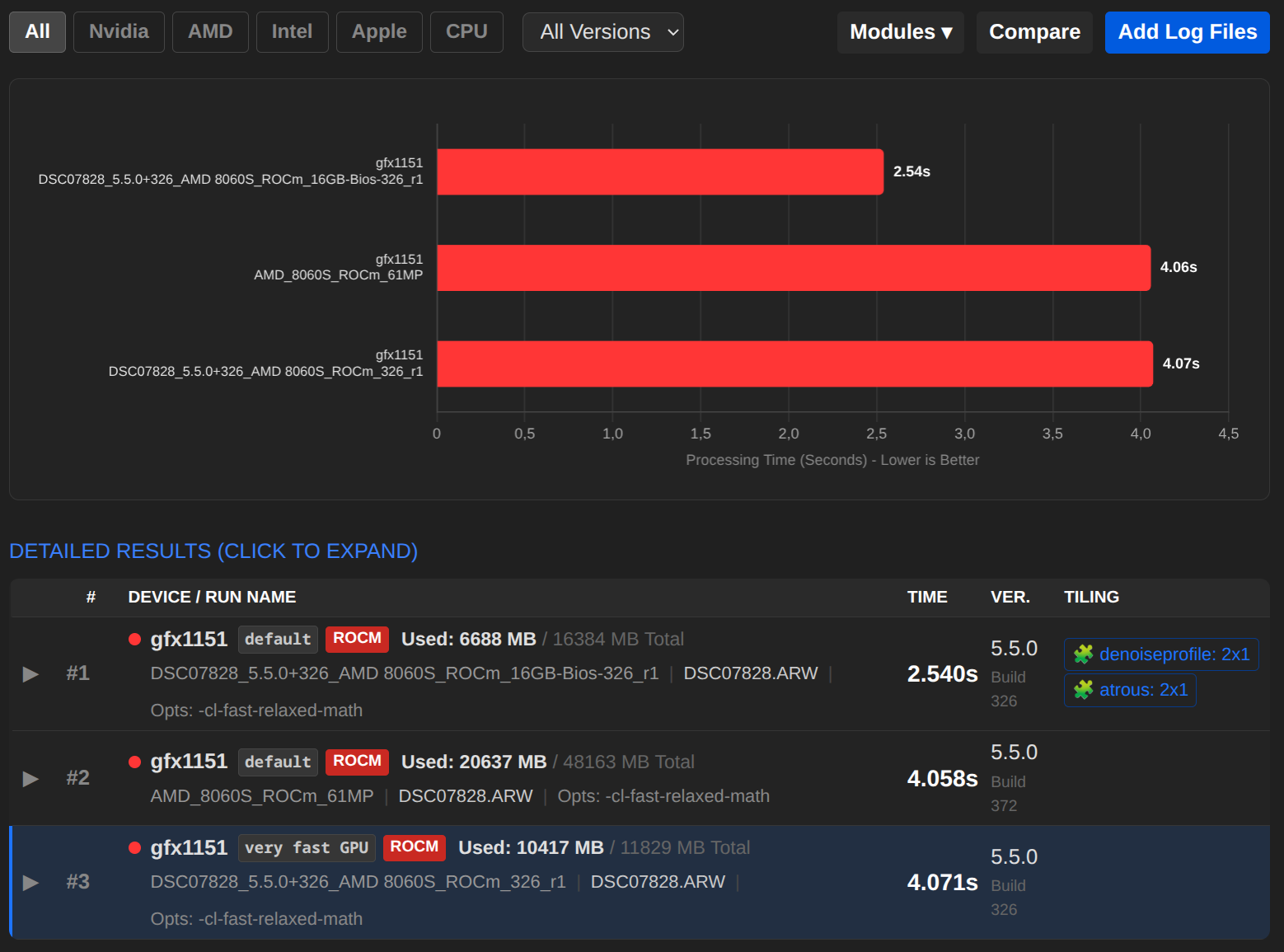
There is a peculiar phenomenon with ROCm. When I set 8GB in the BIOS, DT receives around 12GB from the driver and uses 10.4GB of it. In your case, it is 48GB to 20.6GB. Within the measurement accuracy, we arrive at the same result.
If I set 16GB in the BIOS, this is also reported to DT by the driver. However, DT cannot use more than 6.6GB.
dtrc looks as follows:
cldevice_v5_amdacceleratedparallelprocessinggfx1151=0 250 0 16 16 128 0 0 0.000 0.000 0.500
The differences were most likely due to different ROCm versions on my system. Therefore, I have removed the explanations from dt.info for the time being.
I will add the driver version to the filters in the Performance Analyser so that this can be seen more clearly in future.
That sounds great, I will adapt the tool accordingly to make this visible graphically.
That sounds great too!
Very nice!
Thank you.
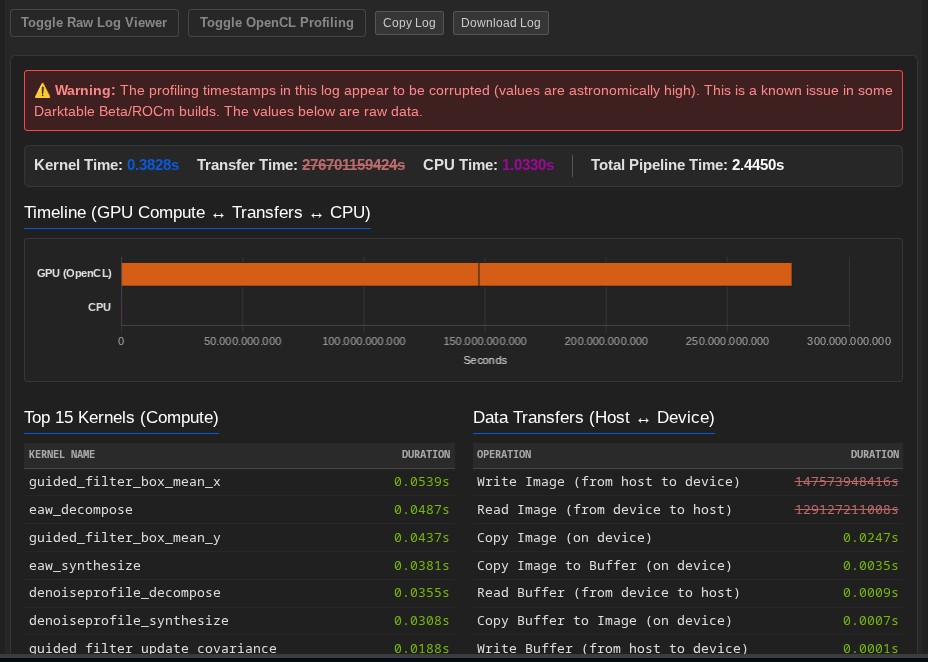
By the way, there is another bug regarding ROCm:
5.4559 [opencl_profiling] spent 73786974208.0000 seconds in [Write Image (from host to device)]
5.4559 [opencl_profiling] spent 36893487104.0000 seconds in [Read Image (from device to host)]
I suspect that this is not a DT problem, but rather a driver issue.
Thank you very much for all the time and energy you put into optimising/developing DT. And thank you for taking the time to write here.
If there is anything you would like me to test, just let me know. Compiling DT is much easier than I thought, and I am very confident that I will be able to integrate any patches you send me.
That has been reported before, for some reason (likely there is some BIOS or other config option special to the hardware/distribution) the reported memory is sometimes “strange”, that seems to be platform specific and very likely related to “unified mem”.
That’s related to unified mem, the allowed fraction and the resorcelevel. I don’t currently know how to do better - working on all platforms.
I would like to emphasize more that tiling code is pretty efficient What you observe here is performance being dependent on cache locality. That’s also relevant for the demosaicer internal tiling ending in very good performance. For the CPU code we had tuned (years ago) the internal tiling for some demosaicers (RCD, LMMSE, AMaZe) to fit within 1MB of data (most CPUs allow that) and could improve performance at least two-fold vs untiled code. Results on OpenCL vary a lot, on our halo systems the penalty for tiling is very low - or even better - on systems with very fast cl memory tiling gets a bit worse.
That’s why we recommend lots of graphics ram on a wide and fast bus over clock rate
Yes i spotted that in your logs, i am not sure yet about the underlying problem, it could well be a rounding problem in dt.
Chris, i can’t spot your “superfast rocm log” any more and didn’t keep it here. Do you have that still available? (Would be interested Have you experimented maybe with the new rocm 7.xxx stuff?
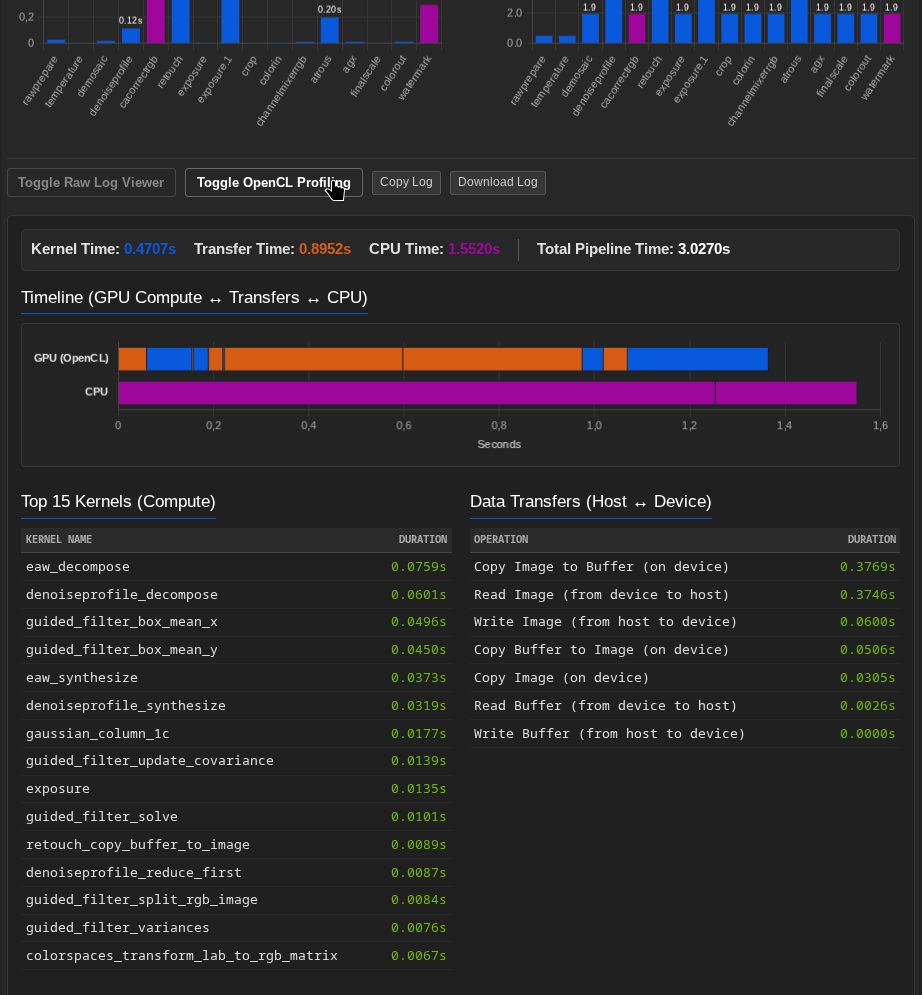
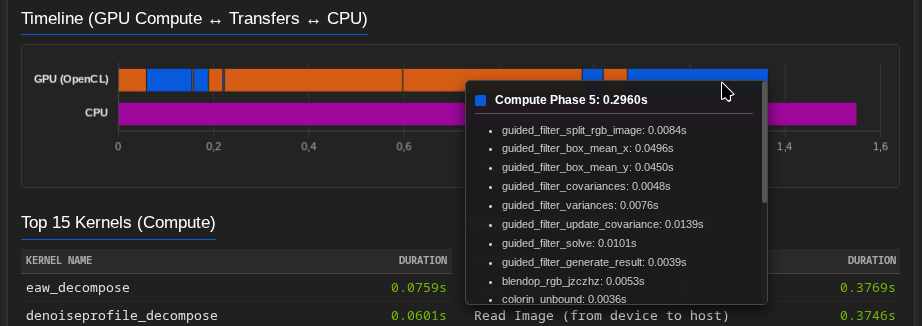
I have expanded the tool to evaluate OpenCL data. There is a new tab for this called "Toggle OpenCL Profiling".
Currently, I am unable to correctly include the CPU times in the timeline, so the total CPU time is shown as an extra bar. At least you can see the relationships quite clearly.
I took a detailed look at that today, but it will take a few more days before I can implement it properly. I will use the timestamps from the log, which are not 100% accurate, but should still be fine.
Definitely a very good change! Thank you for that.
I was also able to reproduce this with ROCm and RustiCL setting memory to 4GB.
Is there another way to free up more memory on dGPUs besides “Headroom” and “Resources”? In this example, the system is running on the iGPU and the dGPU is completely free for DT.
Under Linux, the memory available for ROCm can be read out; I think this is the same function that DT also uses.
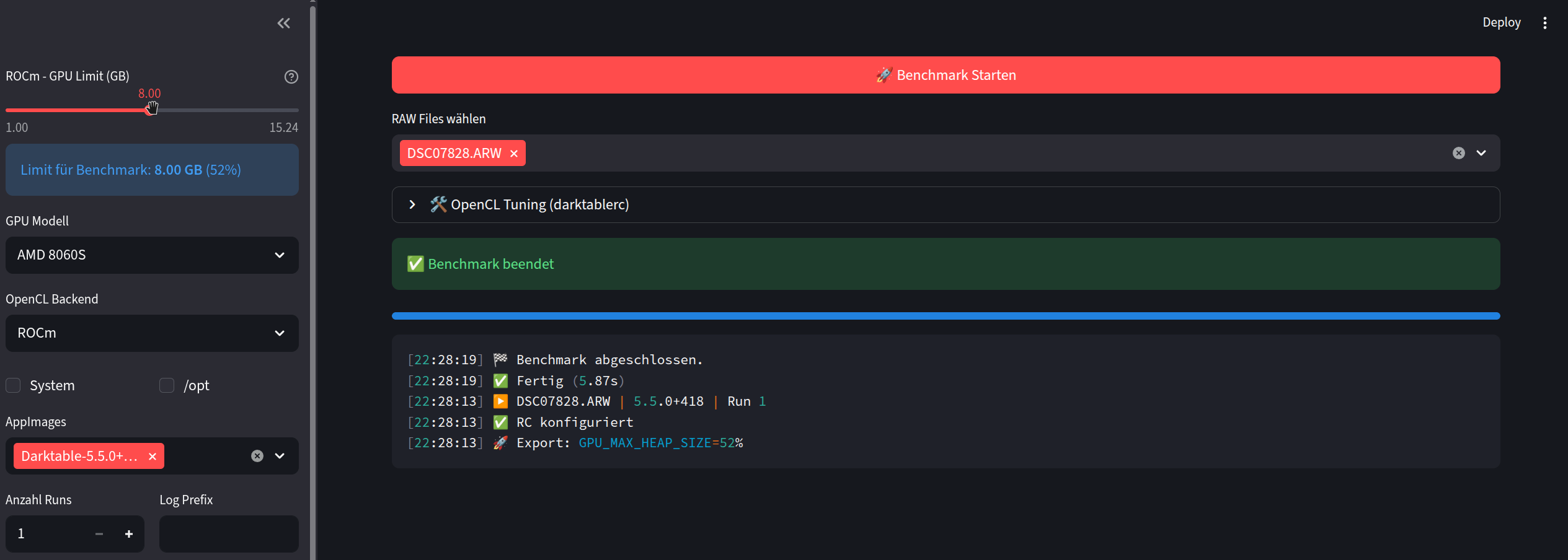
This allows to calculate the memory available for DT “exactly” and set it with “Export: GPU_MAX_HEAP_SIZE=X%”.
That’s helpful for me, at least, since I “only” have 32GB of storage on my Strix Halo tablet You’re living in luxury with your 128GB
I tried a similar approach for RustiCL, but all attempts failed. For Vulkan, for example, it is possible to “reserve” memory without any problems (BIOS = Auto).
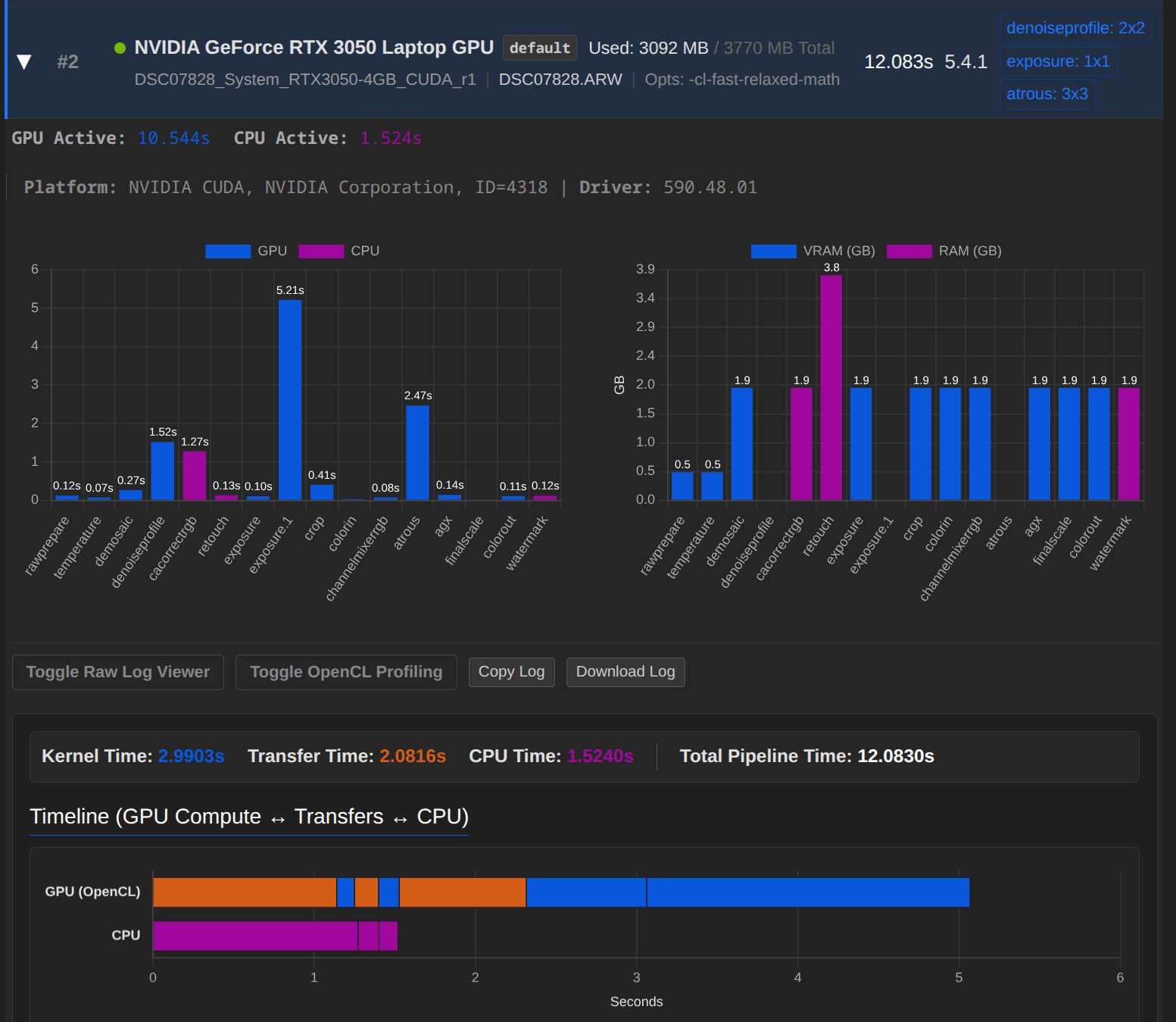
     4,9847 process tiles             CL0 [export]         exposure.1             2600       (0/0)  9567x6375 sc=1,000; IOP_CS_RGB
     4,9847 process *tiled* ptp       CL0 [export]         exposure.1             2600       (0/0)  9567x6375 sc=1,000; 1x1 tiles, size=9567x6375
     4,9847 [default_process_tiling_cl_ptp] [export] tile (0,0) size 9567x6375 at origin [0,0]
     5,2815 blend with form           CPU [export]         exposure.1             2600       (0/0)  9567x6375 sc=1,000; IOP_CS_RGB, BLEND_CS_RGB_SCENE
    10,1193 [dev_pixelpipe] took 5,214 secs (64,587 CPU) [export] processed `exposure.1' on GPU with tiling, blended on CPU
Here we avoid “overtiling” for blending on GPU. I think we can’t avoid that.
BTW i checked the memcopy stuff, some people thought that should not happen as having unified mem At least with the supplied xmp all mem-read/write/copy actions are related to module-internal code as wavelets.


 We have had several reports that rocm sometimes reports wrongly with unified mem. No idea if this something BIOS related or how/why rocm reports what.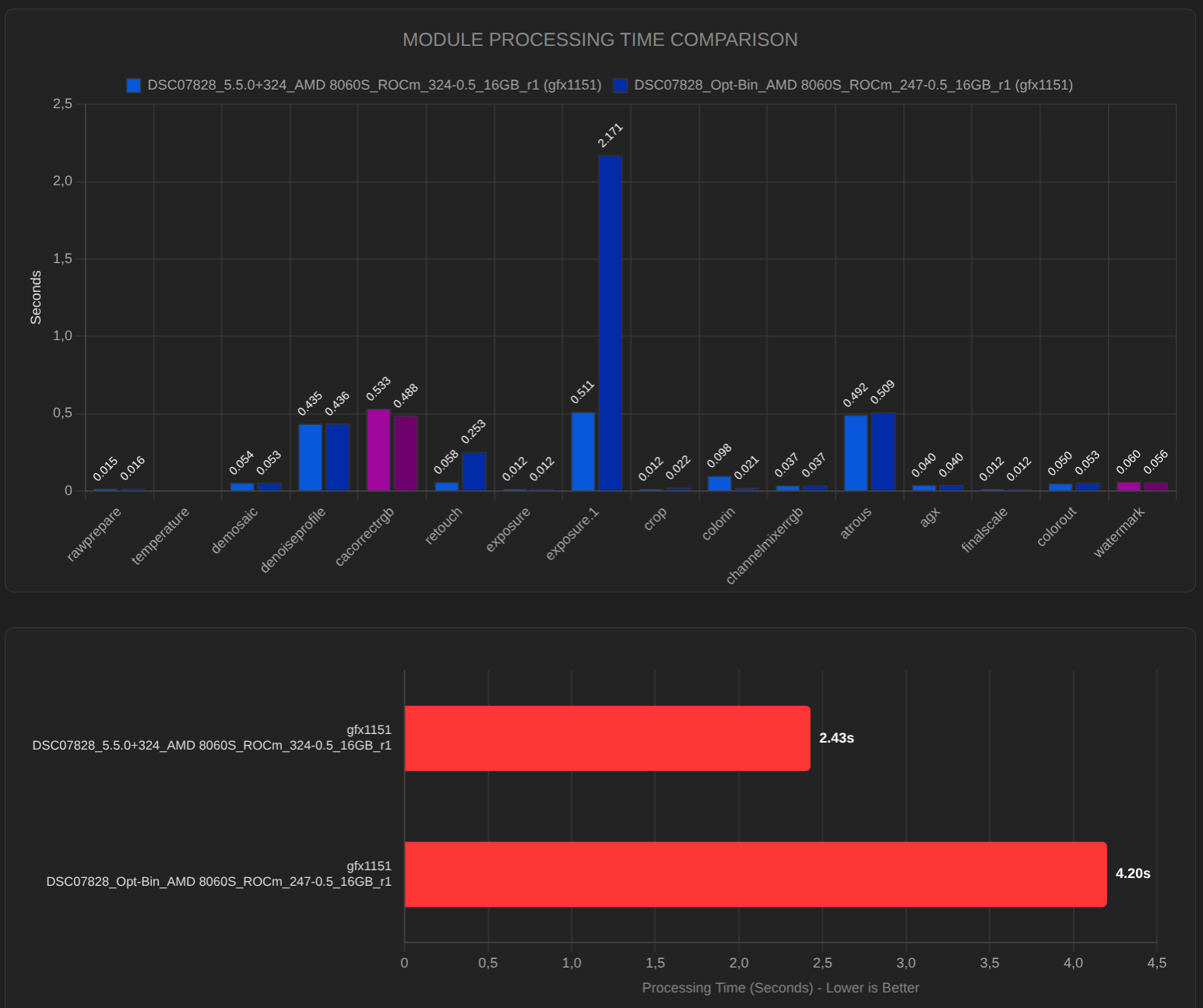

 You’re living in luxury with your 128GB