hannoschwalm
February 28, 2026, 9:11am
224
A bad bad question
In short, OpenCL does not have a portable way to get “free CL memory”. CUDA and ROCm have specific calls. In general, we could use more but the cost would be pretty heavy because of OS swapping. Also - this lead to stability problems on many platforms.
1 Like
Qor
February 28, 2026, 9:47am
225
Thank you for your answers!
There must be a line somewhere between what is feasible and what (still) makes sense. At the latest, this line is reached when it comes to stability.
Editing a 61MP photo with a 4GB GPU just “feels” wrong.
With a 24MP photo, you can get very far with 4GB VRAM, and DT is correspondingly fast.
I am currently trying to understand the topic better and have also read up a bit on OpenCL “Zero Copy”. The topic seems very complex to me. It’s not just that the CPU and GPU share the same memory; they only need to “point” to it.
hannoschwalm
February 28, 2026, 4:38pm
226
That’s “mem-mapping” i mentioned above. Performance varies …
1 Like
Qor
March 8, 2026, 6:51pm
227
I am currently working on the log analysis for the extended information from -verbose.
I noticed the following with exposure.1tile_height=11164 tiles=1 valid=8164 overlap=1500
The photo itself has a height of 6375.
DSC07828_5.5.0+428_AMD 8060S_ROCm_r1_1.txt (45,3 KB)
  2.8858 pipe cache get                [export]         exposure.1             2600  IOP_CS_RGB line  1( 2) at 0x7f15f426d040. hash=216a2009e0930abe
     2.9201 process                   CL0 [export]         exposure.1             2600       (0/0)  9567x6375 sc=1.000; IOP_CS_RGB 4391.3MB
     2.9446 [opencl copy_host_to_device] did alloc/copy img buffer on device 'AMD Accelerated Parallel Processing gfx1151' id=0
     2.9921 blend with form           CL0 [export]         exposure.1             2600       (0/0)  9567x6375 sc=1.000; IOP_CS_RGB, BLEND_CS_RGB_SCENE
     2.9971 [dt_opencl_write_host_to_device_raw] wrote image to device 'AMD Accelerated Parallel Processing gfx1151' id=0
     3.0200 [opencl copy_image_to_buffer] copied image to buffer device 'AMD Accelerated Parallel Processing gfx1151' id=0
     3.0201 [opencl copy_buffer_to_image] copied buffer to image on device 'AMD Accelerated Parallel Processing gfx1151' id=0
     3.0570 [guided CL_0 filter] direct tile_height=11164 tiles=1 valid=8164 overlap=1500
     3.3075 [opencl copy_image] copied image on device 'AMD Accelerated Parallel Processing gfx1151' id=0
     3.5315 [dev_pixelpipe] took 0.646 secs (0.797 CPU) [export] processed `exposure.1' on GPU, blended on GPU
lg
Edit:
The same with a small 24MP image
1.6194 [guided CL_0 filter] direct tile_height=14055 tiles=1 valid=12513 overlap=771
DSC06065_5.5.0+428_AMD 8060S_RustiCL_r1.txt (43,4 KB)
  1.5712 pipe cache get                [export]         exposure.1             2600  IOP_CS_RGB line  1( 2) at 0x7f85fc2bf040. hash=fbf67daf4c47da44
     1.5716 process                   CL0 [export]         exposure.1             2600     (0/229)  5672x3794 sc=1.000; IOP_CS_RGB 1549.4MB
     1.5734 [opencl copy_host_to_device] did alloc/copy img buffer on device 'rusticl Radeon 8060S Graphics' id=0
     1.6047 blend with form           CL0 [export]         exposure.1             2600     (0/229)  5672x3794 sc=1.000; IOP_CS_RGB, BLEND_CS_RGB_SCENE
     1.6194 [dt_opencl_write_host_to_device_raw] wrote image to device 'rusticl Radeon 8060S Graphics' id=0
     1.6194 [guided CL_0 filter] direct tile_height=14055 tiles=1 valid=12513 overlap=771
     1.6360 [opencl copy_image] copied image on device 'rusticl Radeon 8060S Graphics' id=0
     1.7753 [dev_pixelpipe] took 0.204 secs (0.562 CPU) [export] processed `exposure.1' on GPU, blended on GPU
Qor:
tile_height=11164
Understand this as possible maximum tileheight
1 Like
Qor
March 8, 2026, 7:27pm
229
Thank you for your prompt reply!
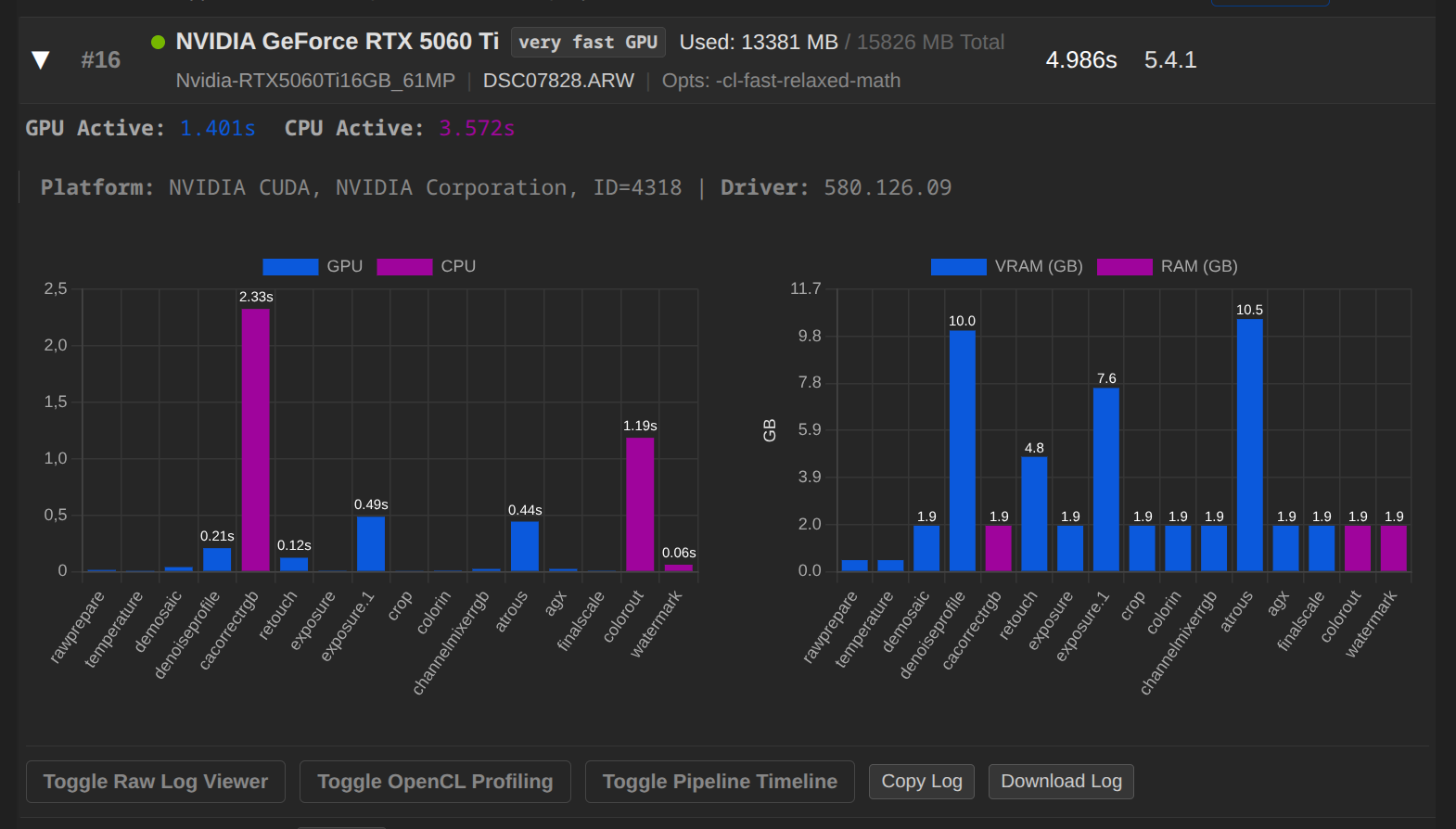
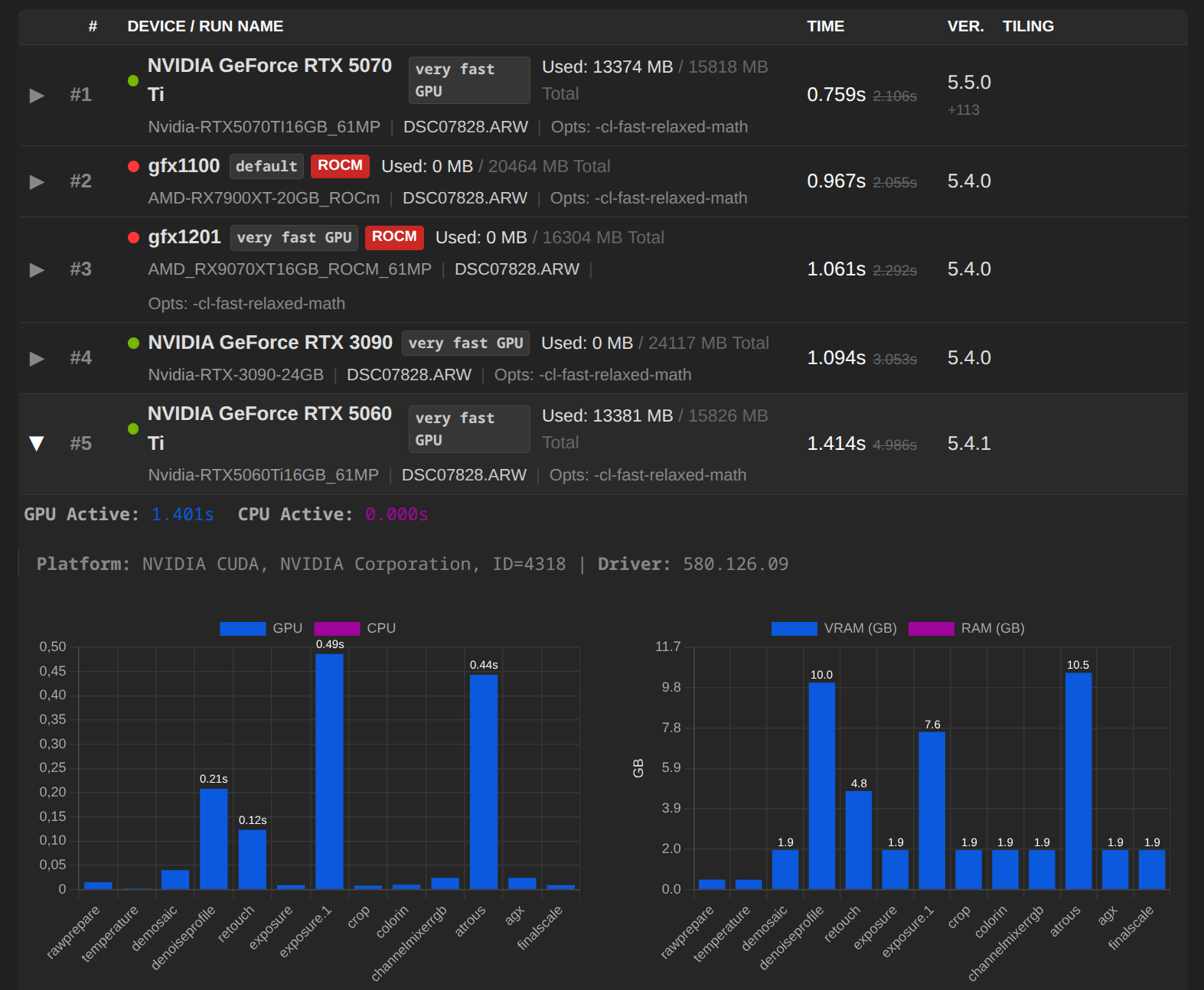
Shiny new Nvidia RTX 5060 TI 16GB GPU installed, so here is a fresh benchmark:
darktable 5.4.1
Copyright (C) 2012-2026 Johannes Hanika and other contributors.

Compile options:
  Bit depth              -> 64 bit
  Exiv2                  -> 0.27.6
  Lensfun                -> 0.3.4
  Debug                  -> DISABLED
  SSE2 optimizations     -> ENABLED
  OpenMP                 -> ENABLED
  OpenCL                 -> ENABLED
  Lua                    -> ENABLED  - API version 9.6.0
  Colord                 -> ENABLED
  gPhoto2                -> ENABLED
  OSMGpsMap              -> ENABLED  - map view is available
  GMIC                   -> ENABLED  - Compressed LUTs are supported
  GraphicsMagick         -> ENABLED
  ImageMagick            -> DISABLED
  libavif                -> DISABLED
  libheif                -> ENABLED
  libjxl                 -> ENABLED
  LibRaw                 -> ENABLED  - Version 0.22.0-Release
  OpenJPEG               -> ENABLED
  OpenEXR                -> ENABLED
  WebP                   -> ENABLED

See https://www.darktable.org/resources/ for detailed documentation.
See https://github.com/darktable-org/darktable/issues/new/choose to report bugs.

     0.0489 [dt_dlopencl_init] could not find default opencl runtime library 'libOpenCL'
     0.0489 [dt_dlopencl_init] could not find default opencl runtime library 'libOpenCL.so'
     0.0491 [opencl_init] opencl library 'libOpenCL.so.1' found on your system and loaded, preference 'default path'
     0.0820 [opencl_init] found 1 platform
[opencl_init] found 1 device

[dt_opencl_device_init]
   DEVICE:                   0: 'NVIDIA GeForce RTX 5060 Ti'
   CONF KEY:                 cldevice_v5_nvidiacudanvidiageforcertx5060ti
   PLATFORM, VENDOR & ID:    NVIDIA CUDA, NVIDIA Corporation, ID=4318
   CANONICAL NAME:           nvidiacudanvidiageforcertx5060ti
   DRIVER VERSION:           580.126.09
   DEVICE VERSION:           OpenCL 3.0 CUDA, SM_20 SUPPORT
   DEVICE_TYPE:              GPU, dedicated mem
   GLOBAL MEM SIZE:          15826 MB
   MAX MEM ALLOC:            3956 MB
   MAX IMAGE SIZE:           32768 x 32768
   MAX CONSTANT BUFFER:      64 KB
   ADDRESS ALIGN:            512
   COMPUTE UNITS:            36
   MAX WORK GROUP SIZE:      1024
   MAX WORK ITEM DIMENSIONS: 3
   MAX WORK ITEM SIZES:      [ 1024 1024 64 ]
   ASYNC PIXELPIPE:          NO
   PINNED MEMORY TRANSFER:   NO
   AVOID ATOMICS:            NO
   MICRO NAP:                250
   ROUNDUP WIDTH & HEIGHT    16x16
   CHECK EVENT HANDLES:      128
   TILING ADVANTAGE:         0.000
   DEFAULT DEVICE:           NO
   KERNEL BUILD DIRECTORY:   /usr/share/darktable/kernels
   KERNEL DIRECTORY:         /home/brian/.cache/darktable/cached_v5_kernels_for_NVIDIACUDANVIDIAGeForceRTX5060Ti_58012609
   CL COMPILER OPTION:       -cl-fast-relaxed-math
   CL COMPILER COMMAND:      -w -cl-fast-relaxed-math -DNVIDIA_SM_20=1 -DNVIDIA=1 -I"/usr/share/darktable/kernels"
   CL EXCEPTION:             DT_OPENCL_ONLY_CUDA
   KERNEL LOADING TIME:       0.0212 sec
[opencl_init] OpenCL successfully initialized. internal numbers and names of available devices:
[opencl_init]		0	'NVIDIA CUDA NVIDIA GeForce RTX 5060 Ti'
     0.2173 [opencl_init] FINALLY: opencl PREFERENCE=ON is AVAILABLE and ENABLED.
[opencl_init] opencl_scheduling_profile: 'very fast GPU'
[opencl_init] opencl_device_priority: '*/!0,*/*/*/!0,*'
[opencl_init] opencl_mandatory_timeout: 400
[opencl_update_priorities] these are your device priorities:
[opencl_update_priorities] 		image	preview	export	thumbs	preview2
[dt_opencl_update_priorities]		0	0	0	0	0
[opencl_update_priorities] show if opencl use is mandatory for a given pixelpipe:
[opencl_update_priorities] 		image	preview	export	thumbs	preview2
[opencl_update_priorities]		1	1	1	1	1
[opencl_synchronization_timeout] synchronization timeout set to 0
[opencl_update_priorities] these are your device priorities:
[opencl_update_priorities] 		image	preview	export	thumbs	preview2
[dt_opencl_update_priorities]		0	0	0	0	0
[opencl_update_priorities] show if opencl use is mandatory for a given pixelpipe:
[opencl_update_priorities] 		image	preview	export	thumbs	preview2
[opencl_update_priorities]		1	1	1	1	1
[opencl_synchronization_timeout] synchronization timeout set to 0
     0.9809 [dt_dev_load_raw] loading the image. took 0.224 secs (0.588 CPU)
     1.0254 get dimensions                [export]                                           (0/0)  9600x6376 sc=1.000; ID=1
     1.0254 modified roi OUT              [export]         rawprepare              100       (0/0)  9600x6376 sc=1.000 -->       (0/0)  9568x6376 sc=1.000;
     1.0254 modified roi OUT              [export]         crop                   3100       (0/0)  9568x6376 sc=1.000 -->       (0/0)  9567x6375 sc=1.000;
     1.0254 [export] creating pixelpipe took 0.039 secs (0.423 CPU)
     1.0254 pipe starting             CL0 [export]                                           (0/0)  9567x6375 sc=1.000; 'DSC07828.ARW' ID=1, nvidiacudanvidiageforcertx5060ti using 13381MB
     1.0255 modified roi IN               [export]         rawprepare              100       (0/0)  9567x6375 sc=1.000 -->       (0/0)  9599x6375 sc=1.000; ID=1
     1.0255 pixelpipe data 1:1 copy       [export]                                           (0/0)  9600x6376 sc=1.000 -->       (0/0)  9599x6375 sc=1.000; bpp=2
     1.0384 [dev_pixelpipe] took 0.013 secs (0.051 CPU) initing base buffer [export]
     1.0517 process                   CL0 [export]         rawprepare              100       (0/0)  9599x6375 sc=1.000 -->       (0/0)  9567x6375 sc=1.000; IOP_CS_RAW 488.7MB
     1.0534 [dev_pixelpipe] took 0.015 secs (0.093 CPU) [export] processed `rawprepare' on GPU, blended on GPU
     1.0537 process                   CL0 [export]         temperature             300       (0/0)  9567x6375 sc=1.000; IOP_CS_RAW 487.9MB
     1.0555 [dev_pixelpipe] took 0.002 secs (0.002 CPU) [export] processed `temperature' on GPU, blended on GPU
     1.0559 process                   CL0 [export]         demosaic                900       (0/0)  9567x6375 sc=1.000; IOP_CS_RAW -> IOP_CS_RGB 1951.7MB
     1.0960 [dev_pixelpipe] took 0.040 secs (0.029 CPU) [export] processed `demosaic' on GPU, blended on GPU
     1.0963 process                   CL0 [export]         denoiseprofile         1000       (0/0)  9567x6375 sc=1.000; IOP_CS_RGB 10246.3MB
     1.3041 [dev_pixelpipe] took 0.208 secs (0.177 CPU) [export] processed `denoiseprofile' on GPU, blended on GPU
     1.7355 process                   CPU [export]         cacorrectrgb           1500       (0/0)  9567x6375 sc=1.000; IOP_CS_RGB 1952MB
     3.6298 [dev_pixelpipe] took 2.326 secs (18.169 CPU) [export] processed `cacorrectrgb' on CPU, blended on CPU
     3.7225 process                   CL0 [export]         retouch                2400       (0/0)  9567x6375 sc=1.000; IOP_CS_RGB 4879.2MB
     3.7529 [dev_pixelpipe] took 0.123 secs (0.454 CPU) [export] processed `retouch' on GPU, blended on GPU
     3.7533 process                   CL0 [export]         exposure               2500       (0/0)  9567x6375 sc=1.000; IOP_CS_RGB 1951.7MB
     3.7621 [dev_pixelpipe] took 0.009 secs (0.008 CPU) [export] processed `exposure' on GPU, blended on GPU
     3.7624 process                   CL0 [export]         exposure.1             2600       (0/0)  9567x6375 sc=1.000; IOP_CS_RGB 7806.7MB
     4.0078 blend with form           CL0 [export]         exposure.1             2600       (0/0)  9567x6375 sc=1.000; IOP_CS_RGB, BLEND_CS_RGB_SCENE
     4.2479 [dev_pixelpipe] took 0.486 secs (0.756 CPU) [export] processed `exposure.1' on GPU, blended on GPU
     4.2483 process                   CL0 [export]         crop                   3100       (0/0)  9567x6375 sc=1.000; IOP_CS_RGB 1951.7MB
     4.2563 [dev_pixelpipe] took 0.008 secs (0.006 CPU) [export] processed `crop' on GPU, blended on GPU
     4.2566 process                   CL0 [export]         colorin                3500       (0/0)  9567x6375 sc=1.000; IOP_CS_RGB -> IOP_CS_LAB 1951.7MB
     4.2567 coeff correction          CL0 [export]         colorin                3500       (0/0)  9567x6375 sc=1.000; `standard color matrix' 2.769(*1.124) 1.000(*1.000) 1.438(*0.850)
     4.2659 [dev_pixelpipe] took 0.010 secs (0.006 CPU) [export] processed `colorin' on GPU, blended on GPU
     4.2661 transform colorspace      CL0 [export]         channelmixerrgb        3700       (0/0)  9567x6375 sc=1.000; IOP_CS_LAB -> IOP_CS_RGB `linear Rec2020 RGB'
     4.2736 [dt_ioppr_transform_image_colorspace_cl] IOP_CS_LAB-->IOP_CS_RGB took 0.007 secs (0.004 GPU) [channelmixerrgb]
     4.2823 process                   CL0 [export]         channelmixerrgb        3700       (0/0)  9567x6375 sc=1.000; IOP_CS_RGB 1951.7MB
     4.2894 [dev_pixelpipe] took 0.024 secs (0.016 CPU) [export] processed `channelmixerrgb' on GPU, blended on GPU
     4.2897 transform colorspace      CL0 [export]         atrous                 4600       (0/0)  9567x6375 sc=1.000; IOP_CS_RGB -> IOP_CS_LAB `linear Rec2020 RGB'
     4.2973 [dt_ioppr_transform_image_colorspace_cl] IOP_CS_RGB-->IOP_CS_LAB took 0.008 secs (0.006 GPU) [atrous]
     4.3059 process                   CL0 [export]         atrous                 4600       (0/0)  9567x6375 sc=1.000; IOP_CS_LAB 10734.2MB
     4.6810 blend with form           CL0 [export]         atrous                 4600       (0/0)  9567x6375 sc=1.000; IOP_CS_LAB, BLEND_CS_LAB
     4.7326 [dev_pixelpipe] took 0.443 secs (0.572 CPU) [export] processed `atrous' on GPU, blended on GPU
     4.7330 transform colorspace      CL0 [export]         agx                    6200       (0/0)  9567x6375 sc=1.000; IOP_CS_LAB -> IOP_CS_RGB `linear Rec2020 RGB'
     4.7403 [dt_ioppr_transform_image_colorspace_cl] IOP_CS_LAB-->IOP_CS_RGB took 0.007 secs (0.005 GPU) [agx]
     4.7497 process                   CL0 [export]         agx                    6200       (0/0)  9567x6375 sc=1.000; IOP_CS_RGB 1951.7MB
     4.7565 [dev_pixelpipe] took 0.024 secs (0.017 CPU) [export] processed `agx' on GPU, blended on GPU
     4.7568 process                   CL0 [export]         finalscale             8700       (0/0)  9567x6375 sc=1.000; IOP_CS_RGB 1951.7MB
     4.7587 [resample_cl] took 0.002 secs (0.000 CPU) 1:1 copy/crop of 9567x6375 pixels
     4.7651 [dev_pixelpipe] took 0.009 secs (0.006 CPU) [export] processed `finalscale' on GPU, blended on GPU
     4.8616 transform colorspace      CPU [export]         colorout               8800       (0/0)  9567x6375 sc=1.000; IOP_CS_RGB -> IOP_CS_LAB `linear Rec2020 RGB'
     4.9310 [dt_ioppr_transform_image_colorspace] IOP_CS_RGB-->IOP_CS_LAB took 0.069 secs (1.044 CPU) [colorout]
     4.9311 process                   CPU [export]         colorout               8800       (0/0)  9567x6375 sc=1.000; IOP_CS_LAB -> IOP_CS_RGB 1952MB
     5.9504 [dev_pixelpipe] took 1.185 secs (16.875 CPU) [export] processed `colorout' on CPU, blended on CPU
     5.9505 process                   CPU [export]         watermark              9400       (0/0)  9567x6375 sc=1.000; IOP_CS_RGB 1952MB
     6.0117 [dev_pixelpipe] took 0.061 secs (0.246 CPU) [export] processed `watermark' on CPU, blended on CPU
     6.0117 [opencl_profiling] profiling device 0 ('NVIDIA CUDA NVIDIA GeForce RTX 5060 Ti'):
     6.0117 [opencl_profiling] spent  0.1516 seconds in [Write Image (from host to device)]
     6.0117 [opencl_profiling] spent  0.0010 seconds in rawprepare_1f
     6.0117 [opencl_profiling] spent  0.0013 seconds in whitebalance_1f
     6.0117 [opencl_profiling] spent  0.0003 seconds in border_interpolate
     6.0118 [opencl_profiling] spent  0.0014 seconds in rcd_border_green
     6.0118 [opencl_profiling] spent  0.0023 seconds in rcd_border_redblue
     6.0118 [opencl_profiling] spent  0.0044 seconds in rcd_populate
     6.0118 [opencl_profiling] spent  0.0020 seconds in rcd_step_1_1
     6.0118 [opencl_profiling] spent  0.0019 seconds in rcd_step_1_2
     6.0118 [opencl_profiling] spent  0.0010 seconds in rcd_step_2_1
     6.0118 [opencl_profiling] spent  0.0028 seconds in rcd_step_3_1
     6.0118 [opencl_profiling] spent  0.0013 seconds in rcd_step_4_1
     6.0118 [opencl_profiling] spent  0.0009 seconds in rcd_step_4_2
     6.0118 [opencl_profiling] spent  0.0028 seconds in rcd_step_5_1
     6.0118 [opencl_profiling] spent  0.0037 seconds in rcd_step_5_2
     6.0118 [opencl_profiling] spent  0.0047 seconds in rcd_write_output
     6.0118 [opencl_profiling] spent  0.0056 seconds in denoiseprofile_precondition_Y0U0V0
     6.0118 [opencl_profiling] spent  0.0845 seconds in denoiseprofile_decompose
     6.0118 [opencl_profiling] spent  0.0165 seconds in denoiseprofile_reduce_first
     6.0118 [opencl_profiling] spent  0.0001 seconds in denoiseprofile_reduce_second
     6.0118 [opencl_profiling] spent  0.0002 seconds in [Read Buffer (from device to host)]
     6.0118 [opencl_profiling] spent  0.0643 seconds in denoiseprofile_synthesize
     6.0118 [opencl_profiling] spent  0.0465 seconds in [Copy Image (on device)]
     6.0118 [opencl_profiling] spent  0.0057 seconds in denoiseprofile_backtransform_Y0U0V0
     6.0118 [opencl_profiling] spent  0.5246 seconds in [Read Image (from device to host)]
     6.0118 [opencl_profiling] spent  0.0067 seconds in [Copy Image to Buffer (on device)]
     6.0118 [opencl_profiling] spent  0.0001 seconds in [Write Buffer (from host to device)]
     6.0118 [opencl_profiling] spent  0.0000 seconds in retouch_copy_buffer_to_buffer
     6.0118 [opencl_profiling] spent  0.0000 seconds in retouch_copy_buffer_to_buffer_masked
     6.0118 [opencl_profiling] spent  0.0051 seconds in retouch_copy_buffer_to_image
     6.0118 [opencl_profiling] spent  0.0121 seconds in exposure
     6.0118 [opencl_profiling] spent  0.0013 seconds in blendop_mask_rgb_jzczhz
     6.0118 [opencl_profiling] spent  0.0122 seconds in gaussian_column_1c
     6.0118 [opencl_profiling] spent  0.0030 seconds in gaussian_transpose_1c
     6.0118 [opencl_profiling] spent  0.0013 seconds in [Copy Buffer to Image (on device)]
     6.0118 [opencl_profiling] spent  0.0052 seconds in guided_filter_split_rgb_image
     6.0118 [opencl_profiling] spent  0.0444 seconds in guided_filter_box_mean_x
     6.0118 [opencl_profiling] spent  0.0464 seconds in guided_filter_box_mean_y
     6.0118 [opencl_profiling] spent  0.0060 seconds in guided_filter_covariances
     6.0118 [opencl_profiling] spent  0.0076 seconds in guided_filter_variances
     6.0118 [opencl_profiling] spent  0.0216 seconds in guided_filter_update_covariance
     6.0118 [opencl_profiling] spent  0.0145 seconds in guided_filter_solve
     6.0118 [opencl_profiling] spent  0.0075 seconds in guided_filter_generate_result
     6.0118 [opencl_profiling] spent  0.0101 seconds in blendop_rgb_jzczhz
     6.0118 [opencl_profiling] spent  0.0057 seconds in colorin_unbound
     6.0118 [opencl_profiling] spent  0.0116 seconds in colorspaces_transform_lab_to_rgb_matrix
     6.0118 [opencl_profiling] spent  0.0058 seconds in channelmixerrgb_CAT16
     6.0118 [opencl_profiling] spent  0.0057 seconds in colorspaces_transform_rgb_matrix_to_lab
     6.0118 [opencl_profiling] spent  0.1057 seconds in eaw_decompose
     6.0118 [opencl_profiling] spent  0.0737 seconds in eaw_synthesize
     6.0118 [opencl_profiling] spent  0.0013 seconds in blendop_mask_Lab
     6.0118 [opencl_profiling] spent  0.0102 seconds in blendop_Lab
     6.0119 [opencl_profiling] spent  0.0058 seconds in kernel_agx
     6.0119 [opencl_profiling] spent  1.3621 seconds totally in command queue (with 0 events missing)
     6.0119 cache report                  [export]                                      2 lines (important=0, used=0, invalid=0). Using 1868MB, limit=0MB. Hits/run=0.00. Hits/test=0.000
     6.0119 pipe finished             CL0 [export]                                           (0/0)  9567x6375 sc=1.000; 'DSC07828.ARW' ID=1
     6.0119 [dev_process_export] pixel pipeline processing took 4.986 secs (37.484 CPU)
     7.8814 [export_job] exported to `test2.jpg'
 [opencl_summary_statistics] device 'NVIDIA CUDA NVIDIA GeForce RTX 5060 Ti' id=0: 158 out of 158 events were successful and 0 events lost. max event=157
gwbarn
March 24, 2026, 9:35pm
231
The exposure.1 is being blended on GPU here. I wonder if that’s because of VRAM or is it a newer version of Darktable with some openCL changes?
1 Like
I am not sure. I haven’t done any tweaking to the darktable OpenCL settings for the Nvidia RTX 5060 Ti 16gb card.
Qor
March 24, 2026, 11:18pm
233
Thank you very much for the log, and congratulations on your new graphics card!
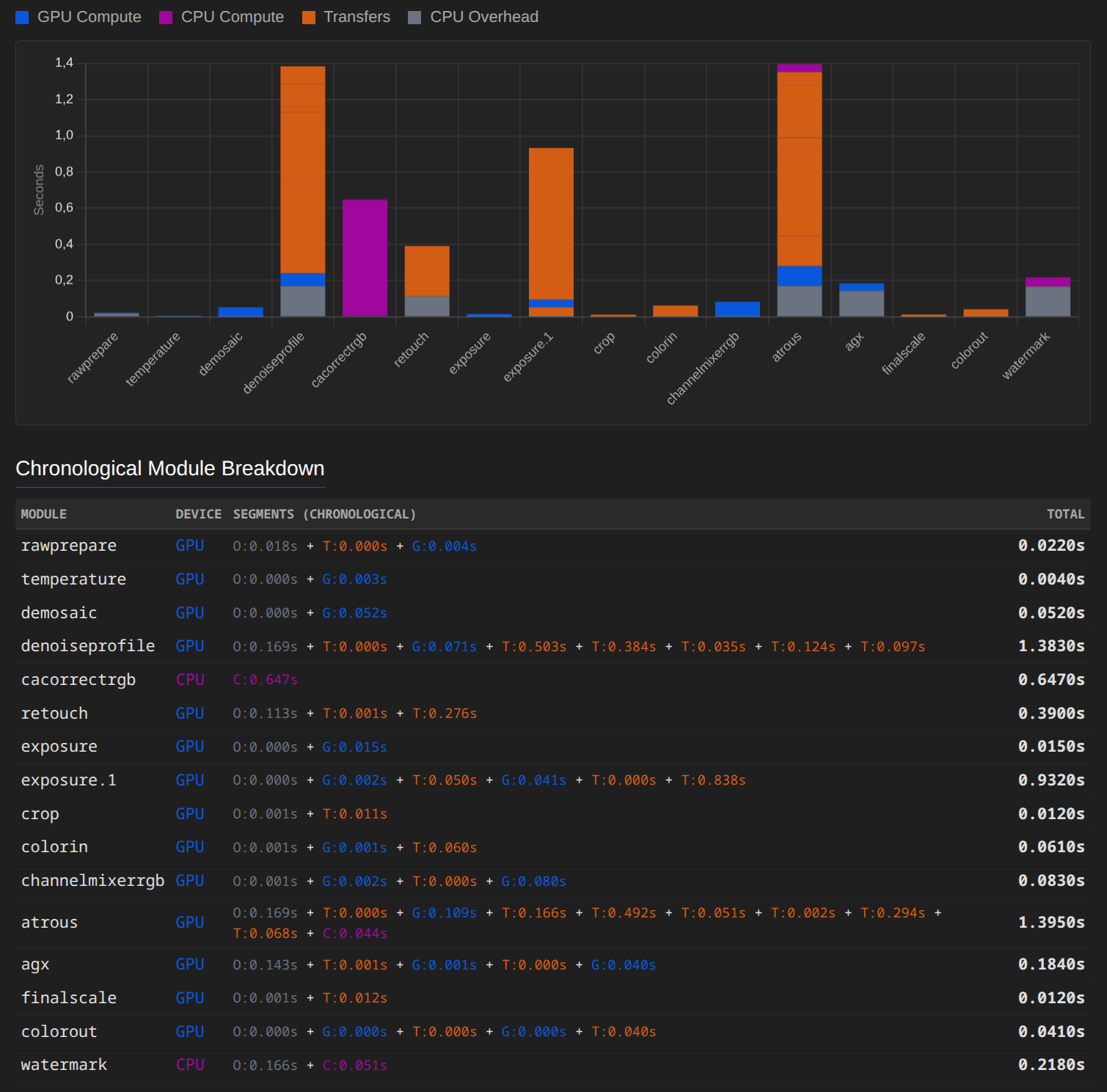
The second screenshot shows the system without any modules running on the CPU, to allow for a better comparison of pure GPU performance.
1 Like
That is helpful, as I was having a bit of buyers remorse spending soo much money on a “high end GPU”. But seeing 13gb of the 16gb VRam being used, I’m more happy I’ve made the right choice
1 Like
hannoschwalm
March 27, 2026, 9:40pm
235
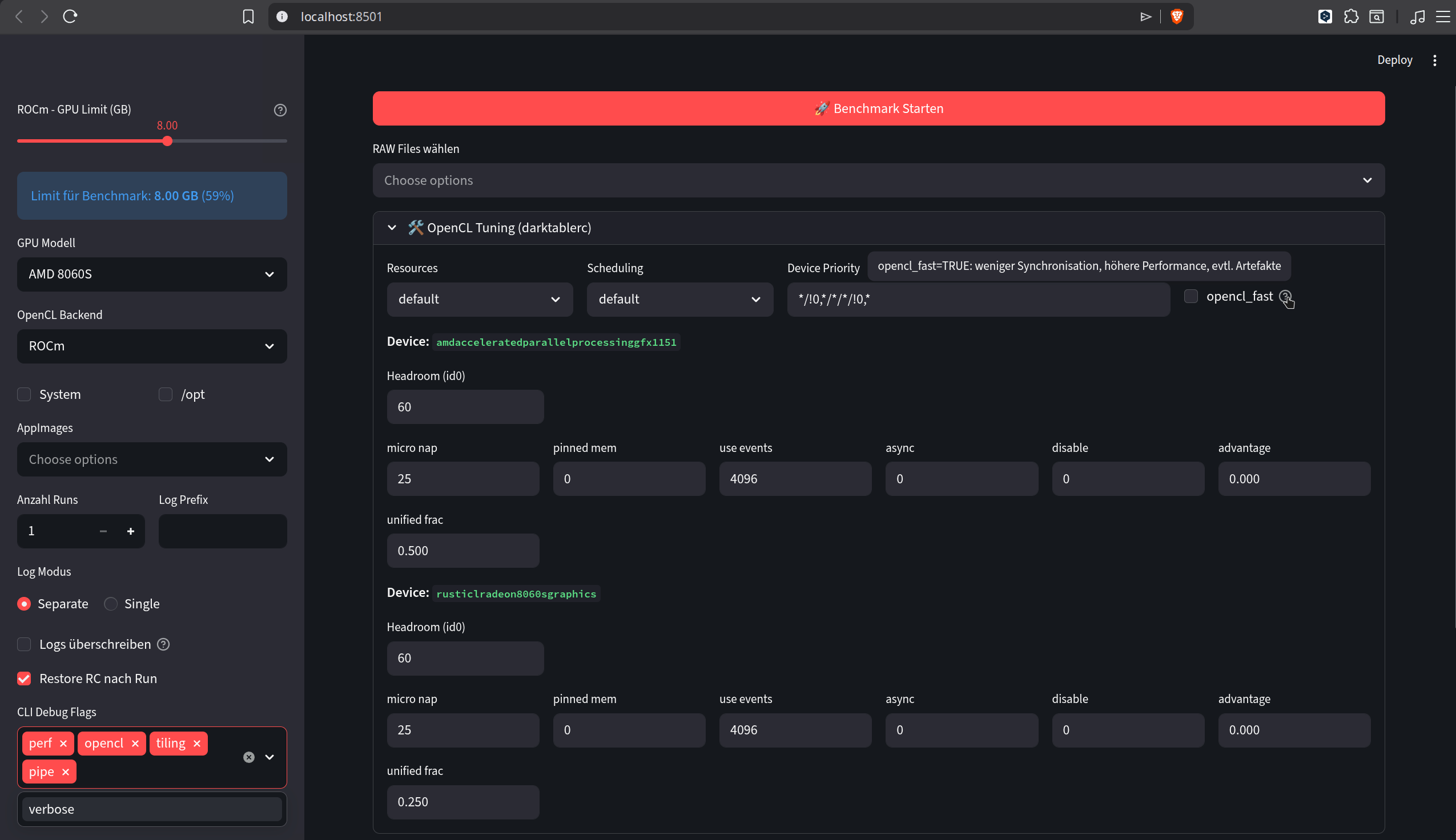
Hi Chris, i guess you have recognized the new option in preferences “OpenCL fast mode” ? It might be worth to check&report
3 Likes
Qor
March 27, 2026, 9:54pm
236
I noticed it a few days ago and have included the option in my local benchmark tool, along with the other changes relating to v6.
I’ve only tested it briefly so far, but I’ll be happy to try it out in more detail over the next few days.
I’ve seen that too – you’re putting in a lot of changes and a lot of work here. Thanks for that!
3 Likes
Qor
March 27, 2026, 11:27pm
237
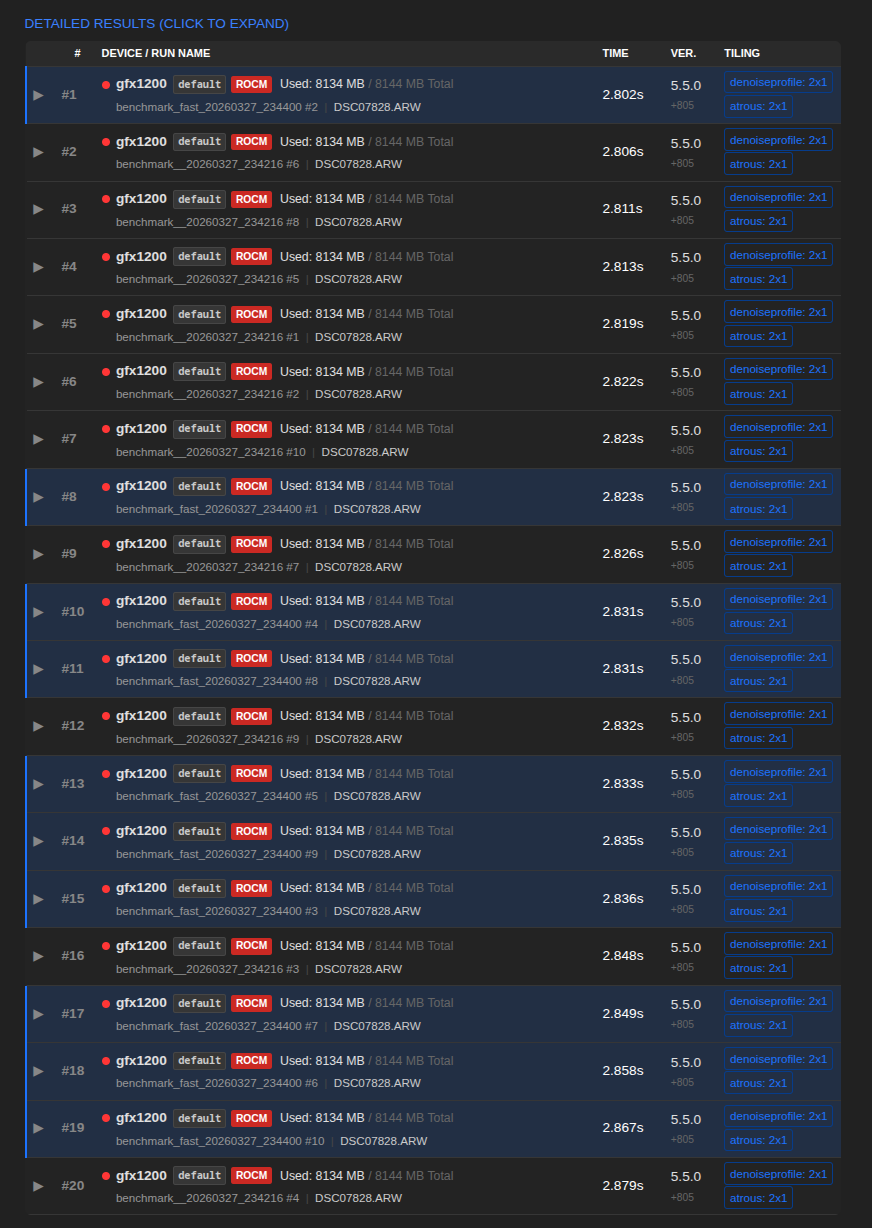
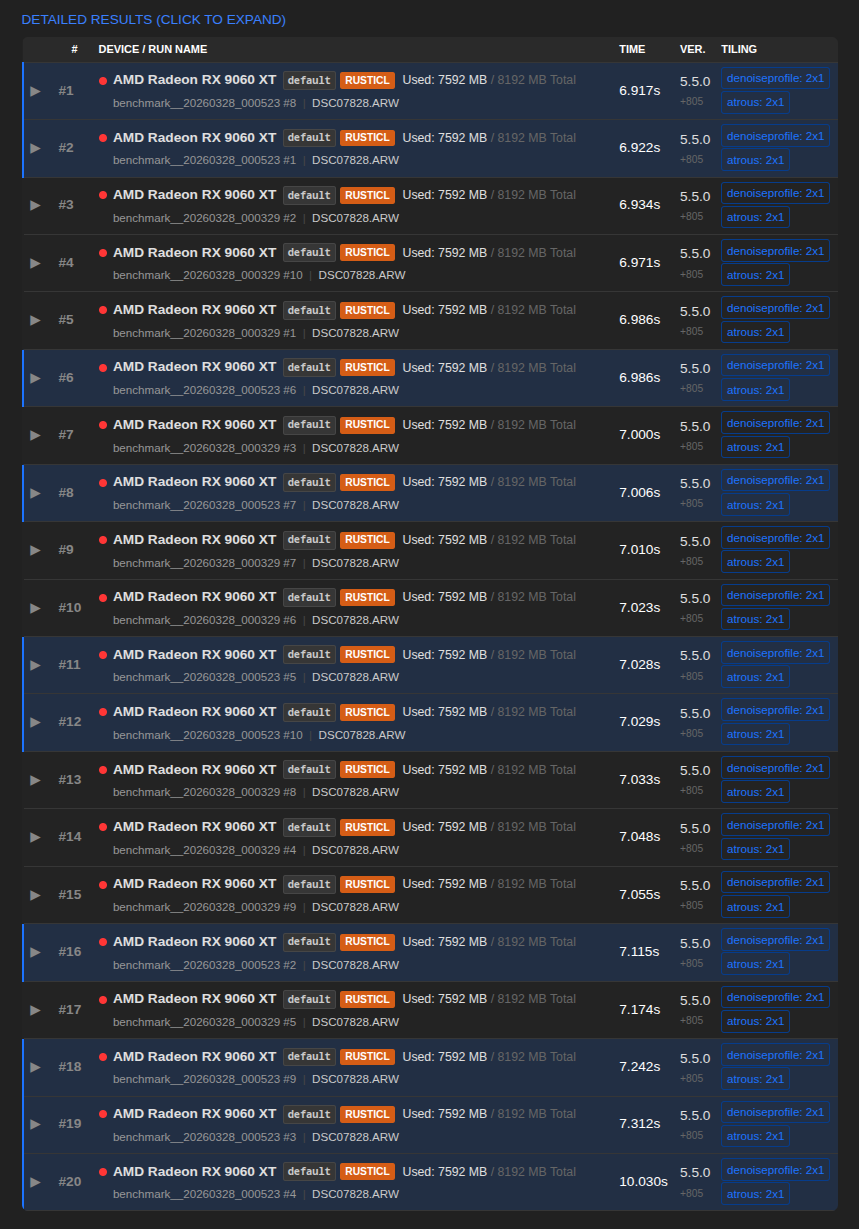
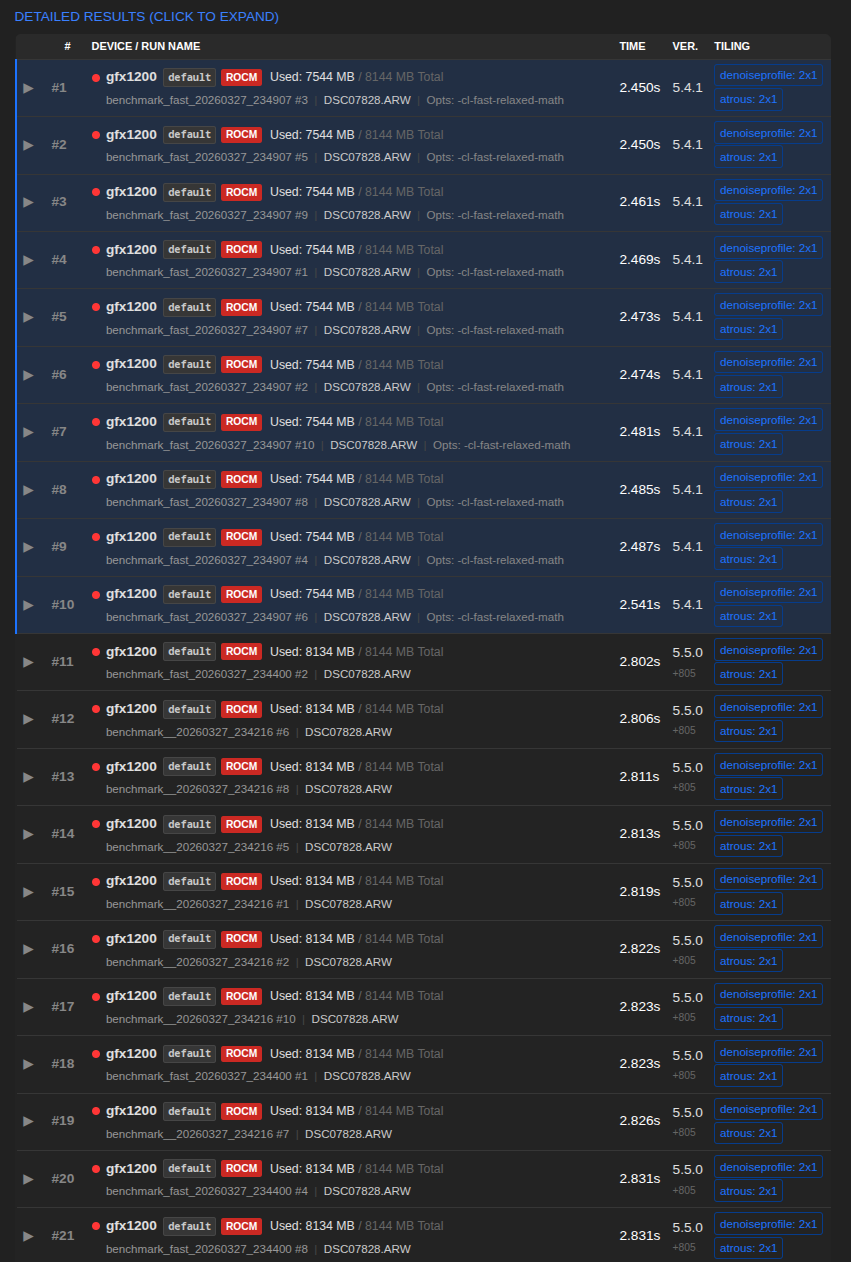
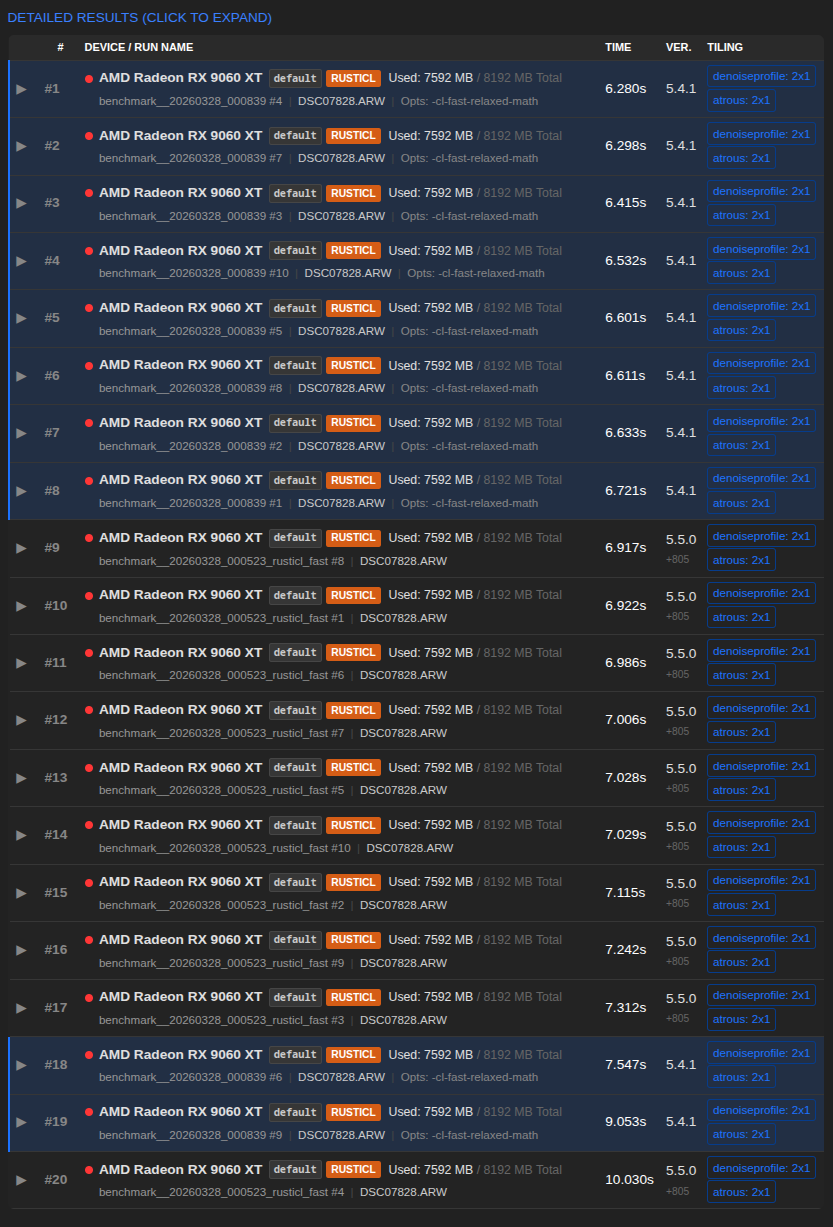
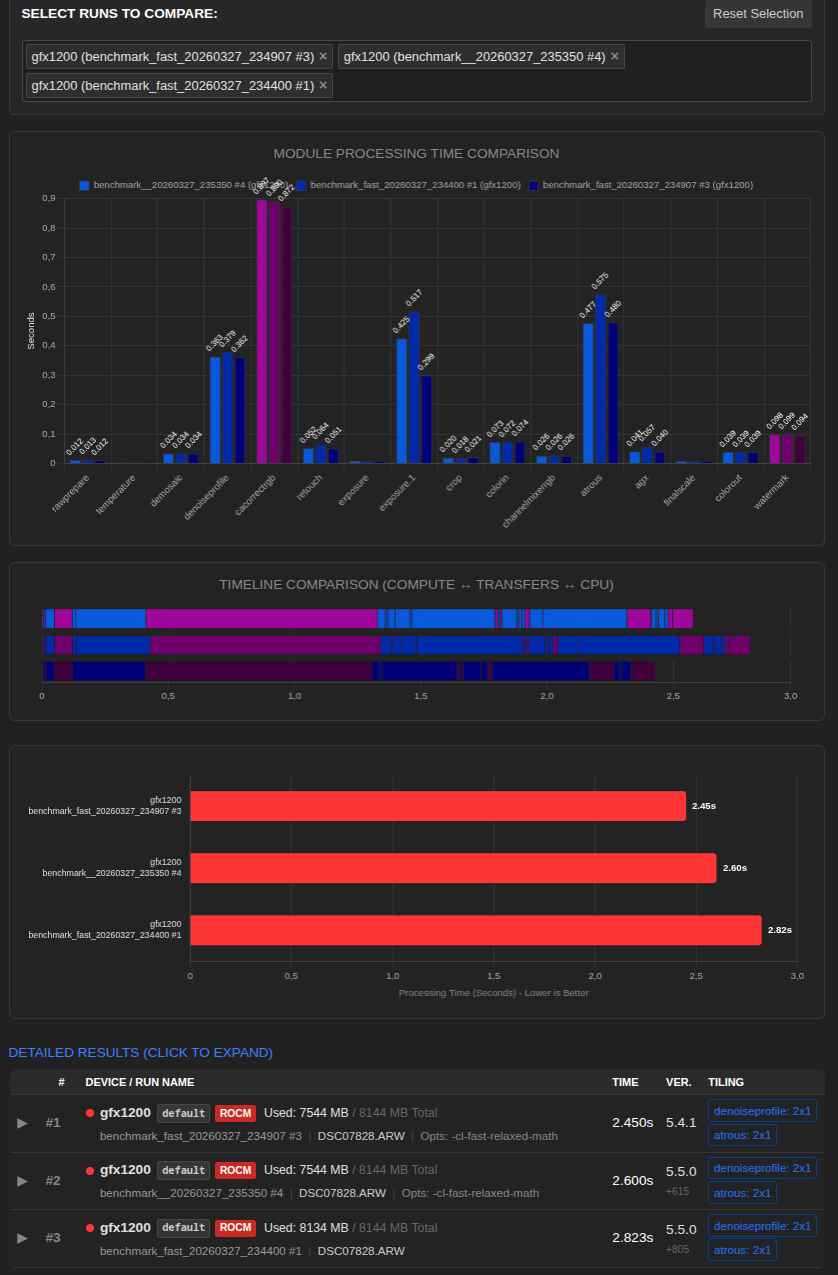
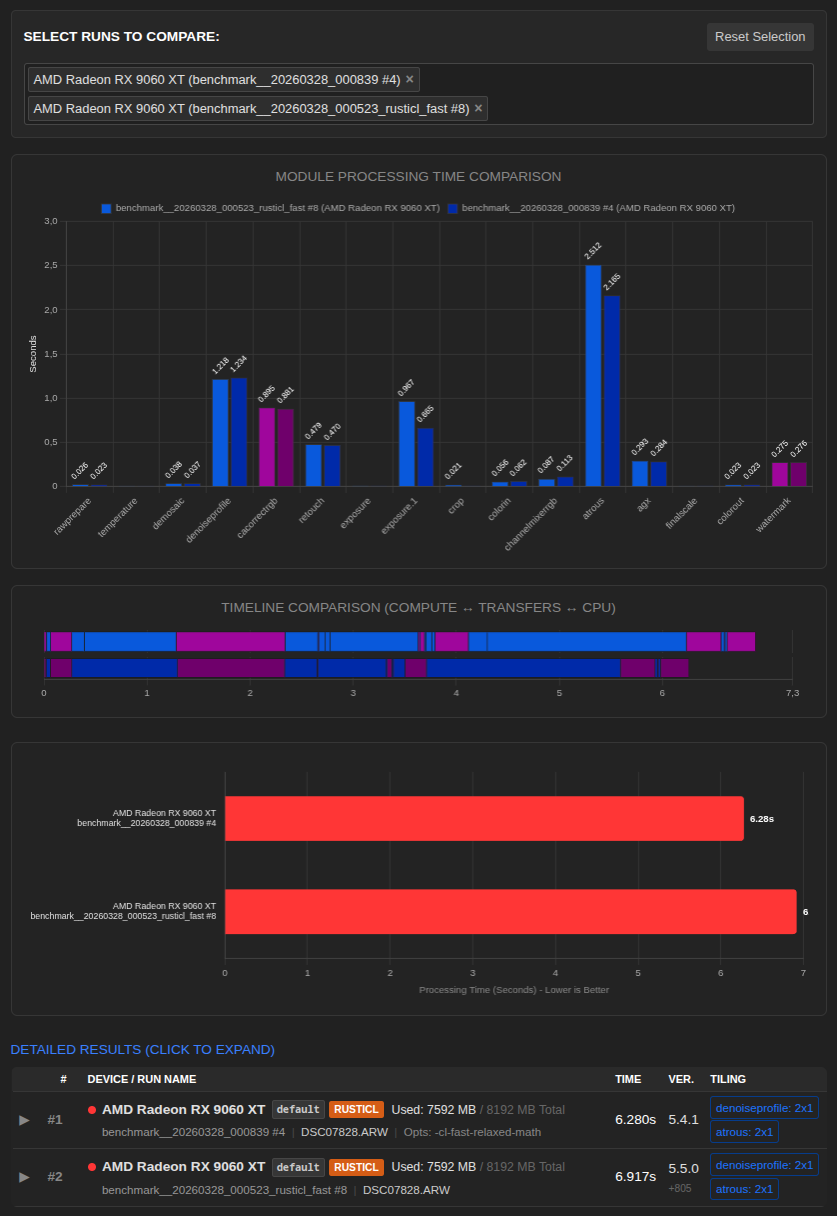
AMD RX 9060 XT 8GB
Build 5.5.0 +805
DT 5.4.1 vs. 5.5.0 +805
DT 5.4.1 vs 5.5.0 +615 vs. 5.5.0 +805 (fastes runs, out of 10)
DT 5.4.1 vs. 5.5.0 +805 (fastes runs, out of 10)
More tests on other GPUs coming soon.
1 Like
Qor
March 28, 2026, 10:36pm
238
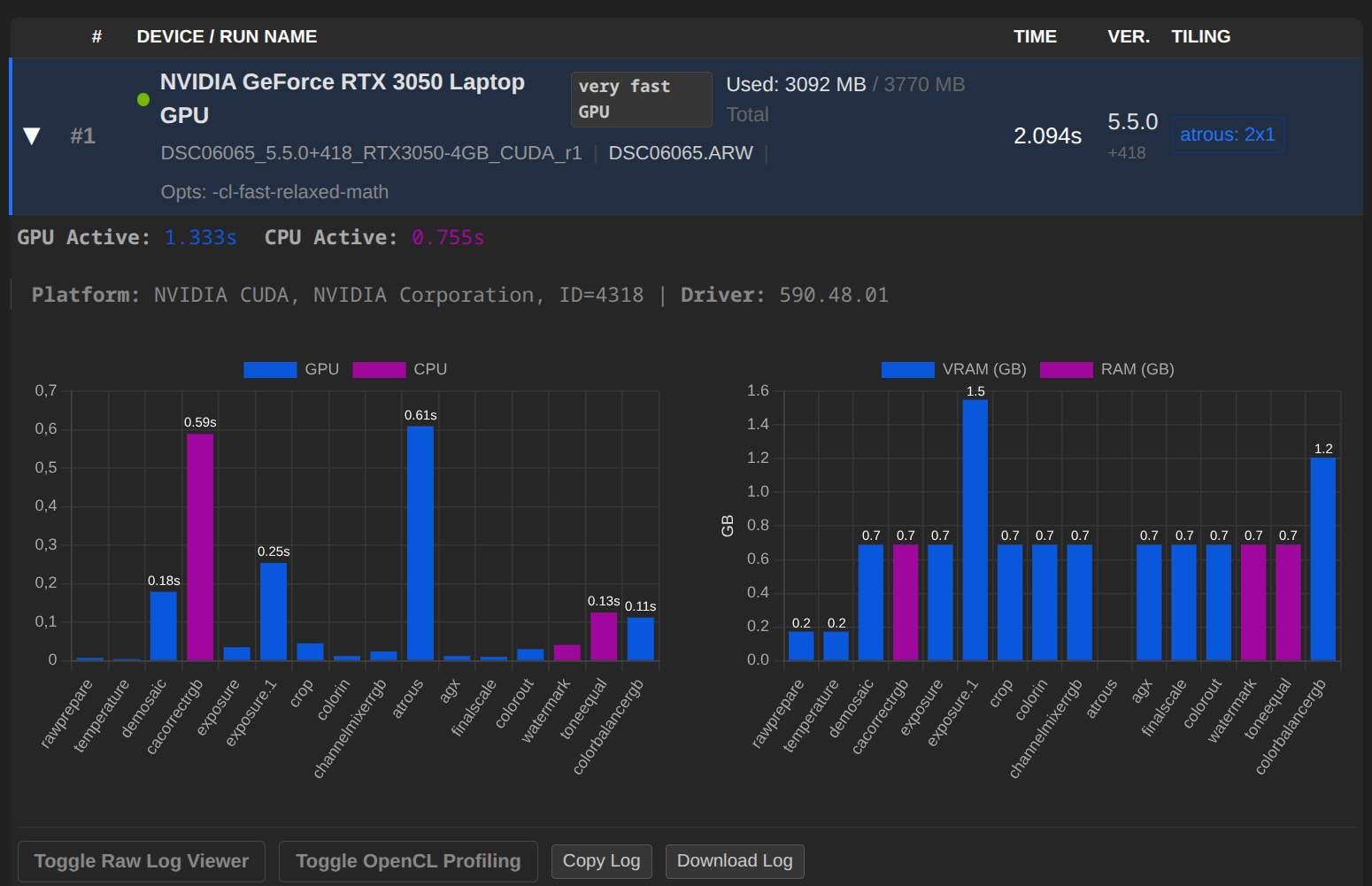
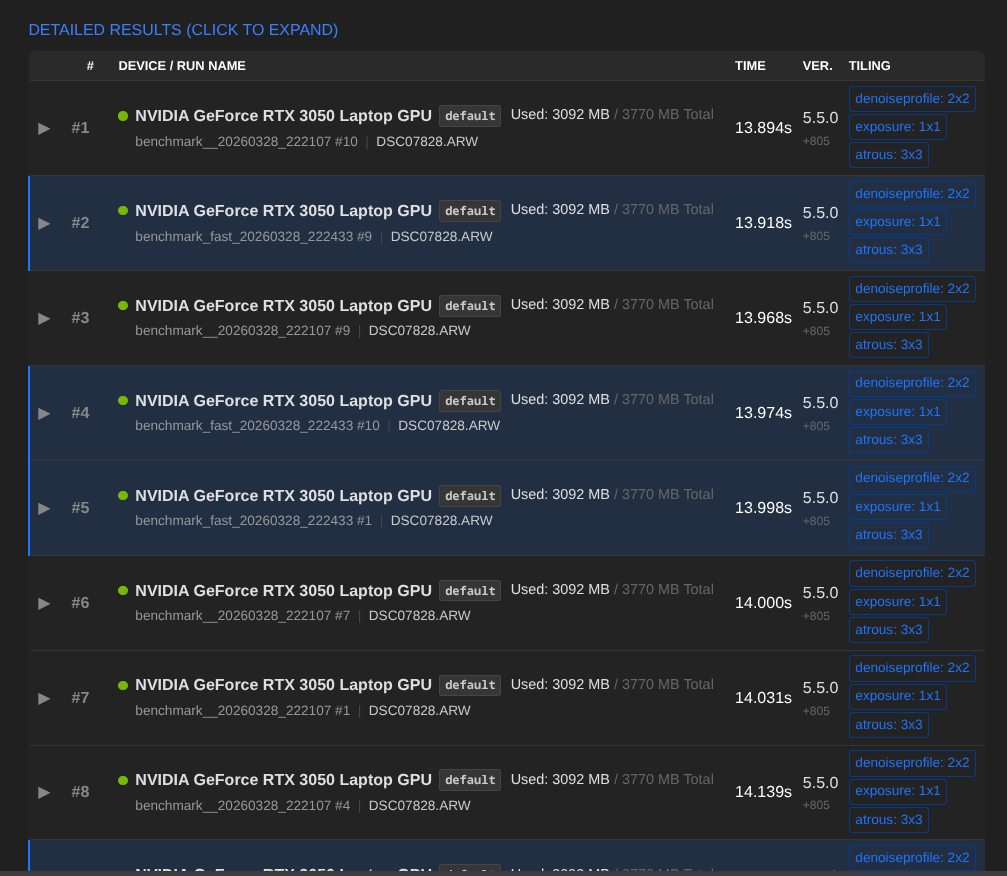
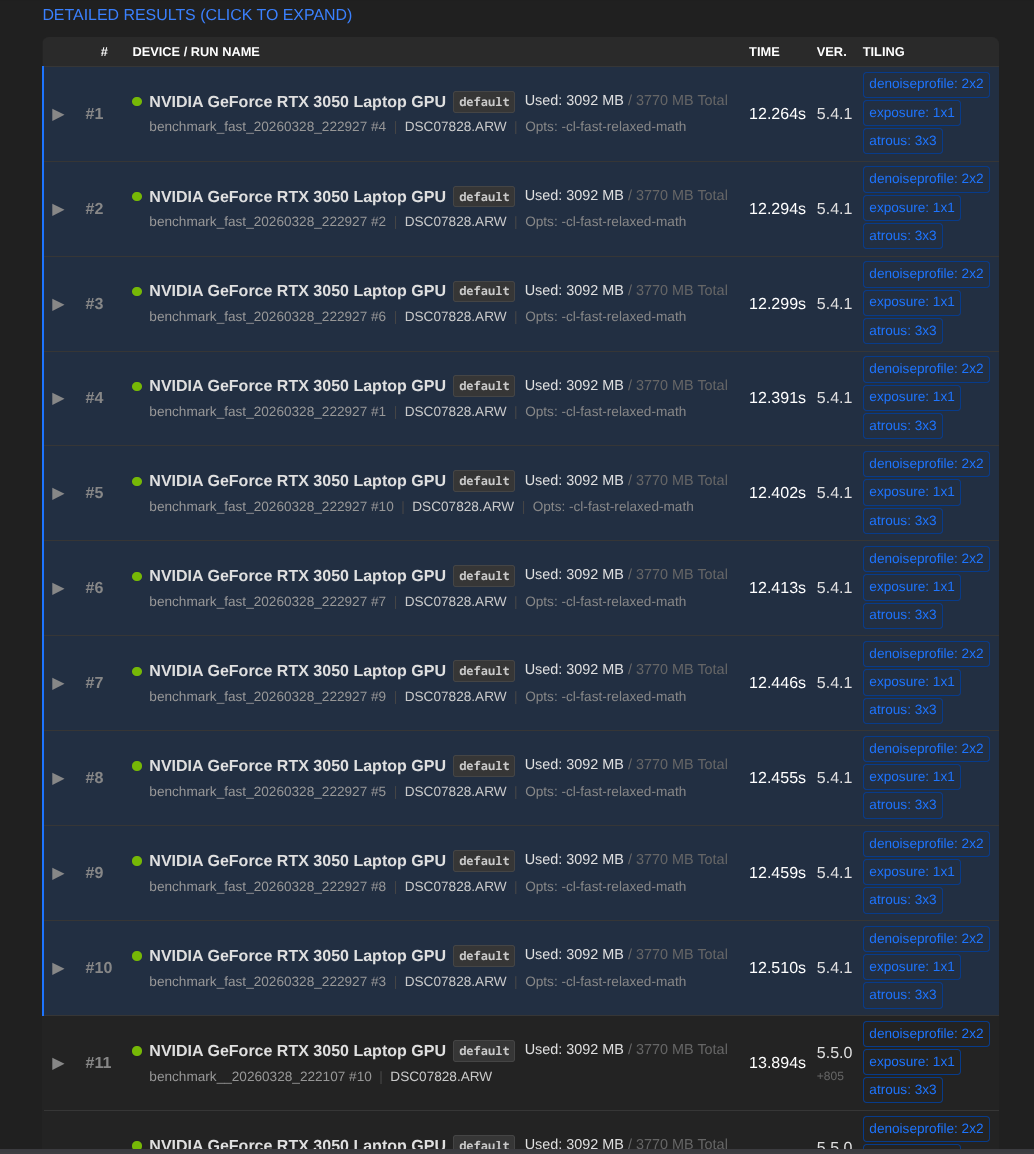
Nvidia RTX 3050 4GB (Mobile)
Build 5.5.0 +806
DT 5.4.1 vs. 5.5.0 +806
@Qor Haven’t run the performance test in a while. Why would I suddenly get this error massage at the end?
darktable 5.4.1
Compile options:
See resources | darktable for detailed documentation.Sign in to GitHub · GitHub to report bugs.
 0.1021 [opencl_init] opencl library 'OpenCL.dll' found on your system and loaded, preference 'default path'
 0.1340 [opencl_init] found 1 platform
[opencl_init] found 1 device
[dt_opencl_device_init]/!0, // /!0,*’
Could you paste the command line that you use to launch the test? I assume that it’s just related to the image path not being correct. I always launch the test from the directory where the image is located.
CMD from c:\program files\darktable\bin
.\darktable-cli.exe DSC07828. ARW DSC07828. ARW.xmp test.jpg --core -d opencl -d tiling -d perf -d pipe > RTX2060_CUDA_61MP.txt 2>&1
Ah I see, so you need to point to the full path of the picture and xmp, because (I assume) the images files are not stored in C:\Program Files\darktable\bin; i.e. something like
.\darktable-cli.exe <pathTo>\DSC07828.ARW <pathTo>\DSC07828.ARW.xmp [...]
or to avoid paths of the picture do it as follows
cd <pathToImageFiles>
"%programfiles%\darktable\bin\darktable-cli.exe" DSC07828.ARW DSC07828.ARW.xmp [...]
@Macchiato17 I don’t fully understand the correct syntax for using this analyzer now. It used to work fine when I used, for example. .C:\Program Files\darktable\bin>.\darktable-cli DSC06065.ARW DSC06065.ARW.xmp test.jpg --core -d opencl -d tiling -d perf -d pipe