log.txt (15.3 KB)
RTX3080 10GB, 5950X.
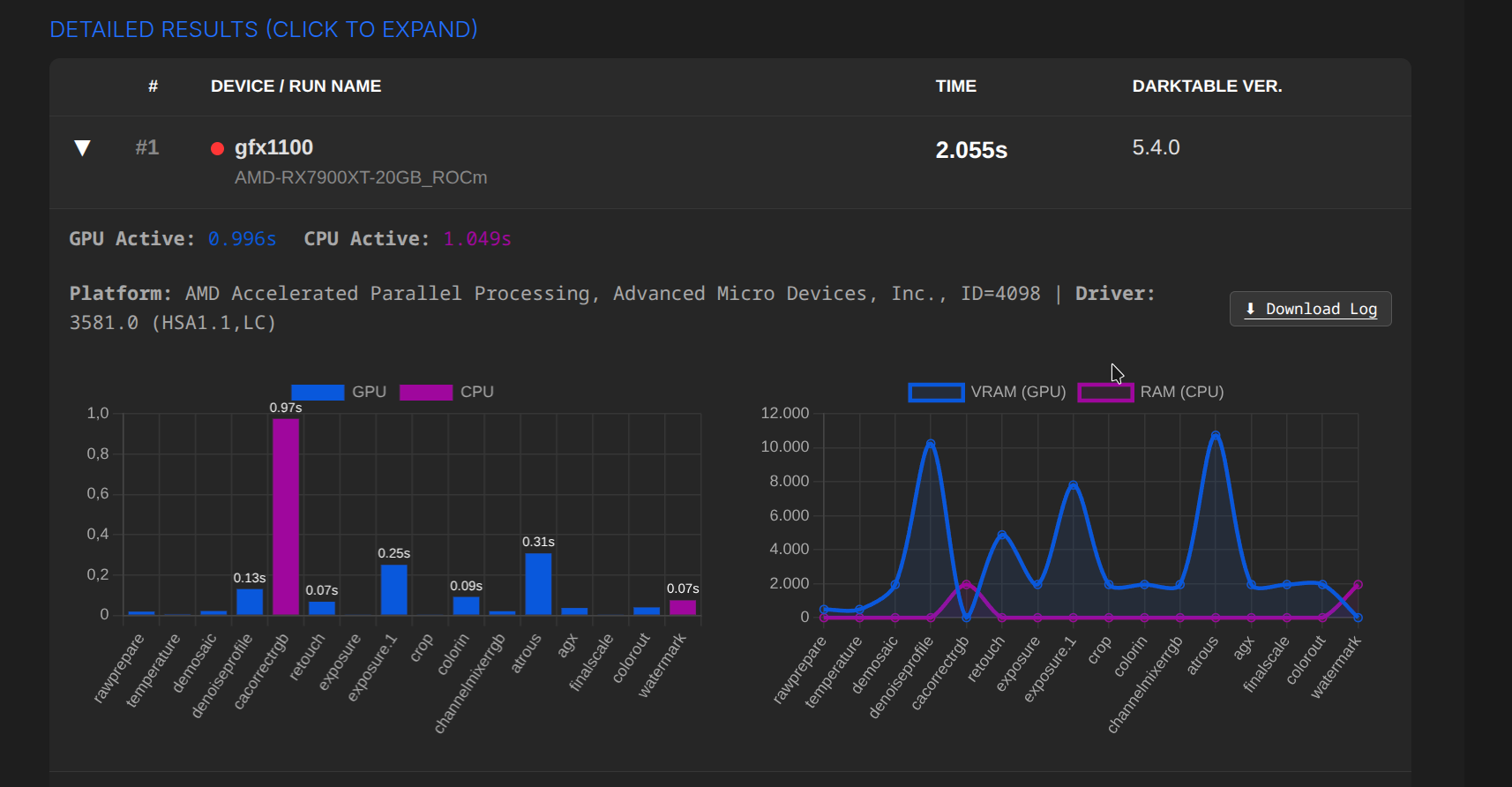
I wonder why AMD GPUs are performing so well on the exposure blend op. It seems to be the main hurdle on nvidia.
log.txt (15.3 KB)
RTX3080 10GB, 5950X.
I wonder why AMD GPUs are performing so well on the exposure blend op. It seems to be the main hurdle on nvidia.
The previous two were darktable, compiled by hand for ARM64. Here is the same thing in emulated x64:
GPU: log3.txt (19.6 KB)
CPU: log4.txt (13.8 KB)
Thank you for the log. I have an old test computer here with an AMD 2200G (4 cores) and a 3070TI. So I thought the exposure.1 problem might be the issue of this strange combination.
I’ll take a closer look at your log later and compare the numbers.
thx again!
It might be interesting to add the operating system to the perf comparison page.
In any case, information about the CPU would also be useful.
I’ll see if the OS can be mapped. At least between Windows/Linux and MacOS, that should be feasible.
Operating System: Fedora Linux 43
KDE Plasma Version: 6.5.5
KDE Frameworks Version: 6.22.0
Qt Version: 6.10.1
Kernel Version: 6.18.5-200.fc43.x86_64 (64-bit)
Graphics Platform: Wayland
Processors: 16 × AMD Ryzen 7 5800H with Radeon Graphics
Memory: 32 GiB of RAM (27.2 GiB usable)
Graphics Processor 1: AMD Radeon Graphics
Graphics Processor 2: NVIDIA GeForce RTX 3070 Laptop GPU
Manufacturer: LENOVO
Product Name: 82JQ
System Version: Legion 5 Pro 16ACH6H
log.txt (17.7 KB)
I was also thinking about this and there are two answers to it:
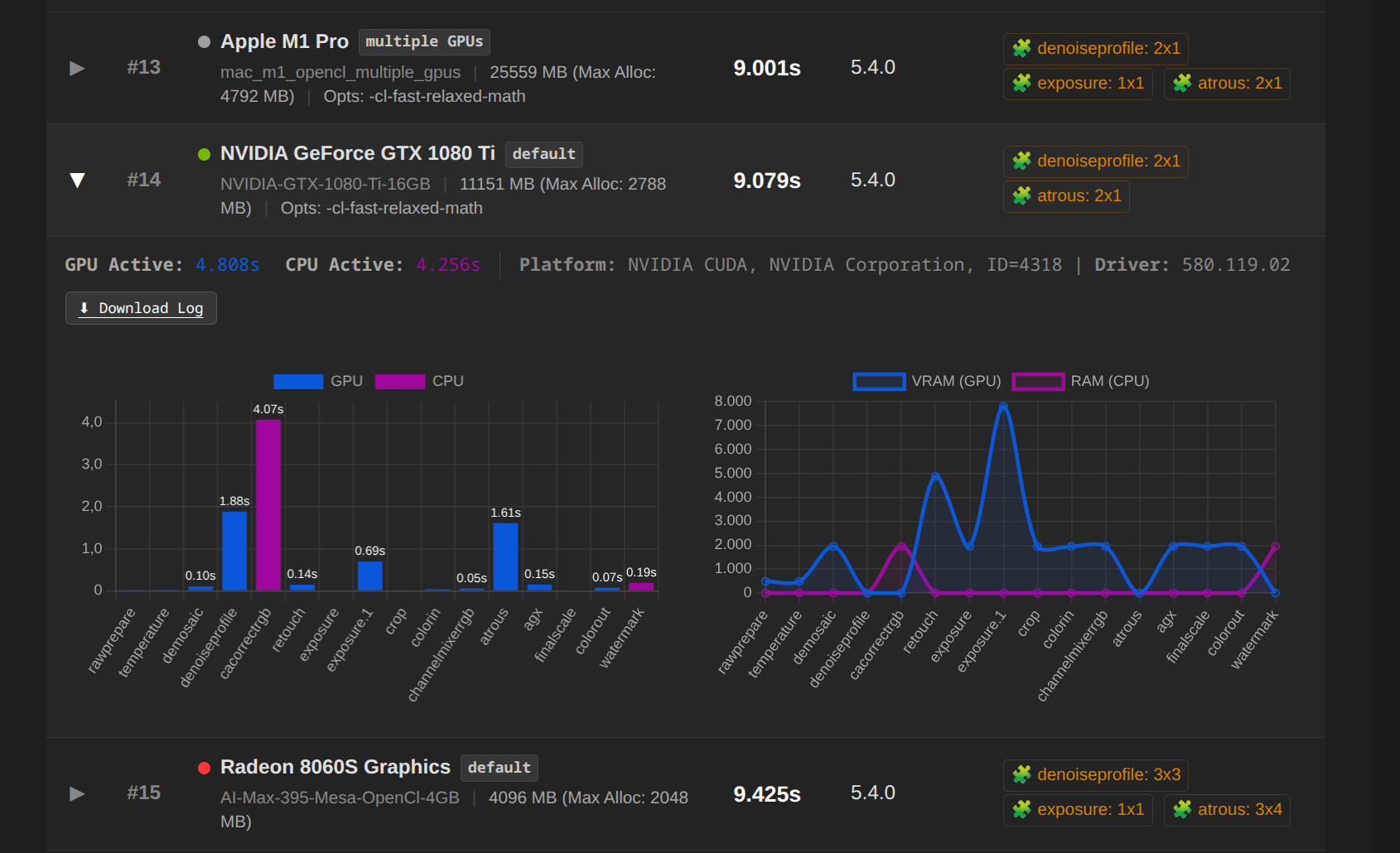
This is a good point but looking at the data there is an RX9060 8GB in there, which still vastly outperforms my card(RTX3080 10GB) when in theory they should be more or less the same. Maybe more efficient memory use on AMD that prevents cpu fallback, even with a 2GB difference?
Edit: I thought maybe using too much vram on other applications and compositor may have caused it to fallback, but I repeated the test from a tty with no logged in session and a clear nvtop and it still persists. Would be nice to try to figure out what is causing this bottleneck on nvidia
I started adding the first logs today. There is a small display bug with the labels, but I think everything is still recognisable.
All results are from the same RAW file and XMP.
Detailed results can be expanded with a click.
There really must be something going with NVIDIA. MacBook Pro M1, performs better then a RTX 3080 with 10GB… that is actually strange…
Thx a lot!
@Qor would it be able to inspect the provided logs too? Are you sure the
With the provided image & xmp we need almost 8GB while doing the guided filter so even with a 10GB card you are on the small side and would fall back to cpu. (And the logs show that too)
We definitely need the resource level to be logged 
Anyway - thanks for all those logs also from my side, i take it as a reminder we need internal tiling for the OpenCL guided blending filter.
@Qor you mention on your site that such a benchmark is somewhat representive for “how fast feels your darktable when using it”. What you benchmark here is like developing in HQ processing mode. For desktop performance it would be more representive if you export to something like monitor size.
Archiv.zip (67,5 KB)
Attached are the logs of the GPUs; the names correspond to the names in the chats.
I’ll see if I can include a download option in the future.
I had selected the file so that 8GB VRAM would not be sufficient, resulting in tiling.

I think you are referring to this paragraph:
The information and examples on this page refer to exporting photos at maximum resolution. Since editing within darktable (DT) generally requires fewer resources, exporting represents the most demanding scenario, which is ideal for analyzing performance.
If the export process runs quickly, smooth performance during editing is guaranteed.
The last sentence in particular is somewhat vague, as there is no definition for “runs quickly” at this point. So at least the time reference in the context of “quickly” is missing. I’m also not entirely happy with “guaranteed”.
In any case, there’s room for improvement
The same applies to the new section “Conclusion”, a first draft.
Grüße nach Bremen, aus dem Bayerischen Wald,
Chris
Update: Fixed chart labels, added log downloads.
Again about this. See the log, there is more than one card involved
I am pretty sure the owner has tuned for multiple cards and has allowed all memory to be used and thus it fits with a small margin. Good luck! So no fallback to cpu, also seen in the log.
Whatever - without any lengthy discussion or feature requests i just did a prototype implementation doing internal tiling for the guided filter. Very promising, <20% performance drop vs untiled. (simulating 8 GB allowed vs 4GB) Stay tuned for master commits, that’s how dt development works. Inspire a dev on something interesting
Bad boy!
On current master (and on 5.4.1) we provide information about the memory that is allowed to be used for a pipe, this would also allow analysis of multiple-card setups. In the log you would have to “extract” from
5.8626 pipe starting CL0 [preview] (0/0) 897x1344 sc=1.000; 'L1083176.DNG' ID=8955, rusticlradeon8060sgraphics using 28272MB
whats told after using
Maybe it would be an interesting idea to spinoff this topic into creating an automated benchmark suite of different resolutions in MP [16, 20, 26, 40, 60, 100] and differing levels of module utilization(Maybe 3 use cases?) per image so that we can then average out or filter per use case.
If nobody tackles this in the following weeks I will give it a go, once I’m more free on time, and open up a new topic. It irks me a bit that this darktable.info code is currently closed source.
log.txt (16.4 KB)
Using the flatpak version of darktable