Hi
I’ve been trying to export a histogram values document for colour values but the doc comes to my laptop with only (0.0,714 ) showing.
Ai has explained this to be a bug with Gimp 3+.
Would anyone know an easy way for me to get this done.
Hi
I’ve been trying to export a histogram values document for colour values but the doc comes to my laptop with only (0.0,714 ) showing.
Ai has explained this to be a bug with Gimp 3+.
Would anyone know an easy way for me to get this done.
I suggest you give a few more details,
Operating system / the exact Gimp version
Details of the image - color mode / bit depth…
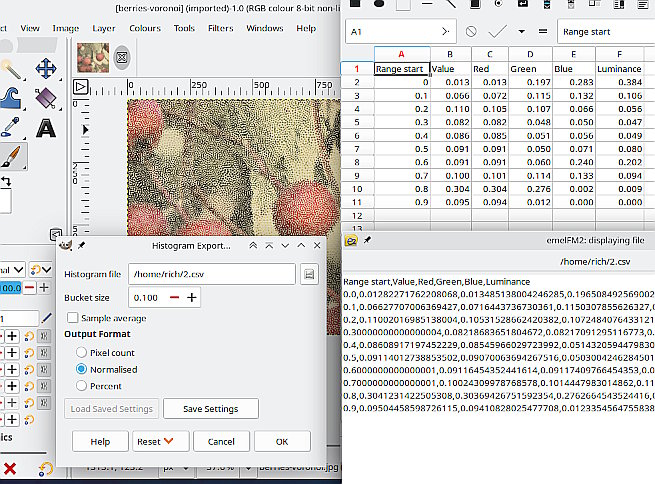
Parameters of Histogram Export
This a Kubuntu 22.04 / Gimp 3.2.0 (Appimage) example
Maybe someone will come up with a solution.
Thanks Rich
Im just heading out of the workshop so I’ll post those details in a while.
Many thanks for the list.
Thanks for the screen shot rich.
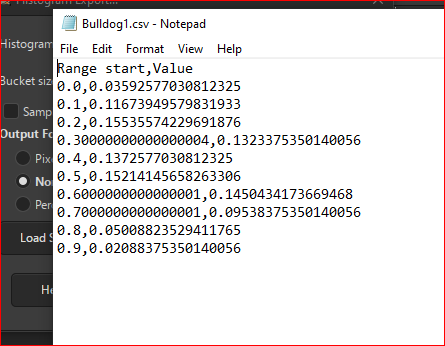
I added .csv to the file, selected Normalized and changed (1.000) to (0.100) for bucket size.
That got the file sent over just fine and I opened it with Notepad.
Not sure what it all means yet and thought there would be more info listed, as there were 255 greyscale tonal values in the image.
Histogram is basically collecting quantity of numbers in specific range. histogram( 0,0,1,2,3,3 ) = 2,1,1,2. There are two zeros and two threes. Actually, this looks way easy to do in G’MIC now to think of it.
Thanks Reptorian
I’ve been at it with Ai since and figured it was the bucket value. I was using 1 and tried 0.1 but it turned out to be 0.004 even though I was not using 32bit.
All I have to do tomorow is convert to Hex and I have my values on the Image. Next I need the values output by the laser and then set my Black and White points so all is calibrated to each type of material for optimal burn range with the image palette to match.
Not sure what I’m doing but seem to be getting somewhere!
Does the value has to correspond to number of pixels? Or hex just refers to 0-255 part?
This is my interpretation. Hex on first column is from 0-255, and the other column refers to quantity. Is something like this you’re looking for?
Range start,Value
0,0
1,0
2,0
3,0
4,0
5,0
6,0
7,0
8,0
9,0
a,0
b,0
c,0
d,0
e,0
f,0
10,2
11,1
12,5
13,3
14,5
15,5
16,2
17,4
18,7
19,5
1a,8
1b,7
1c,5
1d,9
1e,8
1f,12
20,17
21,17
22,20
23,2b
24,2f
25,34
26,3d
27,47
28,49
29,3b
2a,55
2b,55
2c,58
2d,57
2e,5e
2f,64
30,7e
31,73
32,6c
33,6b
34,75
35,7c
36,8e
37,77
38,82
39,7e
3a,79
3b,91
3c,97
3d,b5
3e,b5
3f,c6
40,bd
41,d6
42,ec
43,f8
44,10e
45,12e
46,15d
47,15c
48,15b
49,17c
4a,16c
4b,170
4c,161
4d,160
4e,148
4f,125
50,146
51,143
52,140
53,11e
54,eb
55,fb
56,d9
57,ba
58,c5
59,b8
5a,cb
5b,d2
5c,bf
5d,e4
5e,d7
5f,108
60,10a
61,140
62,157
63,152
64,146
65,153
66,158
67,15b
68,178
69,173
6a,13f
6b,13c
6c,153
6d,14c
6e,16c
6f,190
70,1b3
71,215
72,266
73,2fc
74,352
75,39d
76,41b
77,46b
78,4ae
79,503
7a,512
7b,52f
7c,4d6
7d,52a
7e,4a0
7f,42c
80,37c
81,2c2
82,28e
83,22e
84,1b5
85,15a
86,138
87,f3
88,d0
89,9d
8a,9a
8b,9a
8c,75
8d,6d
8e,75
8f,75
90,59
91,65
92,4c
93,55
94,3f
95,5b
96,58
97,4b
98,70
99,7f
9a,8a
9b,8c
9c,8f
9d,8d
9e,7a
9f,5d
a0,3f
a1,48
a2,37
a3,3e
a4,3a
a5,40
a6,2e
a7,35
a8,29
a9,2b
aa,2c
ab,1f
ac,2f
ad,2e
ae,25
af,32
b0,1a
b1,2d
b2,22
b3,26
b4,2c
b5,34
b6,77
b7,138
b8,2f9
b9,7bc
ba,ede
bb,124b
bc,ff1
bd,aa6
be,5a8
bf,2b9
c0,16e
c1,c3
c2,79
c3,4c
c4,3d
c5,2c
c6,29
c7,36
c8,2f
c9,41
ca,2f
cb,47
cc,35
cd,36
ce,30
cf,34
d0,20
d1,2f
d2,24
d3,25
d4,1a
d5,25
d6,15
d7,18
d8,1a
d9,1f
da,17
db,1f
dc,24
dd,28
de,35
df,44
e0,4a
e1,5f
e2,6c
e3,8e
e4,97
e5,a0
e6,88
e7,50
e8,49
e9,52
ea,37
eb,11
ec,a
ed,8
ee,5
ef,2
f0,0
f1,0
f2,0
f3,0
f4,0
f5,0
f6,0
f7,0
f8,0
f9,0
fa,0
fb,0
fc,0
fd,0
fe,0
ff,0
Or like this?
Range start,Value
0,0
1,0
2,0
3,0
4,0
5,0
6,0
7,0
8,0
9,0
a,0
b,0
c,0
d,0
e,0
f,0
10,3.0517578125e-05
11,1.52587890625e-05
12,7.62939453125e-05
13,4.57763671875e-05
14,7.62939453125e-05
15,7.62939453125e-05
16,3.0517578125e-05
17,6.103515625e-05
18,0.0001068115234375
19,7.62939453125e-05
1a,0.0001220703125
1b,0.0001068115234375
1c,7.62939453125e-05
1d,0.0001373291015625
1e,0.0001220703125
1f,0.000274658203125
20,0.0003509521484375
21,0.0003509521484375
22,0.00048828125
23,0.0006561279296875
24,0.0007171630859375
25,0.00079345703125
26,0.0009307861328125
27,0.0010833740234375
28,0.0011138916015625
29,0.0009002685546875
2a,0.0012969970703125
2b,0.0012969970703125
2c,0.0013427734375
2d,0.0013275146484375
2e,0.001434326171875
2f,0.00152587890625
30,0.001922607421875
31,0.0017547607421875
32,0.00164794921875
33,0.0016326904296875
34,0.0017852783203125
35,0.00189208984375
36,0.002166748046875
37,0.0018157958984375
38,0.001983642578125
39,0.001922607421875
3a,0.0018463134765625
3b,0.0022125244140625
3c,0.0023040771484375
3d,0.0027618408203125
3e,0.0027618408203125
3f,0.003021240234375
40,0.0028839111328125
41,0.003265380859375
42,0.00360107421875
43,0.0037841796875
44,0.004119873046875
45,0.004608154296875
46,0.0053253173828125
47,0.00531005859375
48,0.0052947998046875
49,0.00579833984375
4a,0.00555419921875
4b,0.005615234375
4c,0.0053863525390625
4d,0.00537109375
4e,0.0050048828125
4f,0.0044708251953125
50,0.004974365234375
51,0.0049285888671875
52,0.0048828125
53,0.004364013671875
54,0.0035858154296875
55,0.0038299560546875
56,0.0033111572265625
57,0.002838134765625
58,0.0030059814453125
59,0.0028076171875
5a,0.0030975341796875
5b,0.003204345703125
5c,0.0029144287109375
5d,0.00347900390625
5e,0.0032806396484375
5f,0.0040283203125
60,0.004058837890625
61,0.0048828125
62,0.0052337646484375
63,0.005157470703125
64,0.004974365234375
65,0.0051727294921875
66,0.0052490234375
67,0.0052947998046875
68,0.0057373046875
69,0.0056610107421875
6a,0.0048675537109375
6b,0.00482177734375
6c,0.0051727294921875
6d,0.00506591796875
6e,0.00555419921875
6f,0.006103515625
70,0.0066375732421875
71,0.0081329345703125
72,0.009368896484375
73,0.01165771484375
74,0.012969970703125
75,0.0141143798828125
76,0.0160369873046875
77,0.0172576904296875
78,0.018280029296875
79,0.0195770263671875
7a,0.019805908203125
7b,0.0202484130859375
7c,0.018890380859375
7d,0.020172119140625
7e,0.01806640625
7f,0.01629638671875
80,0.01361083984375
81,0.010772705078125
82,0.009979248046875
83,0.008514404296875
84,0.0066680908203125
85,0.005279541015625
86,0.0047607421875
87,0.0037078857421875
88,0.003173828125
89,0.0023956298828125
8a,0.002349853515625
8b,0.002349853515625
8c,0.0017852783203125
8d,0.0016632080078125
8e,0.0017852783203125
8f,0.0017852783203125
90,0.0013580322265625
91,0.0015411376953125
92,0.00115966796875
93,0.0012969970703125
94,0.0009613037109375
95,0.0013885498046875
96,0.0013427734375
97,0.0011444091796875
98,0.001708984375
99,0.0019378662109375
9a,0.002105712890625
9b,0.00213623046875
9c,0.0021820068359375
9d,0.0021514892578125
9e,0.001861572265625
9f,0.0014190673828125
a0,0.0009613037109375
a1,0.0010986328125
a2,0.0008392333984375
a3,0.000946044921875
a4,0.000885009765625
a5,0.0009765625
a6,0.000701904296875
a7,0.0008087158203125
a8,0.0006256103515625
a9,0.0006561279296875
aa,0.00067138671875
ab,0.0004730224609375
ac,0.0007171630859375
ad,0.000701904296875
ae,0.0005645751953125
af,0.000762939453125
b0,0.000396728515625
b1,0.0006866455078125
b2,0.000518798828125
b3,0.000579833984375
b4,0.00067138671875
b5,0.00079345703125
b6,0.0018157958984375
b7,0.0047607421875
b8,0.0116119384765625
b9,0.03021240234375
ba,0.058074951171875
bb,0.0714569091796875
bc,0.0622711181640625
bd,0.041595458984375
be,0.0220947265625
bf,0.0106353759765625
c0,0.005584716796875
c1,0.0029754638671875
c2,0.0018463134765625
c3,0.00115966796875
c4,0.0009307861328125
c5,0.00067138671875
c6,0.0006256103515625
c7,0.000823974609375
c8,0.0007171630859375
c9,0.0009918212890625
ca,0.0007171630859375
cb,0.0010833740234375
cc,0.0008087158203125
cd,0.000823974609375
ce,0.000732421875
cf,0.00079345703125
d0,0.00048828125
d1,0.0007171630859375
d2,0.00054931640625
d3,0.0005645751953125
d4,0.000396728515625
d5,0.0005645751953125
d6,0.0003204345703125
d7,0.0003662109375
d8,0.000396728515625
d9,0.0004730224609375
da,0.0003509521484375
db,0.0004730224609375
dc,0.00054931640625
dd,0.0006103515625
de,0.0008087158203125
df,0.00103759765625
e0,0.001129150390625
e1,0.0014495849609375
e2,0.00164794921875
e3,0.002166748046875
e4,0.0023040771484375
e5,0.00244140625
e6,0.0020751953125
e7,0.001220703125
e8,0.0011138916015625
e9,0.001251220703125
ea,0.0008392333984375
eb,0.0002593994140625
ec,0.000152587890625
ed,0.0001220703125
ee,7.62939453125e-05
ef,3.0517578125e-05
f0,0
f1,0
f2,0
f3,0
f4,0
f5,0
f6,0
f7,0
f8,0
f9,0
fa,0
fb,0
fc,0
fd,0
fe,0
ff,0
I think your second example is more recognisable to me. Basically I’d like to have the colours of an image appear in the colour-map in gimp and when one of them is selected the value code is shown below it as (color index) & (HTML notation sRGB).
As far as I know, sRGB is ued by my laser software to then be translated into a Power % instruction for the laser to fire on the pixels of that value with an exposure time given in nano-seconds.
(What code is used to comunicate that data to the laser controller is as yet unknown to me but is probably GRBL or a translated variant)
From there I can add or deduct tones that appear with good effect and delete those too close to make a difference or are outside the range of the material, be it bright birch-wood or grey slate…or darker slate.
This gives me a go-to palette to work with that will cut out a lot of material testing and save heaps of time
Some colour values produce a laser firing that overpowers the material and creates crushing/clipping/poor image but gimp has apparently given me a way to adjust the image so a wider palette can be retained.
I had not thought the total number of pixels per value would be of any use to me, but looking at an image last night I realised it had only 37 pixels of ‘0’ pure black which is quite amazing and altered my view on how it could be represented.
If that’s the case, all that one needs to know is that nanosecond times, and the round down if necessary. That thing I did was coded in G’MIC, and I think it can replace GIMP history export.
I found out that the laser operates with ‘laserGRBL’ language and streams that from the controller to the laser module in ‘Gcode’. I can extract the gcode sbtract all except ‘S-values’ which are power%…Which is really Exposure time, given in sequence relative to the x/y grid and laser travel…
Then I have both lists to cross compare and selectively change tones for ones that lase better in appearance or are beyond my Black/White point.
Gimp can also indicate the area of those pixel values using mouse pointer on the image.