sillyxone
July 25, 2025, 3:15pm
41
I think it’s mostly due to the limited amount of training data , especially you’ll see overly-smooth skin since there’s no human subject in the dataset. Other models can recover more details (not sure how accurate), but also more artifacts in smooth areas.
OTOH, that also emphasizes how impressive this got with only a few hundred samples. I’ve been trying to shoot more samples, but still experimenting with finding the most efficient technique/workflow, and working on a tool to align the clean-noisy pair with OpenCV. I’ll ask for community help once I get something stable.
2 Likes
Vente
July 25, 2025, 3:17pm
42
Could we all perhaps contribute samples too? I mean we all shoot a lot of stuff and could license a few shots for the job
1 Like
sillyxone
July 25, 2025, 3:17pm
43
per this answer , looks like you need to dopip install lxml
Vente
July 25, 2025, 3:23pm
44
Alright, that’s solved. Now how do I get a first-stage export
sillyxone
July 25, 2025, 4:29pm
45
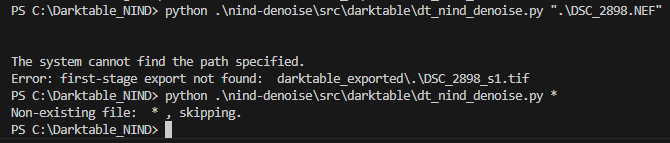
assuming you have DSC_2898.NEF file in the C:\Darktable_NIND folder, try without the .\ in front, e.g.:
python nind-denoise\src\darktable\dt_nind_denoise.py DSC_2898.NEF
Also, a basic tutorial on navigating files/directories might help.
sillyxone
July 25, 2025, 5:53pm
47
Vente:
Nope, the same error.
can you run again in debug mode (with -d flag) and attach the output here? thanks
python nind-denoise\src\darktable\dt_nind_denoise.py -d DSC_2898.NEF
Vente
July 25, 2025, 5:58pm
48
PS C:\Darktable_NIND> python nind-denoise\src\darktable\dt_nind_denoise.py -d DSC_2898.NEF


Rating:  4

Prepping first stage ...
--removed:  exposure
--removed:  colorbalancergb
--removed:  graduatednd
--removed:  colorequal
--removed:  toneequal
--removed:  denoiseprofile
--removed:  bilat
--removed:  colorbalancergb
--removed:  cacorrectrgb
--removed:  sigmoid
--removed:  atrous
--removed:  retouch
--removed:  crop
--removed:  lens
--removed:  colorzones
default:     flip
default:     channelmixerrgb
default:     highlights
default:     temperature
default:     gamma
default:     colorout
default:     colorin
default:     demosaic
default:     rawprepare
--removed:  mask_manager

Prepping second stage ...
default:     exposure 1
default:     colorbalancergb 1
default:     graduatednd 1
default:     colorequal 1
default:     toneequal 1
default:     denoiseprofile 1
default:     bilat 1
default:     colorbalancergb 1
default:     cacorrectrgb 1
default:     sigmoid 1
default:     atrous 1
default:     retouch 1
default:     crop 1
default:     lens 1
default:     colorzones 1
default:     flip 1
--removed:  channelmixerrgb
--removed:  highlights
--removed:  temperature
default:     gamma 1
default:     colorout 1
default:     colorin 1
--removed:  demosaic
default:     rawprepare 1
default:     mask_manager 0
First-stage cmd:  /opt/darktable/bin/darktable-cli "DSC_2898.NEF" "DSC_2898.NEF.s1.xmp" "darktable_exported\DSC_2898_s1.tif" --apply-custom-presets 0 --core --conf plugins/imageio/format/tiff/bpp=32
The system cannot find the path specified.
Error: first-stage export not found:  darktable_exported\DSC_2898_s1.tif
It seems like it can’t find the temporary .tif file it produces
Oh and btw., I removed the denoise from the .xmp
1 Like
sillyxone
July 25, 2025, 6:20pm
49
ah, you need to edit the file dt_nind_denose.ini and adjust the path to darktable-cli according to your system.
By default, it has this value (for my system):darktable = /opt/darktable/bin/darktable-cli
According to this ticket , the default location on Windows seems to be C:\Program Files\darktable\bin\darktable-cli.exe
So, you’ll need to edit the top section of dt_nind_denoise.ini (in the same folder as dt_nind_denoise.py) to:
[command]
darktable = "C:\Program Files\darktable\bin\darktable-cli.exe"
or to wherever darktable-cli.exe is.
I’ve added error handling for when darktable-cli does not exist, you can pull the latest code again with git pull origin if you want.
1 Like
Vente
July 25, 2025, 7:07pm
50
I changed the paths and downloaded a gmic-cli for Windows. Now I get this error, it seems the file is being named incorrectly:
16.9070 [export_job] exported to `darktable_exportedDSC_2898_s1.tif'
Error: first-stage export not found:  darktable_exported\DSC_2898_s1.tif
sillyxone
July 25, 2025, 9:52pm
51
There is an open bug for darktable-cli on Windows that eats the single backlashes.
I’ve updated the dt_nind_denoise.py script to leaver all intermediates TIFF files in the current folder as a workaround, and only move the final output file into darktable_exported at the end.
Please pull the latest code with git pull origin and try again. Thanks.
Vente
July 25, 2025, 9:59pm
52
Now it suddenly fails at:
Error: darktable-cli does not exist. Please correct the path in dt_nind_denoise.ini
even though the path is correct as far as I can tell.
Off to sleep soon
sillyxone
July 25, 2025, 10:21pm
53
Not sure what could be wrong, it works fine on Ubuntu
Please git pull origin and try again when you have a chance. No hurries, thanks.
Vente
July 27, 2025, 5:28pm
54
Did not help, copying the darktable-cli path into the dt_nind_denoise.ini file still gives the false error of file not existing, seems unsolvable…
sillyxone
July 27, 2025, 5:30pm
55
can you run in debug mode (with -d flag) and attach the output here? Thanks.
Vente
July 27, 2025, 5:33pm
56
sillyxone
July 27, 2025, 5:39pm
57
Looks like it picked up the path to darktable-cli.exe correctly, but did you verify that the darktable-cli.exe actually exists at the specified path?
If the file darktable-cli.exe is there and the path looks correct, try editing dt_nind_denoise.ini and take out the double quotes surrounding the path.
Vente
July 27, 2025, 5:42pm
58
Yes it does exist, as I said - I copied the path of the executable itself . But what about the space in the path? Is “Program Files” not gonna break it?
EDIT:
sillyxone
July 27, 2025, 5:58pm
59
I swapped the function that checks for file existence to another one. Also, the script won’t stop if it couldn’t detect the file, just display an error, but still carry on in case the check is incorrect.
Please git pull origin and try again. Thanks.
Vente
July 27, 2025, 6:01pm
60
PS C:\Darktable_NIND> python .\nind-denoise\src\darktable\dt_nind_denoise.py -d "DSC_2898.NEF"

Error: darktable-cli ("C:\Program Files\darktable\bin\darktable-cli.exe") does not exist or not accessible. Please correct the path in dt_nind_denoise.ini

Error: gmic ("C:\Users\---\Documents\Programy\gmic-3.5.5-cli-win64\gmic.exe") does not exist, disabled RL-deblur


Rating:  4

Prepping first stage ...
--removed:  denoiseprofile
--removed:  exposure
--removed:  colorbalancergb
--removed:  graduatednd
--removed:  colorequal
--removed:  toneequal
--removed:  denoiseprofile
--removed:  bilat
--removed:  colorbalancergb
--removed:  cacorrectrgb
--removed:  sigmoid
--removed:  atrous
--removed:  retouch
--removed:  crop
--removed:  lens
--removed:  colorzones
default:     flip
default:     channelmixerrgb
default:     highlights
default:     temperature
default:     gamma
default:     colorout
default:     colorin
default:     demosaic
default:     rawprepare
--removed:  mask_manager

Prepping second stage ...
default:     denoiseprofile 0
default:     exposure 1
default:     colorbalancergb 1
default:     graduatednd 1
default:     colorequal 1
default:     toneequal 1
default:     denoiseprofile 1
default:     bilat 1
default:     colorbalancergb 1
default:     cacorrectrgb 1
default:     sigmoid 1
default:     atrous 1
default:     retouch 1
default:     crop 1
default:     lens 1
default:     colorzones 1
default:     flip 1
--removed:  channelmixerrgb
--removed:  highlights
--removed:  temperature
default:     gamma 1
default:     colorout 1
default:     colorin 1
--removed:  demosaic
default:     rawprepare 1
default:     mask_manager 0
First-stage cmd:  "C:\Program Files\darktable\bin\darktable-cli.exe" "DSC_2898.NEF" "DSC_2898.NEF.s1.xmp" "DSC_2898_s1.tif" --apply-custom-presets 0 --core --conf plugins/imageio/format/tiff/bpp=32
    12.1729 [xmp_import] creating tag: darktable|changed
    12.1733 [xmp_import] creating tag: darktable|exported
    12.1735 [xmp_import] creating tag: darktable|format|nef
    12.3912 [_dev_read_masks_history] can't find history entry 0 while adding mask brush #1(1753212822)
    12.3914 [_dev_read_masks_history] can't find history entry 0 while adding mask group `retouch'(1753212825)
    12.3915 [_dev_read_masks_history] can't find history entry 0 while adding mask path #1(1753213228)
    12.3918 [_dev_read_masks_history] can't find history entry 0 while adding mask group `color balance rgb ΓÇó sky'(1753213270)
    12.3924 [_dev_read_masks_history] can't find history entry 0 while adding mask gradient #1(1753213529)
    12.3925 [_dev_read_masks_history] can't find history entry 0 while adding mask group `color equalizer'(1753215528)
    26.4482 [export_job] exported to `DSC_2898_s1.tif'
nind-denoise cmd:  export 'PYTORCH_CUDA_ALLOC_CONF=max_split_size_mb:512'; /home/noname/python_envs/nind_denoise/bin/python3 /home/noname/tinker/git/nind-denoise/src/nind_denoise/denoise_image.py --network UtNet --model_path "/home/noname/tinker/git/nind-denoise/models/2021-06-14T20_27_nn_train.py_--config_configs-train_conf_utnet_std.yaml_--config2_configs-train_with_clean_data.yaml_--g_model_path_..-..-models-nind_denoise-2021-06-12T11_48_nn_train.py_--config_configs-train_conf_utnet_std.yaml_--config2_configs-train_w/generator_650.pt" --input "DSC_2898_s1.tif" --output "DSC_2898_s1_denoised.tiff"
'export' is not recognized as an internal or external command,
operable program or batch file.
Error: denoised image not found:  DSC_2898_s1_denoised.tiff

 I added some cleaning and debugging info.

