FerrumPix: Photo/RAW-Editor, Viewer, Gallery, Immich and Nextcloud Client in one App

Hi everyone,

another FerrumPix follow-up 0.9.61 through 0.9.63 bring quite a few changes around culling, layers, selections and the editor workflow.

Bursts, RAW+JPEG pairs and culling

0.9.63 adds optional stacks for bursts and RAW+JPEG pairs.

Shots taken in quick succession can appear as one thumbnail, and clicking a burst opens just that series for culling. The sharpest image is automatically brought to the front, and the other shots show how their sharpness compares.

There’s also a new Reject flag:

  • X rejects the current image
  • Shift+X rejects everything in a burst except the selected shot
  • rejected images can be hidden or filtered separately
  • the reject flag is also written to the sidecar

For RAW+JPEG pairs, ratings, labels, keywords and deleting can be applied to both files together.

Selections & masks

The selection tools have grown quite a bit over the last few versions.

Selections can now have their own fill, stroke, shadow and glow, with control over stroke position, hardness, gradients and opacity.

There’s also Refine Edge, which makes a selection or mask follow nearby image detail more closely. Useful for hair, fur, branches and similar edges, without requiring an AI model.

Selections made on layers now stay within the visible content of that layer and respect masks and clipping much more consistently.

Frame & warp tools

The frame is now treated much more like the other editor objects, with:

  • fills and multi-stop gradients
  • inside/outside shadow and glow
  • adjustable distance from the image edge

Warping can now go beyond the image border, more like a free transform. Corners and edges can be dragged outside the canvas, while the final image keeps its original size.

New editable looks

0.9.63 adds eight new looks under Filters, including Base Light, Color Harmony, Luminous Curve, Desert Light, Film Grain, Color Haze, Clear View and Timeless.

They aren’t baked-in effects, they’re made entirely from normal FerrumPix adjustments, curves, HSL, grain and vignette, so everything stays editable afterwards. They also work with batch adjustments and Export to.

File handling

A new opt-in setting allows file operations outside the home folder, so photos on mounted drives, removable media or network folders can be copied, moved, renamed or deleted directly from FerrumPix.

System folders remain protected.

Smaller improvements

There’s also been quite a bit of cleanup around the editor:

  • red-eye removal now lives with the image brushes
  • numeric controls are more precise
  • slider reset behaviour is now consistent
  • eyedropper previews the color before you click
  • color grading can tone black-and-white images
  • viewer comparison no longer compares a picture with itself
  • lens metadata in the gallery and EXIF panel now agrees
  • complex-script text rendering uses HarfBuzz shaping

The focus is gradually shifting more toward workflow polish and stability now, but there are still a few areas where feedback from real-world use continues to uncover useful improvements.

Thanks again to everyone testing and reporting.
3 Likes

What are the minimum hardware requirements for this? Does it run on old hardware like e.g. intel core duo/4gb ram?

Thanks for asking! I don’t have official minimum specs yet, so here’s what I can say honestly:

An original Intel Core Duo won’t work, unfortunately. It’s a 32-bit CPU, and FerrumPix only ships 64-bit builds (x64 and ARM64). A Core 2 Duo is 64-bit and should start, since the .NET runtime we’re on still supports CPUs that old.

With 4 GB of RAM, browsing the gallery and editing photos of normal size (say 12 to 24 megapixels) should be fine, just not fast. Very large RAW files and the AI tools (object selection, depth, face recognition) need a lot more memory and CPU, so expect them to be slow or to struggle on a machine like that.

I haven’t tested on hardware that old myself, so if you give it a try, I’d really like to hear how it goes.

1 Like

Ah, thanks for the quick answer. Its a core 2 duo I think, anyway I am pretty sure its 64bit. I havethat little retro project… But the machine still has to be repaired, apparently the hdd is broken.
Glad to hear though that ferrumpix not so resource heavy

Hello Patrick, I found the problem of the missing lens info on the thumbnails while the lens is shown in the exif panel. It has to do with the size of the thumbnails!

When I enlarge them, the lens string is shown, in my case “Sigma 17-50mm f/2.8 EX DC OS HSM”. That’s quite long and that explains as well why the “AF Nikkor 50mm f/1.8” did show up before. Same applies to my Sigma 10-20.

Perhaps you can cut a part of that long string, or long strings in general, eg. to Sigma 17-50mm f/2.8. That will do for a user.

Hello Patrick

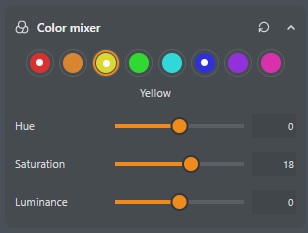
Having worked with FerrumPix for a while, the biggest quality of life improvement I can think of is to have a toggle for displaying a tool adjustment. For instance, here’s a screenshot of the “Color Mixer” with adjustments made to 3 different colors. Currently there’s no way to turn off and on the display of these adjustments. There’s nothing built into any of the tools for this and using the “Comparison” slider gives you a “Before” and “After” that takes you all the way back to the original raw image before any edits were made. The only way I can see a “Before” and “After” for that particular tool is to jump back and forth in the “History”, which takes up additional screen real estate and is rather slow.

Thanks again Patrick

1 Like

Hi, a per-tool toggle for temporarily enabling/disabling the adjustments of just that tool would make comparisons much easier, especially for things like the Color Mixer where you may want to judge only that part of the edit.

Using History for that is definitely more cumbersome than it should be, and the global Before/After comparison is too broad for this use case.

I’ll add this to the feature list. Thanks for the suggestion.

2 Likes

Hi Patrick!
Ferrumpix is a great piece of work—it meets my needs perfectly!
I want to let you know that it seems I have a similar problem to Paul. Ferrumpix only recognizes one of my lenses (a Canon lens on a rather old Canon EOS 40D body). Two Tamron lenses and a Sigma lens aren’t recognized, even though they ought to be in the database,so i can select them manually.
Just so you know: Darktable doesn’t have this problem.
Best regards, Thomas

1 Like

Esens? Bin gerade in Westeraccumersiel…

If possible, could you please open a GitHub issue and provide a few example photos? You can either attach them directly to the issue or share them via a cloud storage link.

Cool! Dann ein paar schöne Tage hier oben!

1 Like

FerrumPix-0.9.64-2-x86_64.

When I open a raw and save it as xxx_fx.jpg, the lens info on the thumbnail of that particular file has gone.

My Sigma 2.8/50 Macro is well recognized now.

Somewhere in this thread you said that we can disable a tool (eg. sharpening) and enable it again to see the difference. I can’t find that!

Hi Paul

Regarding tool disable/enable, I mentioned this very thing to Patrick in my most recent post. He said he will add it to the feature list. Until then, the best workaround I’ve found is to go back and forth in the history stack.

I’ll take a look at it next week when I’m back from vacation.

It’s good that you’re getting away from it for a while. Have a great vacation!

1 Like

Hello, history stack, yes I know. But let’s wait until Patrick implements an on/off switch or something.

Hi Paul,
you were right about the missing lens info. When a RAW was saved as JPEG, only the standard lens field was copied over, and many cameras keep the lens in their own data instead. That’s fixed in 0.9.65, which is out now: the saved file gets the same lens name FerrumPix shows for the RAW.

About switching a tool off and on: What 0.9.65 brings is a quick comparison for single sliders. Right-click a slider or its number field, and it jumps to its default and changes colour. Right-click again, and your value is back. If you’re typing in the number field anyway, pressing SPACE does the same. You can do that with several sliders at once, so for sharpening you could set the amount and radius to default and back to see what they do. Keep in mind that Save and Save As save what you see, so a slider that is on its default for comparison is saved that way; before you move to another picture, every slider gets its value back.

Hi everyone,

I’d like to share a quick update on FerrumPix. Versions 0.9.65 include quite a few changes, particularly in RAW processing, lens correction and editing performance.

Some of these improvements directly address issues that were discussed and tested here, so I especially wanted to follow up on those.

RAW processing and tonal adjustments

I recalibrated several editing controls, including Contrast, Highlights, Shadows, Whites, Blacks and Vibrance.

One important fix concerns the behaviour of Highlights, Shadows, Whites and Blacks at stronger settings. Certain combinations could previously cause tonal inversions, where brighter areas became darker than neighbouring areas. Strong adjustments could also introduce unwanted hue shifts or desaturation.

These issues have been addressed, and the controls should now behave more naturally across different images. Existing edits retain their appearance despite the slider recalibration.

Lens corrections

Version 0.9.65 significantly expand lens identification and correction.

I add distortion, chromatic aberration and vignetting corrections for several fixed-lens camera families, including Panasonic LX/FZ, Canon PowerShot, Sony RX and Fujifilm X100.

FerrumPix can now also use correction data embedded in RAW files from Sony, Olympus, OM System and Panasonic cameras when a database profile is unavailable.

Lens identification has been improved for older Canon, Olympus, Panasonic, Samsung, Sony and Pentax cameras, as well as approximately 600 Nikon F-mount lenses.

I add better identification of Sigma, Tamron and Tokina lenses on Canon bodies, helping to avoid applying an incorrect profile when a lens cannot be identified unambiguously.

Editing workflow and performance

A new slider comparison feature lets you temporarily compare an individual adjustment with its default value. Right-click a slider or its numeric field to compare, then right-click again to restore your setting. Multiple adjustments can be compared independently, and Space works in numeric fields.

Detail and effect sliders, including sharpening, noise reduction, clarity and haze, should now respond faster thanks to the reuse of intermediate processing results.

There’s also a new full-image Blur adjustment, separate from Smoothing, which preserves edges while reducing noise.

For large TIFF and DNG scans, particularly on network drives, metadata handling has been optimized to avoid repeatedly reading entire files. This should make indexing and browsing considerably faster.

Other fixes cover burst handling, depth blur previews, white balance state and lens metadata in exported files.

The Flatpak build now also includes video thumbnails and playback with sound.

Thanks again to everyone here.
Patrick

4 Likes

Hello Patrick, works now!

I manage to do that with the space bar or by right-clicking the number field. But only one slider a time. What would be much better to compare before/after sharpening is a way to reset/set all sliders at once imo.

Edit. Other softwares use an on/off checkbox next to the name of the tool.

Hi Paul,

that’s strange, because comparing multiple sliders at the same time works fine on my side, exactly as intended. I wonder if this might be related to your Wacom tablet. Could you try it with a regular mouse and see if it behaves differently?

As for the checkbox, I don’t plan to add one. I know other applications handle this differently, but I’m not trying to clone any existing software. FerrumPix is my own take on how a photo application should work, and I make design decisions based on that rather than following what other applications do.

1 Like