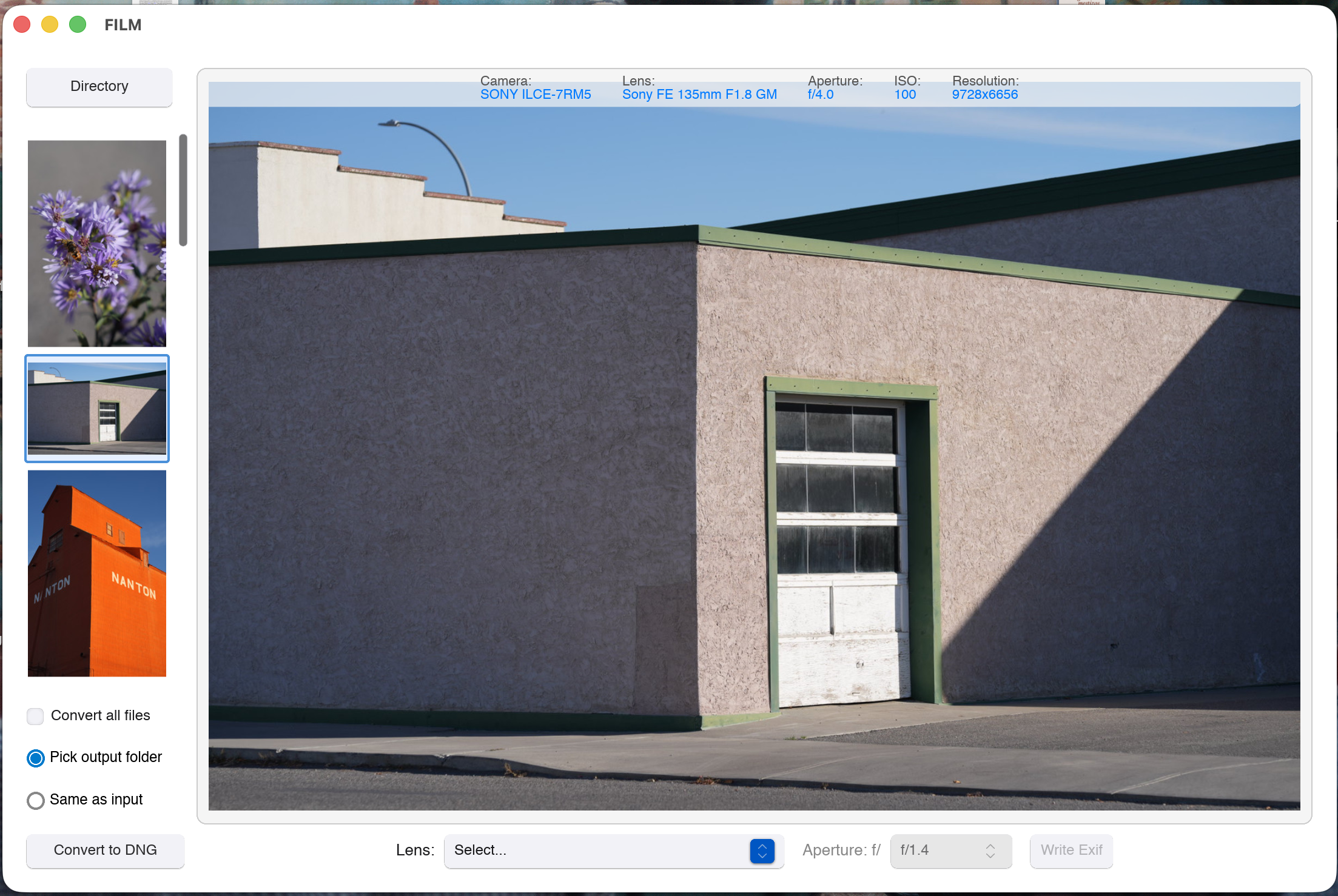
Open source app for Linux and MacOs to lossless compress raw image to DNG. Useful for users of cameras without lossless compression (like the Sony a7 II, a7 III, a7rII, a7r III, a7r IV or Leica SL, SL 2), or for those who just want to keep their images in DNG format. It also let you write exif lens and aperture data, for those using vintange lenses.
5 Likes
Hey, two questions about your project:
- What is the license?
- What is the reason for only supporting Linux on ARM?
I wonder what advantage there is converting a RAW file to another format such as DNG? I remember this option in LR and wondered what I should do at the time. I settled on sticking to the RAW file because then at least I knew which brand of camera took the original and that it was in fact a RAW file and not a DNG export post editing in LR.
1 Like
And what’s the advantage of using FILM over using DNGLab, a dependency of FILM. More widely, what’s the advantage of using FILM rather than any other DNG converter?
OK, DNGlab is command-line, which should not be an issue for Linux users where it concerns a converter.
1 Like
Having a GUI and a place to type of exif info, if necessary.
Because not everyone likes to use the terminal. A proper designed UI reduces the mental load for a user. I use on a daily basis so many utilities that I simple don’t remember all the command line options for the utility that I don’t use that often.
So I am really happy with such a UI!
1 Like
Do you know whether the reverse would be possible to implement? Back in my LR days I converted my entire library to compressed dng and I miss being able to edit some older shots with darktable.
I’m an example of a Linux user who avoids the terminal as much as possible, I don’t like it, it bores me and I think it limits the spread of the penguin (of course just my opinion).
Greetings. Roberto
Also, why on earth would you want to call this program film when it has absolutely nothing to do with the medium?
3 Likes
Maybe the Adobe DNG converter can do that trick for you…
The DNG spec and format is open, its less of a black box then your vendor’s raw file.
3 Likes
Actually, it is even more than an open standard, it is an ISO standard (ISO 12234-4:2026). With that, there is actually rather much more of a guarantee that in say 100 years from now you will have the capability of reading your lives.
Actually for Library of Congress it is now acceptable to have DNG files in the collection (https://www.loc.gov/preservation/digital/formats/fdd/fdd000628.shtml) which is actually absolutely not the case for other raw formats (LoC has historically always settled on TIFF)
So yes, the DNG standard is much better than every vendors own closed format.
From a FOSS standpoint, there are two draw backs of DNG. While it is an open standard, the full specifications are controlled by ISO and thus have to be paid for. Also there is space within the DNG standard for vendor specific undisclosed fields.
If this all matter for you personally?? That is for yourself to decide
6 Likes
@martinus you bring up a valid point for archival storage and also valid points against DNG for FOSS. My Pentax cameras offered PEF or DNG but I settled on PEF because I knew it was shot with a Pentax where LR at the time would output DNGs and therefore I wasn’t sure if I was looking a a true original image or an edited image. I feel the same when I see a DNG in the playraw category. How was the DNG generated is the question I always wonder. Not all DNG seems equal but maybe I am mistaken.
1 Like
Indeed, not all DNG are equal. I have 4 different DNGs in my collection
-
My Leica outputs DNG directly. If my Leica shoots RAW, it is a DNG. These DNGs are really just raw data. No issue with that.
-
Then I have converted NEFs. Sometimes when I am traveling, I see the risks of running out of storage. So I switch my Nikon to those high efficiency NEFs (slightly less data is better than no data). From what I have seen in those DNGs, that is real RAW data. But I hate that Nikon is using this closed source compression tech…
-
Then I have my iPhone’s ProRaw files. They are not really really RAW of course be the are demosaiced.
-
And then the last category are converted ProRaw files so darktable can read them. I really hope that one day I can get rid of this category.
But I am pracmatic in nature. I don’t really care about which format or conversion. A data format is just that a format.
If it represents the same data as the original data, then it is the same data. Data is not about having the exact 0s and 1s, it’s about having exactly the same capabilities.
And it is also about achieving my goal: have a great time while making the photo and having a nice memory to share.
O btw, another benefit of DNG: it have a baked it checksum so it is possible to detect if your files maintain integrity over time
2 Likes
I did… The whole sentence. Maybe you’re not as clear as you thought?
My Ricoh GR cameras shoot into dng and it works fine. And the name of camera maker is in the metadata of the DNG, so I don’t get it.
You can look at the exif tag for Software and it’ll you if its been thru a comverter. Also if you have the camera, you likely know if the camera is dng capable or not.
This seems like a non sequitur, I don’t see how this has to do with file conversion.
1 Like
First, as others have said, the DNG standard is open.
But I just want to add a practical point: file size. DNGlab (under the hood) uses modern fancy lossless compression used in JXL, which can result in a 15–30% file size reduction, depending on the compression level in the original. May be irrelevant for some people, or important for some others, depending on the details.
It makes sense to experiment with your particular camera. For my Panasonic GX9, I 23 Mb files are reduced to 15–18 Mb ones.
1 Like
Indeed very relevant, less space, is less storage space, is less upload time…
I think you don’t understand… Actually to will gain compatibility! Don’t think today… think 20 years ahead… There is no guarantee that in 20+ years from now your raw files will be readable. Yes currently JXL is not yet supported everywhere, but is an open standaard in contrast to your raw files.
But the DNG is recommended as an archival standaard. That mains that parties that do archival for a living, (think Library of Congress, and other national archives) will choice that format for raw files. And with open standaards and such big parties there is much more of a case to support it
Do you understand the notion of lossless at all? Your data will not change, just a different encoding. There is a huge difference between data and mere the sequence of bites.
Well how many years do you think? If you depend on harddrives… it is not so likely your photos will live 20 years form now… Enterprise harddrive expected life span is about 7 years…
So what is a reliable medium to store digital data? The ones I know of all seem to have rather limited lifespans, and every copy cycle risks introducing errors.
So far, the best option for images and text seems to be print (if well executed)… But that takes up a lot of space.
1 Like