I added the ‘Michaelis-Menten’ (MM) algorithm to Selective Editing. This algorithm has the advantage of being simple for the user and is very efficient in most cases. It’s a tone mapper using the Michaelis-Menten equation, which is borrowed from biochemistry to describe enzyme kinetics .
It has the same role as GHS, that of a 'pre-tone mapper’ which prepares the work for other ‘Game changer’ tools. Of course, like GHS, it can be sufficient on its own for certain images. Schematically, it’s essentially the same as GHS (on the goals), but simpler, with slightly fewer options for (very) difficult images. In mathematical terms, comparing MM to GHS is like comparing the curriculum for the Baccalaureate exam to a Master’s degree in Mathematics. If we put ourselves in the “mission impossible” situation, the asymptotic possibilities in the highlights are superior for GHS, but at the cost of greater complexity for the user.
I created a Pull Request
Pull Request
I added this algorithm, modifying it to:
- Better handling of high-dynamic-speed images, and/or poorly positioned white or black points… which is more common than you might think (even on seemingly simple images)
- To easily control the highlights
- Equip it with an LMS matrix that takes into account the Working profile. I had fun creating my own matrix… I added an ‘x’, for matriX.
I was inspired by the CTL from ART, thanks to Alberto…
It’s simple to design; it took me a whole day (the weather’s bad here…) to do everything…
It’s easy to use, and for me, it works with the vast majority of images. Of course, it’s part of the "game changer"concept.
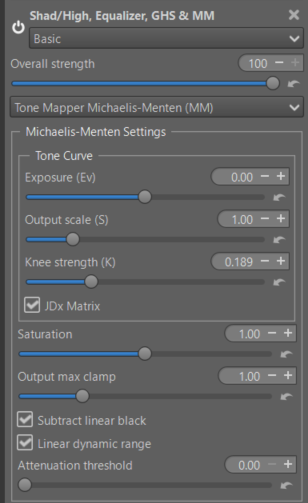
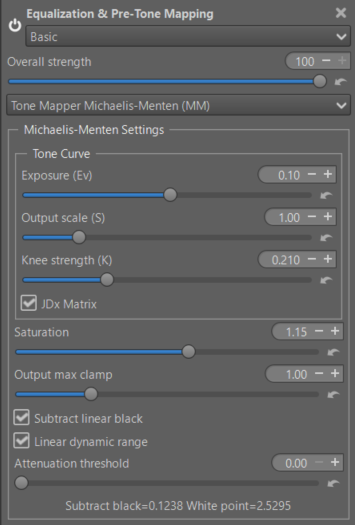
The main settings (the original ones where I haven’t changed much)
- Exposure : Adjusts the input image brightness.
- Output scale (S) : Controls the maximum asymptotic value of the curve; essentially the output white level.
- Knee strength (K): Determines the “knee” of the curve. Lower values result in a sharper transition to the compressed highlight region.
- Saturation : Adjusts color saturation post-tone mapping.
- Output max clamp : Sets the final clipping point for the output values.
I haven’t added an on/off button, but that shouldn’t be a problem.
You need to pay attention to the additions I’ve made that concern :
- ‘Subtract linear black’ and ‘Linear dynamic range’ : I emphasize the word linear. It’s the same principle as GHS: to be sure that all the data are in the interval [0 1]. If, for example, the Black Point is 0.03, it’s not 0; you lose contrast… I’m not talking about certain images where it’s 0.15. If the white point is 0.6, you limit the algorithm’s performance. If it’s greater than 1, you’ll lose the algorithm’s capabilities again. It’s highly advantageous to recover as much as possible, using ‘Highlight reconstruction > Color propagation’ (after verifying that this actually benefits the current image). The operation is very simple, at the level of a CM1 student. To simplify the interface as much as possible, I’ve only included checkboxes and no information. Of course, it’s easy (it’s just code) to change this and add sliders and two lines of information.
- ‘Attenuation threshold’ : with an exponentiel function, reduce the highlights that can cause a gamut overshot.
- ‘JDx Matrix’ : It’s a simple LMS matrix of my own design, using XYZ data, therefore independent of working profile.
I just did a review using Copilot, and I made a few adjustments
There are probably things that could be improved regarding the labels and tooltips. Any suggestions you may have would be welcome.
Executables
Michaelis-Menten
Jacques







 ), but I am enjoying the ride!