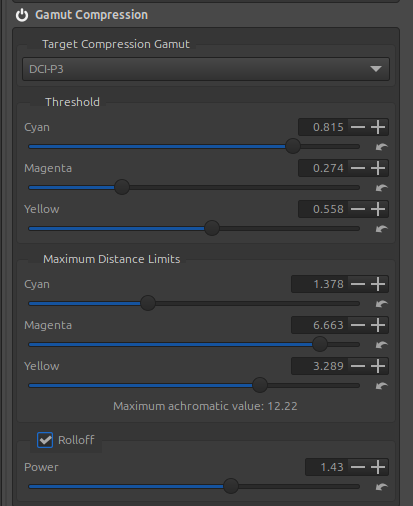
Displays the highest measured value of the 3 RGB (achromatic) channels. This value helps to understand the state of the image and the incidence:
‘Working’ and ‘Target Compression Gamut’ profile.
‘Highlight reconstruction’, even with low incidences.
The need or not to retouch White point (see GHS for example).
Very high values, for example above 5 or 10, often indicate the use of an LED or halogen illuminant and a significant exceeding of the color gamut.
High values of 2 to 4 are often linked to an excessive light source (sun, etc.) or incorrect exposure settings that have resulted in out-of-range values on the sensor. Try using ‘Highlight reconstruction’.
Low values, less than 1, often indicate poorly adjusted white and black points (see for example GHS).
There is a link, but not a correlation, between this value and the 3 ‘Maximum Distance limits’.
I pushed the Pull Request with Kaesa’s help, specifically how to explain the purpose of this modification and better define the function of ‘Gamut compression’.
I also made two changes:
changed the minimum possible value of ‘Power’
added ‘Beta’ as the ‘Target Compression Gamut’ profile. To my knowledge, this is the profile whose primaries allow the inclusion of the entire ‘Pointers’ gamut’ without having primary values outside the CIExy range.
I’ve attached the new text.
===
Displays the highest measured value of the 3 RGB (achromatic) channels. This value helps to understand :
The state of the image and the reciprocal influence of : a) ‘Working’ and ‘Target Compression Gamut’ profile; b) ‘Highlight reconstruction’, even with few side effects.
The need or not to retouch White point - see ‘Generalized Hyperbolic Stretch’ (GHS) for example.
Effect of values:
Very high values, for example above 5 or 10 or more, often indicate the use of an LED or halogen illuminant (with ‘Color Propagation’) and a significant exceeding of the color gamut. Try ‘GHS > Auto Black point and White point’, ‘White Balance > Blue/Red Equalizer’, ‘Abstract Profile > Primaries and Illuminant’
High values of 2 to 4 are often linked to an excessive light source (sun, etc.) or incorrect exposure settings that have resulted in out-of-range values on the sensor. Try using ‘Highlight reconstruction > Color Propagation’.
Low values, less than 1, often indicate poorly adjusted ‘White point (WP linear)’ and ‘Black points (BP linear)’ : see for example GHS.
Notes:
Using values higher than ‘Maximum distance limits’ for the three ‘Maximum achromatic value’ sliders offers little benefit.
Using low values for the three ‘Threshold’ sliders, whether or not combined with low values for the ‘Power’ slider, can lead to significant desaturation and color shift.
There is a link, but not a correlation, between this value and the 3 ‘Maximum Distance limits’.
====
Questions remain unanswered. Where should the ‘Gamut compression’ function be placed in the process? At the beginning, at the end…? I chose the beginning (after White Balance), so that the rest of the process could be run with minimal artifacts. However, this raises a series of questions without any truly relevant answers in all cases. This is especially true when the ‘White point linear’ are out of gamut - and often by a significant amount (as with LEDs, sunsets, etc.).
Another question you might ask is: why not provide ‘Threshold’ and ‘Maximum Distance Limits’ values tailored to each user’s configuration and preferences? Theoretically, this is possible, but it would create as many cases as there are ‘Working Profile’ options associated with the seven ‘Target Compression Gamut’ scenarios… resulting in an extremely complex GUI. The calculations would rely on the color preservation of ColorChecker24 in CIExy.
The ultimate goal would be to provide values suitable for ‘normal’ image (or with few deviations) cases. However, the problem to be solved, in my opinion, lies primarily with all challenging images: LEDs, multi-illuminants, sensor saturation in highlights - which Color Propagation handles well in most cases, but which leads to ‘Threshold’ and ‘Maximum Distance Limits’ values quite different from those calculated.
For your information, the default values are those obtained with the ACES profile primaries. These are the ones found in the literature.
The other question that arises, and it’s an important choice, is: What is the default ‘Working Profile’ in RawTherapee?
Since its creation, the choice has been ‘ProPhoto’… which is perfect except for the blue and green primaries, which are outside the CIEX diagram. We’re working with imaginary colors.
Furthermore, this choice makes it difficult to modify the primaries if you touch the red… We’re dealing with imaginary colors.
Therefore, I suggest, as with other software, choosing ‘Rec2020’ by default. It’s at the limits of CIExy, but it allows for retouching the primaries… This is sufficient in 99% of cases.