I don’t want to stir up the AI controversy again. While I’m excited to use the new masking and denoise processes, my use of AI has been very limited and will continue to be so.
That said, as a sports photographer, I occasionally have to “hurry” a shot (you snooze, you lose) and as a result it’s less well framed than I’d like. Just this past weekend I got a couple of great images where the framing was not centered or straight, and cropping resulted in a background that looked disorienting/ugly. The options were to discard the shot - or to try to salvage it. I’m just a volunteer and I’m not doing this for a salary, so I feel that a limited amount of effort to rescue a shot is sometimes warranted.
Yes, it’s possible to reconstruct the area just outside the image boundaries with a pixel editor or other paint tool, but it takes several minutes of precise work with multiple tools and is ultimately still not a “real” image. I’ve done this in the past, enough times that I know how much effort it is. But this time I loaded the image into ON1 and used its local model to crop and outpaint the perimeter of the image slightly. It took a minute or two, but was satisfactory and looked very accurate. And it let me move on with my processing (3200 photos last weekend, meaning several days of work). I wasn’t replacing or removing anything in the main part of the image, just restoring the framing as it would have been if I’d had seconds instead of milliseconds to take the shot.
So I ask - is there any possibility that a similar tool will come to dt in the future? It’s not something I’d heavily rely on, but when it is needed, it’s a massive boon. Normally I’d look to GIMP to do this, but the MacOS tools such as G’MIC are still missing in 3.2 and there is no timeline for when they will be ported.
From what I recall (without checking it out: it’s bed time!) from said controversy and the resultant guidelines and guardrails, generative is somewhat out of the question at this time.
Generative object replacement (not allowed): filling removed areas with newly generated content that is not derived from existing image regions is not permitted.
Example: removing a person and synthesizing a plausible background (e.g., generating new buildings, textures, or scenery not visible in the original frame).
Object insertion: adding new elements not present at capture time.
Example: adding animals, people, or artificial objects.
Scene modification: replacing or significantly altering parts of the image.
Example: changing the sky, altering backgrounds, or modifying landscapes.
Generative transformations: stylistic or structural changes that reinterpret the image.
Example: converting a photograph into a painting-like result or changing seasons.
Well actually with Stable Diffusion XL (and Krita AI Diffusion, e.g.) there is a way to generate a part of the image based on a different part of the same image - you just have to use/create a so called control layer.
But I think integrating something like this into darktable would be kind of “bloat”. If you have such a use case, do it in Krita/Stable Diffusion (yes, it’s one click more to start Krita and open the image in it, so what).
Or would there be a point in creating a “generative” AI plugin/module for darktable (which connects to Stable Diffusion etc)?
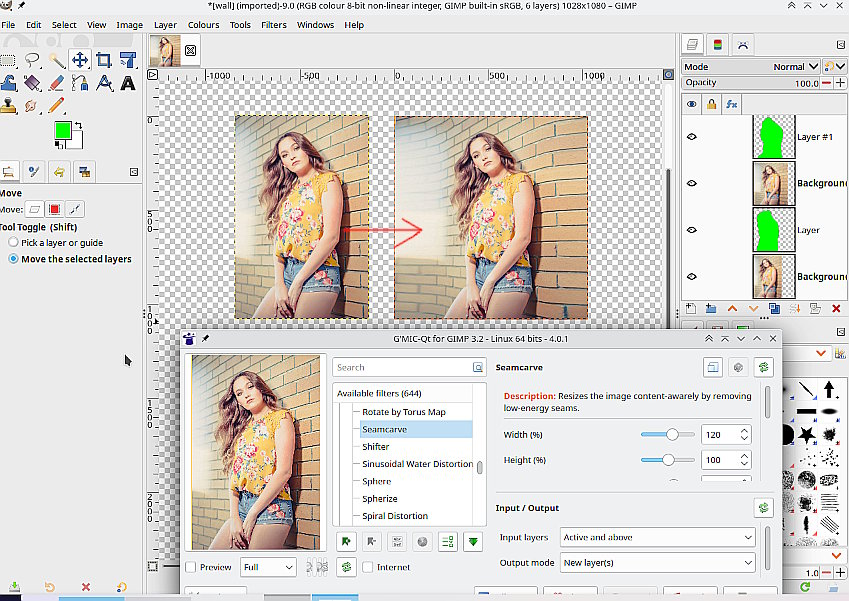
That is a shame, possibly one tool is some form of seam-carving aka liquid-rescale. There are on-line versions but nothing I can see that uses a “keep” mask. For the future this in Gimp / gmic plugin.
The example is nice and justifies this kind of manipulation of an image. It is unlikely that any developer would want to include this integration in Darktable with the current sentiments being expressed about AI. Luckily other FOSS programs are available for this sort of work as you have demonstrated. Thanks for the link.
I don’t really think it does. The manipulation is so strong that I don’t even see the point…I mean I thought the point of photography was to show something off that you created, not half-a**sed and got a machine to do the rest.
Edit: and yes, I’m aware that we still use machines for editing. But that’s more like the last finishing touches, not trying to transform a reject photo into a winner.
I want to stress: this is within the darktable ai rules, I only used the left part of the image as the base for inpainting the white area. Are you familiar with the exact steps how to do such a fix? This is kind of like blowing up images with ai, i mean its that level.
First of all, sorry for my long absence. Somehow my email provider marked all notifications from pixls.us (and a couple of other sites) as spam while I was on a trip and I never got notifications of any replies till I resolved that.
Second, thanks for the discussion and I will be looking at some alternatives now that I’m back in the groove again.