Hi everyone! I recently started exploring RawTherapee for processing my RAW photos, and I’m amazed at how much control it gives over colors, exposure, and sharpness. I’m curious, what are some essential tips or tricks you use to get the best results without spending hours tweaking each image? Any favorite workflow suggestions for a beginner would be super helpful!
Hi and welcome to the forum! A couple of good resources for someone starting out with RawTherapee can be found here: 1. The auto way | paulsphotopalace
and here: https://youtu.be/o4-T0laAf0E
For specific insights on how to do things and speed up your workflow, Andy Astbury’s videos are another valuable resource. https://youtu.be/mb96_8BWPyA
Thanks Wayne for pointing to an article of mine. But beware, it was written in November 2015! Since then, RT has evolved a lot…
1 Like
Hi Paul,
Thanks for the article - it was a big help when I first started using RawTherapee nearly 10 years ago. The section on tone curves is particularly good and still just as relevant today.
Wayne
Hey @alexa12 welcome… I’m a newbie too and have learnt a great deal from this forum and its members… Tips and tricks… Start basic as per Getting Started - RawPedia and work through a couple of raw files. you may not need to do much more to get good results pretty quickly.
Then I’d suggest setting a custom profile to do the basics as per Creating processing profiles for general use - RawPedia. I call mine ‘Standard Initial Profile’. Specifically I use it to turn on Capture Sharpening (in the RAW tab), and turn on the ‘Resize and Framing’ (in the Transform tab) as well as activating the ‘Post-resize Sharpening’ & ‘Framing’ options within the Resize and Framing part… as I mainly want to process an image and save the jpeg (in a suitable size for Pixls.us (1920 x 1080)  ), select ‘bounding box’ and I like a small black (border color) frame (size 0.05). I also use it to set Profiled Lens Correction to ‘automatically selected’ as RT has all my lenses and camera. you’ll find this in the Transform tab, under ‘Lens / Geometry’. That’s it…
After that I then go through the first link above (Getting started), but tend to use the advanced section… Although I send each image to ‘Queue’ until I’m done for the session, and then start the processing.
So I find that’s a really good start:
Now I’ve got a workflow to get started I can be more creative afterwards.
Others will have different workflows I’m sure, but the general idea of the Getting Started is as good as any. There is a YouTuber, ‘1kwords’ I think he is known as (on YT), who does a (longish) tutorial on getting started; it’s a slightly different workflow to the RAWpedia version… but works well, I’ve used it.
Hope this helps. Bon chance!
1 Like
What an interesting post. It’s indeed essential to know where to start, how to go about it, and it’s not specific to RT.
First, I would like to thank @Wayne_Sutton and @paulmatth (of course, there were other contributors) for their contributions. Paul notably tested the first steps of ‘wavelets’…and Wayne provided more than just a contribution, notably by translating into English, but especially by offering criticism and asking for clarifications.
Indeed, translating concepts (often very complex) into understandable terms is not easy. Whether some like it or not, algorithms and mathematics are everywhere. Moreover, with very few exceptions, there are no ‘standards’… I’ll take a simple example of vocabulary used everywhere: ‘Lightness’ and ‘Brightness’… which seem identical. The difference is profound, and in 95% of cases, what Brightness actually refers to is Lightness.
It all depends on:
- your photographic and scientific background and knowledge
- what you’re trying to achieve (processing one or two photos for yourself, photographing a wedding, or creating a gallery with images one meter wide
- Have you ever used other software, either paid (C1, Lightroom…) and you want to find the same functions, even the same vocabulary, or free software and there the difference is probably even greater (especially in terms of graphical interfaces)?
The advice given here by the participants seems appropriate to me.
A few remarks:
- RT was conceived and created by a single man, Gabor Horvatz, in 2006. This is a fantastic achievement. However, this has consequences: the GUI interface has remained the same, prioritizing what was good, given the knowledge available at the time in 2006.
- Today, the powerful modules are scattered across the different Tabs, and for my part, I almost never use them (with the exception of ‘Highlight reconstruction’) in the first two ‘Tabs’.
- Other improvements have made some modules that were very good 10 years ago a little less so. I’m thinking of the excellent “Dynamic Range Compression” (which is mathematically complex), which is slow and resource-intensive… there might be an additional problem with 5.12, but it’s always been a bit slow. But that’s just one example.
- There are also the effects of fads; yesterday everyone was talking about “XXX”, then “YYY”…and now “ZZZ”, and since it’s present elsewhere, why isn’t it being developed in RT? This doesn’t mean that “ZZZ” is better than “XXX”.
- RT also has the unique characteristic of employing certain specific algorithms or processing methods. People may like it or dislike it, criticize it or approve of it, and compare it to what exists elsewhere. Before condemning, compare apples to apples (you wouldn’t compare a chicken and a fish). I’m referring in particular to: CIECAM, Auto WB temperature correlation, Selective Editing, Wavelets, Abstract Profiles, etc.
When you’re ready, check out Pixls.us for everything related to “Game changers”; I’ve made several tutorials there. Of course, you’re under no obligation to use them.
One obstacle, however, is that recent documentation is not easily accessible… (that’s an understatement).
I remain – as do all the participants in this forum – available to provide assistance (to the extent possible).
Jacques
8 Likes
Makes me wonder Jacques, which modules do you use to process a photo to your liking?
I admit that I also use only a small subset from RTs toolbox, just the things I need.
Salut Paul
En anglais (avec traducteur).
(a) Depending on the situation, at least check if it’s useful.
Of course, I’m not talking about certain tools like Demoisaicing, Dark Frame, Flat Field, Chromatic Aberration, etc., which of course can be useful, and also denoise, etc. I focus on the essential points for colorimetry and sharpening
- set to “Neutral”
- (a) Highlight reconstruction (Exposure tab) - Color propagation (the best in 95% cases)
- (a) Raw black points - Dehaze (Raw tab)
- Capture sharpening (Raw tab) - can be used to “denoise” the background in some cases
- (a) White balance auto - temperature correlation: The most complex algorithm I’ve ever created… it’s really very mathematically complex.
- Selective Editing ‘Generalized hyperbolic Stretch’ - GHS - one or more RT-Spot - It’s a “pre-tone mapper” whose purpose is to retrieve out-of-gamut data and precisely place it within the working profile. At the end of GHS, the goal is to have an “acceptable” image for subsequent processing. Of course, it can be sufficient on its own.
- (a) Selective Editing, other tools if necessary, perhaps including “excluding spot”
- (a) Gamut compression
- Abstract profile (Color tab) which will allow balancing the image (with TRC - gamma / slope, etc.), adding local contrast (even though I don’t like that term) with an interface that implements wavelets (in a complex way, but simple for the user). If necessary you can adjust the primaries (in my opinion, in rare cases such as LED or compound illuminants), but I do not dispute the (difficult) use
- Color Appearance & Lighting (CIECAM) (advanced tab), The Rolls Royce of colorimetry, which has long taken into account the concepts of “scene” (or source) , Image adjustments, and “viewing” (or display). It considers physiological aspects…most of the time completely overlooked by the user (often only they know the shooting conditions and the conditions under which the image is projected). For example, if you’re looking at your screen in the dark, in dim lighting, or in bright daylight… the display will be different. Ciecam takes this into account.
I hope I haven’t forgotten anything (my age…).
Jacques
5 Likes
Merci Jacques, I’ll bookmark your processing list. Next time I process a photo, I’ll use your “recipes”.
Thanks,
Paul.
1 Like
Adobe DCP profiles.
Load the profile that matches your camera profile and get a ready-to-use photo.
1 Like
Absolutely this. There are pretty simple directions here somewhere for getting those profiles. After you download what you need, just go to the Color tab, then Input Profile, then get your custom profile and make sure these boxes are checked:
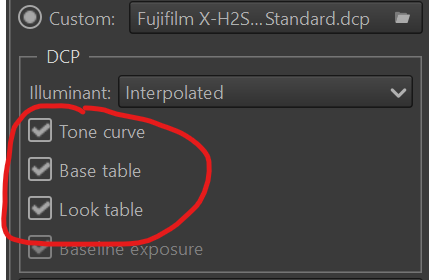
It’s a great starting point for your images, and one I use every time. Let us know if you have questions.