Hi,
I have updated this plug-in that allows users to use ART Flatpak version as client program.
To use ART Flatpak version as client program, you need to modify the description in config.ini file as below.
[ART directory path on Linux]
COMMAND_LINUX;flatpak run us.pixls.art.ART
And I keep JPEG-XL compressed dng support in this version, but it is not stable so I will remove the support when ART will use libraw ver. 0.22 which supports JPEG-XL compressed dng.
Revised points are…
1) It allows file names which contains space or parenthesis, even if users use ART flatpak version.
2) Improved error handling.
And I also dropped JXL compressed dng support, because ART next version (1.26.2) will natively support JXL compressed dng as libraw starts to support it.
In this version, I have improved error handling and fixed a bug about exiftool on Windows. Also I have integrated this plug-in and Plug-in using ART as raw importer (ART UI disabled version).
If you want to disable UI of ART, change [Activate UI of ART] parameter False in config.ini file.
Hi @yasuo!
Tnx for your script; it is useful and well done!
I have a suggestion for what its Windows version is concerned.
Both the file config.ini and fileimport_through_ART_UI_g3.py have an absolute reference to the name of the Windows directory where ART is.
For example:
“C:\Program Files\ART\1.24.10” or “C:\Program Files\ART\1.25.5” etc…
In fact we know that by default ART creates n different directories (one for each new release).
One can modify this behaviour (as I do) and simply install ART into:
“C:\Program Files\ART”
Setting the content of variable: [ART directory path on Windows]
into config.ini
and COMMAND_NT =
into fileimport_through_ART_UI_g3.py
to the full path of ART (version release included) as you did, causes the necessity to update these 2 files everytime @agriggio releases a new version.
My suggestion is to use a variable whose content is only the short path to ART, ie: “C:\Program Files\ART”
and recall its value inside config.ini and fileimport_through_ART_UI_g3.py.
Then you can create another variable whose content must be chained to the previous one, whose content is the short path to ART.
The content of this 2nd variable should be the version of ART or a null value like “”.
So, if one doesn’t use the full “subversion path” to ART, the value of this variable remain empty, while it will be filled-in with the ART program version number and updated everytime @agriggio updates his program if it is used.
This way, if a user (like me) installs ART in:
“C:\Program Files\ART”
then (s)he has nothing to do at any new ART release.
On the contrary, those who install ART in its subversion folder have to update the value of one variable in only one place at any new release of ART.
I hope I’m being clear enough. If not, plese tell me!
I don’t know how ART path works in Linux and/or MacOS, but for Windows I think this could be useful (at least IMHO).
Mainly out of curiosity, but also to understand how your great plugins work, as a non-programmer, I have one question: Why do you create additional configuration files instead of including the available options (choices) in the plugin’s graphical interface? Is it just for speed?
Basically I place optional parameters tailored to the user environment and basic user’s preference in config.ini, as they aren’t needed to be changed frequently and keeping the simplicity of my plug-ins UI, while parameters related to other operations are placed in the UI. However, as @Topoldo pointed out, frequent change of ART path description will be needed in Windows, so I will try to find better solution.
I have updated this plug-in. In this version, I have modified specifying way of some parameters in config.ini.
For [ART directory path on Windows], you can specify the upper directory path of actually ART installed directory, like COMMAND_NT;C:\\Program file\\ART . The plug-in will automatically search the actual installed directory of the latest version of ART from sub directories. However these ART installed sub directories name must contain only numbers and periods. If actual ART installed directory name has the other characters, you must specify the full path of it.
For [Exiftool path], if you use exiftool under ART installed directory in Linux or Windows, you must simply disable the parameter specifying line with “#” (the default value is already disabled). Otherwise, you must specify the exiftool path and enable the line deleting #.
And this plug-in is not compatible with AppImage version of ART, so it is recommended to use the other versions. Actually there is no point to use AppImage, because its contents is identical with tar.gz version.
In this version, it supports now Jpeg-XL encoded and Apple Pro Raw dng files. To enable these functions, users must change the parameter blow in config.ini and install Adobe DNG Converter and, in Mac OS, exiftool as helper tools.
 [Use Nikon HE compressed Raw, Jpeg-XL compressed dng, Apple Pro Raw]
NIKON_HE;False

* change to NIKON_HE;True
And if you use Linux, install DNG Converter with WINE. I confirmed that DNG Converter ver. 18.x demand DirectML.dll placed in ~/.wine/drive_c/windows/system32 .
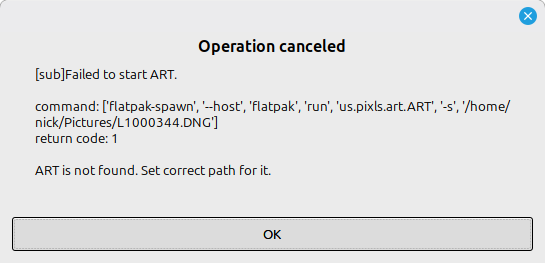
I have Gimp 3.2.6 and ART 1.26.8 installed via flatpak on Linux Mint 22.3. I extracted import_raw_through_ART_UI_g3 1.0a under ~/.config/GIMP/3.2/plug-ins, and updated config.ini to call the flatpak version of ART.
I can run ART on it’s own without problem from the icon created by the flatpak install, but when I run Gimp, select Import RAW with ART from the file menu, double-click on a RAW to select it, and then OK, I get a dialog containing the following error message: