I have downloaded the latest gimp 3. and instaled it,When i open the program, and try to locate the plugin folder: i go prefererens then folder: but there is no plugin folder, I hope that someone can advise me, it is not about download plugins, but to find the foleder to put them?
sanks
svaage_c
Edit → Preferences → expand Folders → click Plug-Ins
You will most probably see something like
/home/username/.config/GIMP/3.0/plug-ins
and
/usr/lib/gimp/3.0/plug-ins
Hi,
welcome here @svaage_c ,
What is your system? On Linux OS, the folder is in your_home_folder/.config/GIMP/3.0/plug-ins/
Replace your_home_folder with the name of your’s.
As the other posts, it does depend on your OS Edit → Preferences -Folders → Plug-ins In pictures
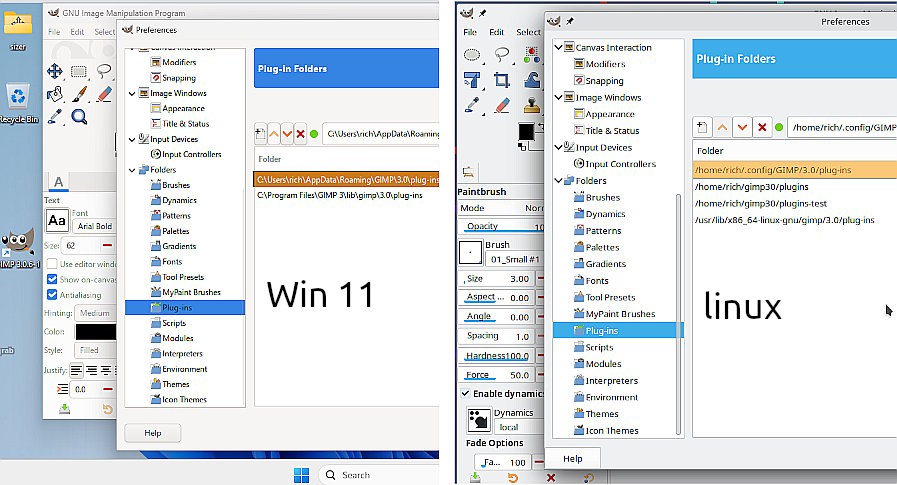
For Windows: C:\Users"yourname"\AppData\Roaming\GIMP\3.0\plug-ins
For regular linux installation ~/.config/GIMP/3.0/plug-ins/ but you might see something else if a flatpak or SNAP installation.
MacOS - might be something like Users/name/Library/Application Support/GIMP/3.0/plug-ins/
…but as my linux installation you can add your own (more convenient) folder
EDIT: just read again and
More information required as to OS and how Gimp was installed.
thanks.
My sistem is windows 11 pro
hej.
I have tried to instal older version of gimp, but ge erroe nessage now i have insatled rhe latest versio 3,0.8, stil no plug in folder, my sistem is windows 11 pro danis.
I thanks for all the help.
Windows: Reinstalling Gimp rarely fixes anything. All settings are in your Gimp User Profile which remains between installations
First thing to try is:
If you had a Gimp 2.10 installation that you want to keep, rename as
C:\Users\ “yourname” \AppData\Roaming\GIMP\2.10-backup.
Delete the Gimp 3 User profile.
C:\Users\ “yourname” \AppData\Roaming\GIMP\3.0
Gimp will create a new default when you run Gimp.
Start Gimp 3 and see if that fixes your issue.
If not fixed, then I do not know. You might need to purge your computer of everything Gimp. There was a problem for Danish / Norwegian users but as far as I know, fixed with Gimp 3.0.8
There is another user profile folder.
When you reinstall GIMP, it is needed to delete these folders.
C:\Users\%USERNAME%\AppData\Roaming\GIMP\3.0
C:\Users\%USERNAME%\AppData\Local\GIMP\3.0
Best to create your own plugin folder and add it to the plugin folders list in Preferences > Folders > Plug-ins.
That way you don’t lose anything if you uninstall/reinstall/upgrade/whatever.
Hover over the icons in the “Plug-in Folders” view to see tooltips that explain what they do.
I have tried to look for plugins to download , is there somone there can tell me the best site to download gimp plugins?
It does depend on your interests.
compiled plugins for Windows / Gimp 3
gimp_gmic_qt (over 600 filters in one plugin) www.gmic.eu
python / scheme plugins
https://sourceforge.net/projects/gimp3-tools/files/general/
There are more but tend to be individual plugins scattered in forum posts.
Just a reminder: A Gimp 3 plugin goes in a folder with the same name as the plugin name. Example
folder layer-group contains the plugin layer-group.scm