First of all, thank you!
Upscaling means for example important a 24MP image and upscaling it to a bigger one? That is not supported right now.
So you’re saying if I implement that I have to watch out for the ordering, right?
First of all, thank you!
Upscaling means for example important a 24MP image and upscaling it to a bigger one? That is not supported right now.
So you’re saying if I implement that I have to watch out for the ordering, right?
Sorry for not being more clear, I’ll try to rephrase.
Sometimes we need to upscale, like when printing and using low resolution cameras (like my 12 MP A7S III).
Grain masks interpolation/upscale artifacts very well. So, upscaling should come early in the pipeline (before halation and all that too).
On the other hand, applying grain and then upscaling results in smeared grain which looks terrible.
In the post i linked, I compare the results from upscaling after and before grain.
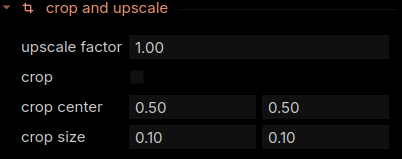
Early upscaling is available in the Spektrafilm napari python app:
Honestly, I think having a text input for “Longest side: _______ px” (where underscore is the text box) would make more sense. Upscale factor becomes messy if you have cameras with different resolution and you need to calculate the factor to get the resolution you want for each camera. Also, cropping messes with the factor. So, pixels would be more optimal.
Thank you for explaining it! I’ll add it to the feature backlog. I also wanna support presets soon.