Hello, my phone (iPhone x) is 8 years old and has been on the decline for a while. I am thinking of replacing it with a more modern apple phone (I’m on Mac and use an iPad at work).
With all the hype made around phone photography (my current phone takes poor images, I only use it for image notes really), I’m wondering whether it is worth splashing out a bit more to get a higher end phone. The aim would be to take most of my photos in jpg, but some in raw for future development in Darktable.
Am I deluded ?
Is pro raw a valid thing or a gimmick?
Thanks,
Nicolas
darktable currently has bad support for Apple ProRAW, Samsung Expert RAW and other DNG 1.7 files, such as those from my Pixel 6a using the Pixel Camera app.
So you won’t have access to computational photography features with raw/DNG in darktable. That is, shitloads of combined exposures in a demosaicked linear DNG. Some scream: “but they’re not true raw!”. And while they’re not mosaicked raw files, I find that for cameras with small sensors (phones), they’re better (in software where they are supported).
On the whole I find phone cameras uninteresting though. The tele lenses always have smaller sensors than the main camera and when the main camera sensor has a decent size it always comes with an unattractive focal length (24–28 mm) lens for general purpose photography. That is my highly subjective take, of course.
There are exceptions, such as the Nubia Z70 Ultra and Vivo X200 Ultra (with 35 mm equivalent lenses). But their versions of Android will likely be EOL before you blink.
I would squeeze a few more years out of the iPhone and spend my money on a Ricoh GR camera instead. 
2 Likes
It may be valid but not supported by darktable.
4 Likes
Hello Nicolas,
I use an iPhone 15 Pro Max and before that I had the 11 Pro Max which was the first phone that delivered real good quality shots in many situations.
Nowadays there are holiday trips where I leave my DSLR at home and decide to travel light - just with the phone.
But be aware that you need to invest time and a lot of trial/error into smartphone photography to achieve the results you want. You need to learn about the features like with your SLR. Sometimes you have to “fight” against automatic features and will miss freedom. Additional camera apps can help but in my experience increase complexitiy and take away the spontaneous and fast usage in situations where you need it.
But considering the ease of use, the lightweight package I can encourage you to go this direction.
ProRaw images are not the type of native RAW you expect form an SLR. Apple uses their multi-shot-composite even in ProRaw. They just leave away most of the oversharpening and oversaturating and give you a quite neutral, soft image with a little more bit-depth for image manipulation. You can use them in darktable after conversion with Adobe DNG Converter, as the DNG format is not usable with darktable without it (at least with my iPhone 15). I found the ProRaws to be an interesting addition to the whole package and when I travel only with the phone i use them for some special shots in addition to the normal JPEG/HEIC for later adjustments.
As always - most things aren’t up to the hype, but as most images are nowadays enjoyed on small screens with high dynamic range there is some truth in the hype.
Be aware, that Apple images are recorded in Display P3 color space and the latest iPhones also make use of gain maps in XDR mode that at the moment aren’t widely supported, not even in image editing apps. So most images benefit from being edited simply in the Apple Photos App which is the only App supporting that afaik.
2 Likes
ProRaw is not an actual raw file, so there is that
2 Likes
Thanks for the answers, the question I still have is whether to invest in a pro model or not.
On the plus side : probably a more flexible photo system, telephoto lens, possibility of proraw.
On the minus side : if shooting in jpg or heif, standard models will give similar results for less file size.
I always have my trusty x100 with me anyway!
I feel left out though because most people around me have all their photos on their phones (needs a lot of organisation). I have my photos on a hard drive at home.
Well, you asked specifically about using the ProRAW images in darktable. So that’s what the answers are aimed at.
If the plan is to have/leave the photos on the phone, you could profit from a better camera/software on said phone. As I don’t use Apple, I have no idea if those phones allow export to e.g. 16-bit png or TIFF, ideally with a linear (and large) color space.
2 Likes
I think the best solution to that (I struggle though) is to upload your images to a cloud storage (iCloud? not an Apply person so not sure) after editing in dt.
Cos after all, if you process your images in darktable, even if they are taken on your phone once edited they won’t be on the phone, so you’re no better off.
On my (Android) Nokia X30 I do use the camera quite a lot, in Raw mode, then edit on the phone with Saulala which works well and is actually based on AgX as I understand it. This is a nice halfway house for me.
If that made sense… 
It makes sense, thanks. Getting images to darktable is the problem. Perhaps apple will pay millions to our devs to make a fork for ios on day!
The ProRAW issue aside, do you have an idea what you want to do with your raw images in Darktable?
Eg fixing white balance, correcting and grade colors, and minor tonal adjustments would be fine. But you may find it hard to pull much from the shadows.
I find it is best to just try out Darktable directly on raws find online. Eg dpreview usually has some raws in their galleries (the one I linked is the Pixel 10, use their search tool).
2 Likes
Sooo… on Android you can simply plug USB and copy the files over. Buggy on my Nokia (infuriating) but can your iPhone be plugged in via USB?
Btw, the Adobe Project Indigo app on the iPhone outputs non-JXL compressed DNGs, but also including the multi-frame computational photo results, might be a good alternative…
1 Like
Yes. You may find you can copy files off the phone easily but may not be able to copy files back onto the phone as you can with Android, probably due to Apple permission issues.
2 Likes
I purchased an iPhone 16 Pro Max this summer, with similar objectives. In some sense, I am quite impressed with what Apple (and others) have accomplished. The ProRaw images seem to be quite a step up in terms of overall quality.
But in the other hand, I struggled to bring such photos into dt, and once I did, I found that it was a challenge to further “improve” the images. I found that I often preferred edited images from an old DSLR (a Canon Rebel XS from around 2010).
The DNG “wrapper” for the ProRaw images is not supported in dt. Inside the DNG is a JXL image (I use JPEG-lossy file format to keep file size down), and I found that simply changing the .DNG file extension to .jxl, that images open in dt (5.2). The light table shows these files to be “JXL HDR” format. On my standard monitor, these look like the images on the phone, only without the “exceedingly bright” highlights.
There is more margin for editing these images than with standard jpeg. However, Apple has already done everything for you, including demosaicing, exposure, white balance, color temperature and balance, and denoising and sharpening. As you know, multiple images are combined computationally. I personally found it challenging to “improve” these images, but there is margin for what you might call “artistic interpretation.” However, you can do similar things, with less effort, directly on the iPhone.
At the suggestion of some more-experienced folks on this forum, I experimented with Adobe DNG converter using JPEG-lossless file format on the iPhone. Files were huge, but import did work. But I was disappointed with my edits of these images, and I tended to forget which flavor of DNG I had moved to the PC. It was too much trouble for me.
There are some third-party apps that can record with limited processing. I tried Halide, which has an option for saving single-image “Bayer raw” DNG’s. Under very bright conditions, these images look fine to me, but I still struggled to do much in dt. And with lower light, such as indoors, images were very noisy and has very limited dynamic range. So I abandoned this approach.
I think the latter challenge can be appreciated by understanding that the phone sensor is rather small. Here is a plot from photonstophotos comparing an iPhone 14 Pro Max to a Lumix micro 4/3 camera:
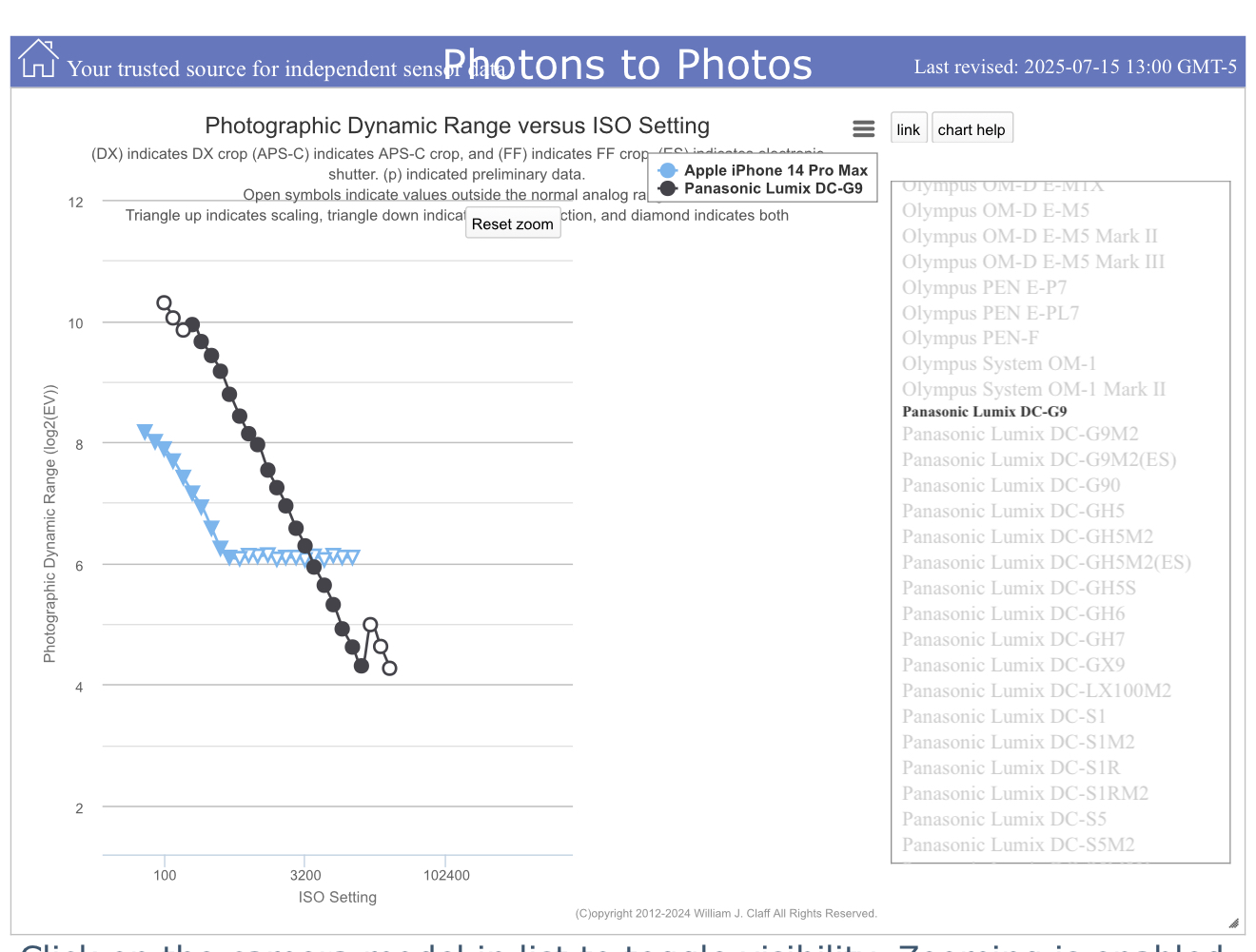
I assume the flattening of the dynamic range curve is computational.
Best wishes to you.
2 Likes
I highly suspect you’re not getting the LinearRaw image Apple was intending you to get from the DNG this way, but some processed (first?) preview instead…
2 Likes
Thank you @kmilos
You may well be correct. I wish I knew of a way to better understand the content of these DNG’s.
I experimented with the free Adobe Lightroom app, which I would presume has full access. My earlier editing comments apply - hard to improve, possible to “interpret.”
exiftool -a -u -s -G1 foo.dng
2 Likes
My Pixel 8 works just fine…surprised that the 6a has an issue if anything the 8 should have a more modern version of DNG…
DP review is a good idea.
If I knew exactly what I wanted to do with the files, I would be more advanced for sure…I have some kind of idea that I would take it on family holidays and take raw files of interesting scenes (landscapes, street….) that I might come across… that is where darktable comes in. On Mac, getting them from the phone to the hard drive is a doddle.
For many years, I have taken all my photos with a “real” camera but I struggle in my organisation to share them with friends and family, the delay can be several weeks before I develop them. Also the jpgs are quite larger than iPhone jpgs and api am reluctant to fill up my phone storage but maybe I could export to a lesser quality and get organised.
From your feedback, proraw is better quality than the standard heic or jpg but not really worth while editing outside of mobile apps.
The adobe indigo project sounds promising.
IIRC, there were some bad color issues due to the embedded profile around that time, but no problems ever actually decoding the Google DNGs…