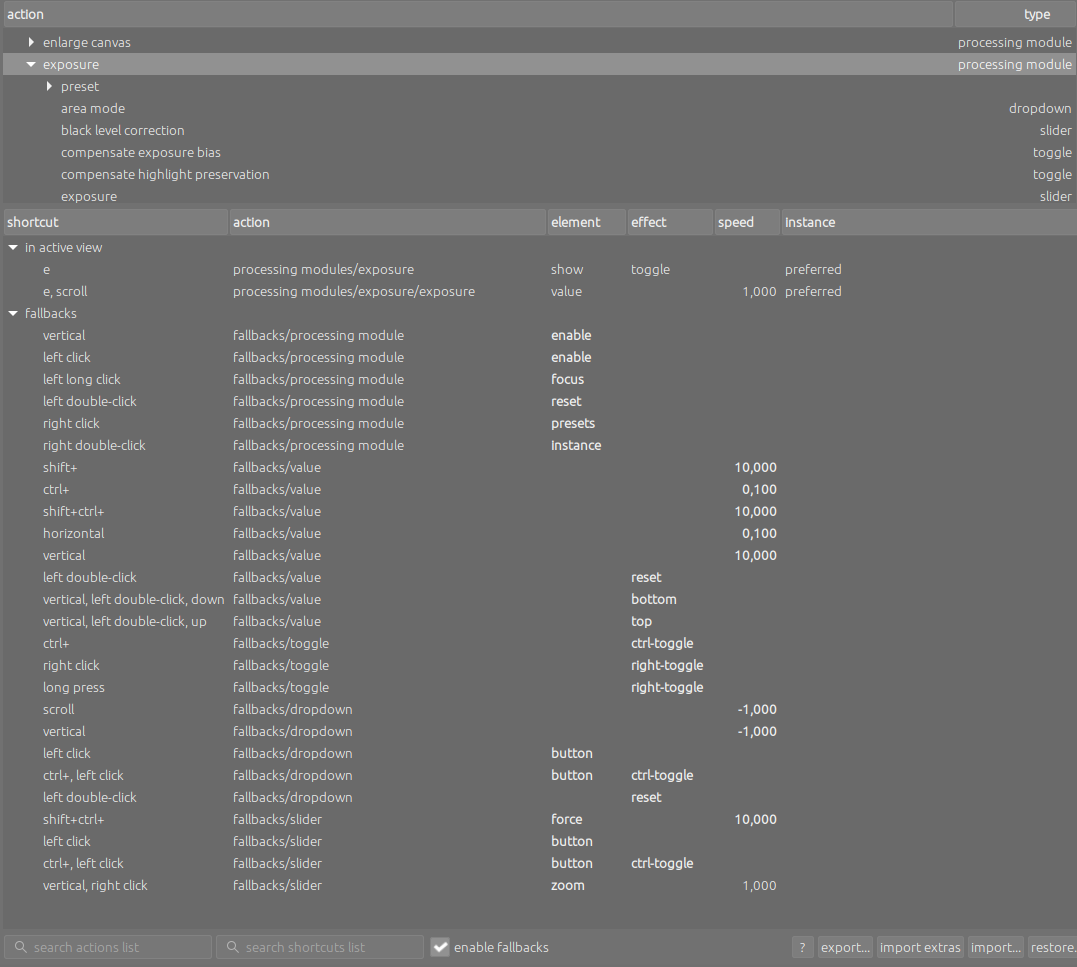
it seems like I just don’t quite understand the handling of fallbacks for shortcuts. Since I have checked enable fallbacks in the shortcut preferences, I thought I had laid the necessary foundation for having a lot of fun with them. Instead, I had to realize that things are apparently more complex.
Example: I have set key E to toggle the exposure module and E+scroll to increase/decrease the exposure slider with the mouse wheel. Both settings work as expected. With fallback enabled, I would expect that eg. pressing E+leftclick enables/disables the module, e+rightclick shows the presets menu etc. But both examples won’t trigger anything, same goes with all other fallbacks. Consequently I’m receiving according messages like e, leftclick not assigned.
As far as I’ve understood, the idea of fallbacks is precisely not having to set them explicitly for each shortcut, but to have them prepared automatically by default, if you only enable them. Anyway, for test purposes I added these lines to shortcutsrc (while darktable was closed):
When I started darktable again, still none of them worked. Even more weirdly, the lines were gone from shortcutsrc after closing darktable, so it looks as if darktable didn’t like them and thus deleted them for me.
As I’m fascinated by darktable’s shortcut concept in general, the fallbacks topic seems to be a bit too much for my understanding. So I would be really grateful for any advice on how to handle them properly
Thanks @Masterpiga – I’ve read this thread already before posting mine, but the crucial part either doesn’t seem to work for me or I’m just doing something wrong:
If you have a shortcut set up for a slider (or module), you can also set up a separate shortcut to reset it to default value(s). @mino above has done this. Or for color picker buttons associated with the slider.
Fallbacks does this automatically.
Fallbacks obviously doesn’t do anything automatically. How exactly could I set the five described example fallbacks for key E, that I had expected to be set automatically?
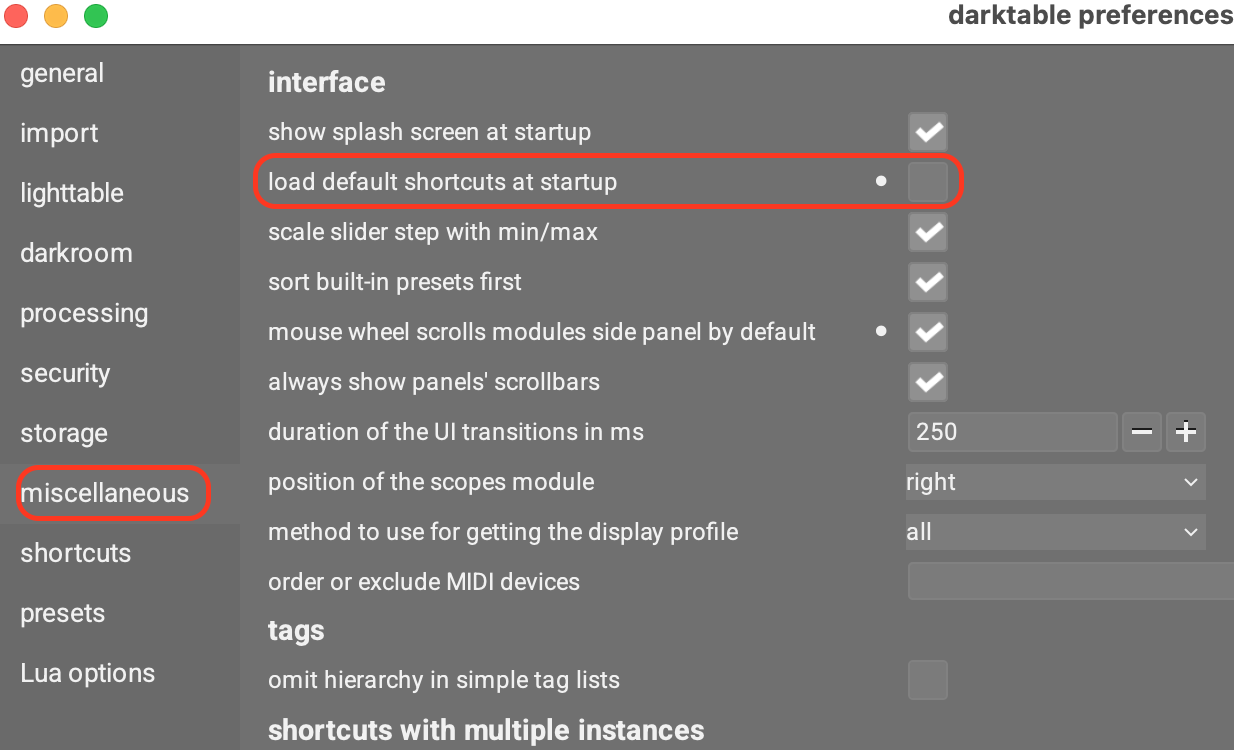
Ah, sorry, I had skipped over this bit. Have you tried disabling this option (which for some reason is not under shortcuts, and for even more obscure reasons is on by default)?
Also, I have taken a stab at rewriting the shortcuts page (which has been under review for a while due to the upcoming release taking all available reviewer cycles).
The changes in the fallbacks section are not huge, but maybe they could help you anyways. Worth a try:
EDIT: Updated the link, the previous one was pointing at the master branch, not the one with my edits.
I.e., they are not tied to a specific shortcut (e, in your case). The None In the fallback shortcut definition, at runtime will be replaced with whatever is the shortcut that you have set for each specific module/slider etc.
Now, if I set e to activate, say, exposure, I can use e + right click to directly access the presets of exposure, e + double click to reset the module, etc.
But there is no e in the fallbacks shortcut, because they apply to anything, hence the None in the shortcut definition.
Yes, I have already set ‘load default shortcuts at startup’ to false. And your stab confirms essentially what I thought to have understood (though I didn’t compare it to the original). Im my humble optinion I made more or less exactly what each explanation so far has been telling me, just the result differs significantly.
You caught me Seriously: The mentioned test lines still were in shortcutsrc. I deleted them, but that didn’t change anything, the bevaviour is the same. Here a refreshed screenshot:
@ralf_s could you try running with --configdir=/tmp (so that you have all the defaults), then follow the three steps in the post above and see if it works? I suspect that your config/shortcuts are messed up for some reason, as it should just work…
If that does not work, we will have to wait for @dterrahe’s wisdom
You stumbled on a bug/incomplete feature. For your understanding it might help to first assign just a single shortcut to a key. For example 9 to the agx module. Make sure nothing is assigned to 9+something.
Now you should be able to expand/collapse the agx module by single press of 9, but also enable/disable by clicking while holding the 9 pressed. And opening the multi-instance module by double-right clicking or scrolling through the presets by single right clicking and moving the mouse left or right.
The problems start when you assign specific other meanings to some of the combinations. Then the fallback mechanism sometimes can’t figure out from which explicit shortcut it should start. The e is a particularly inconvenient example, because it already has ctrl+e assigned to export. So if you assign it to the export slider, then a single press will correctly open the slider popup. e+scroll will correctly change the value. e+scroll+shift will make bigger changes. But e+scroll+ctrl doesn’t work for smaller changes because now it thinks you meant “export + scroll”.
The example you are trying to get to work is maybe clearer, but the fallback execution mechanism just isn’t smart enough. Sorry. Maybe I’ll spend more time someday to get it to work perfectly. The combinations that can occur are complex and therefore the code is quite finicky, so it is very easy to fix one thing and break another. If it doesn’t get tested properly, I usually only find out by accident myself later on and keep going back and forth. Since nobody else really understands what it is meant to do anyway, nobody tests and feedback (like this) only arrives years later. We’ll see.
But I still don’t understand @dterrahe. Why wouldn’t e + right click work for @ralf_s to show the presets for whatever module e is assigned to, if e + right click is not explicitly assigned to anything? I have e assigned to exposure and e + right click shows the exposure presets.
He also has e+scroll assigned. Somehow this is found first when the algorithm is looking for right-click and apparently it then gives up. That clearly should not happen.
@dterrahe Thanks for your detailed explanation. I followed your suggestion, deleted e+scroll and bingo, everything works as expected now! The sad thing is that I have to chose whether to stay with the fallbacks or setting up my own stuff. But at least I can stop doubting my sanity
Beside that, there is no conflict with other mappings or combinations of e, as I usually delete most of the default shortcuts in any app. As I work with many graphical tools, I prefer to have more or less the same shortcuts for similar functions in all of them.
I’ve tried to set up shortcuts and fallbacks lately. Generally I am positive about them. But, there is a but…
On the fallbacks I either lack insight / understanding or maybe they just fall short to my wishes. So lets check which of the two it is…
My understanding so far is that I have to apply a shortcut to each element (widget in the manual) of the user-interface I want to address (with or without fallbacks). Being it a view, a module or a slider. And when having applied a shortcut, fallbacks applicable to that element take effect.
At the module level this works quite well. But this also means that - at least in my understanding - a shortcut will be needed for each and every slider I use regularly. Is my understanding right?
In a simple module like exposure a ‘ee’ or e_left-click’, ‘eee’, e_double-left-click’ may still work. But how to reach something both usable & memorable, for say a dozen modules, some quite complicated like AgX and color balance rgb, is still beyond my understanding. And any sound advice will be welcome.
If the above holds it means I will have to evaluate my developing habits and identify each often used widget (slider, masking-channel-slider, whatsoever) and apply a shortcut to it. Make a list of them and start to remember them (help!:-)).
It would be nice to set free shortcuts used inside a module from the elsewhere used shortcuts. I mean that the letter ‘c’ applied to open the crop module can as well be applied to contrast in AgX and in color balance rgb. The ‘local’ shortcuts only apply when a module is open and has focus. This would offer a lot more usability as I would simply use the first, second or third letter of a slider as a shortcut (not having to bother about overall defined shortcuts). It might also open up a standard set of shortcuts applicable to masking - being the same in each and every module. Which I think would be very nice. And for my feeble mind it would be nice to have something like this exposure (where the x is the shortcut). I do know the mouse-tips show this very well but I find them rather intrusive and slow when working in darktable.
Long story short - I do hope for some good advice showing me more possibilities then I see are there. Anyhow I will start using shortcuts systematically.
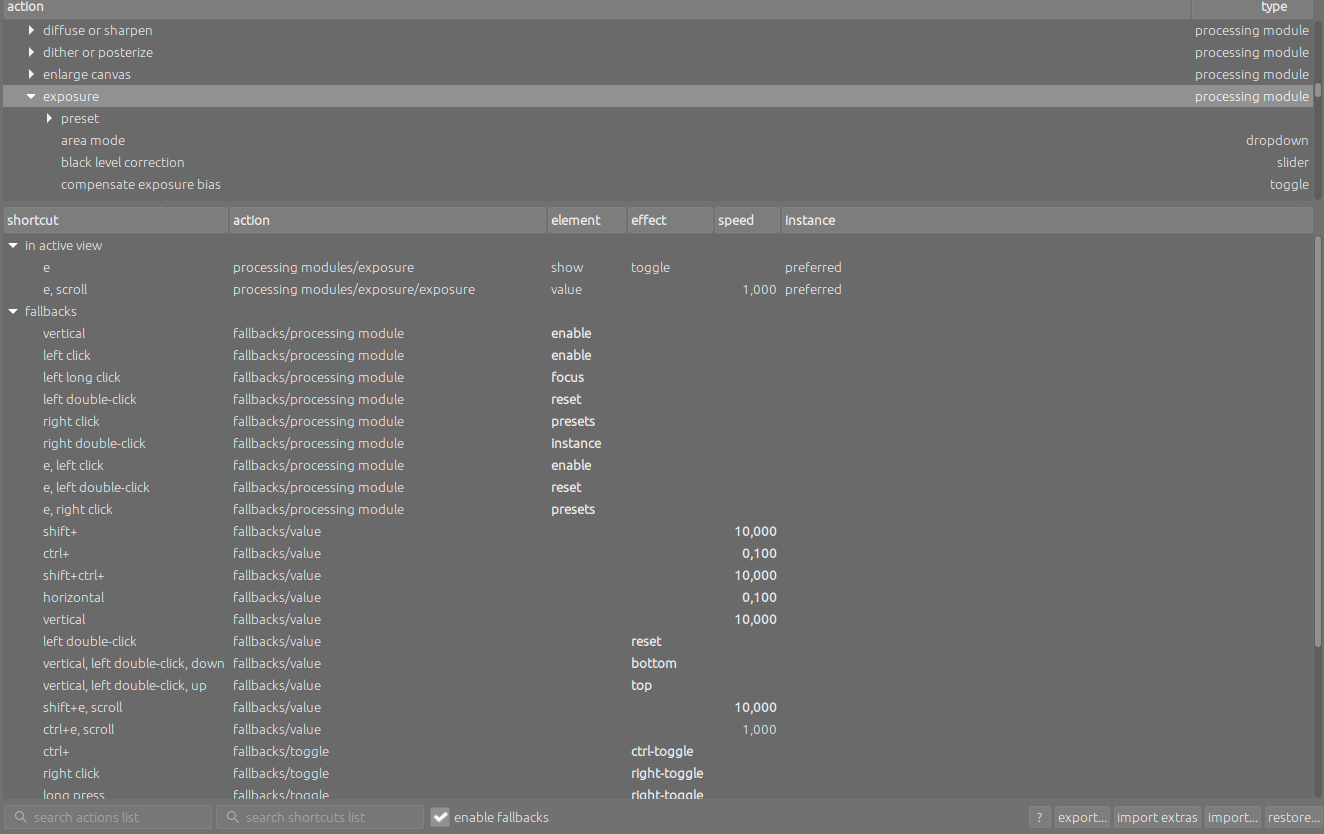

 Seriously: The mentioned test lines still were in shortcutsrc. I deleted them, but that didn’t change anything, the bevaviour is the same. Here a refreshed screenshot: