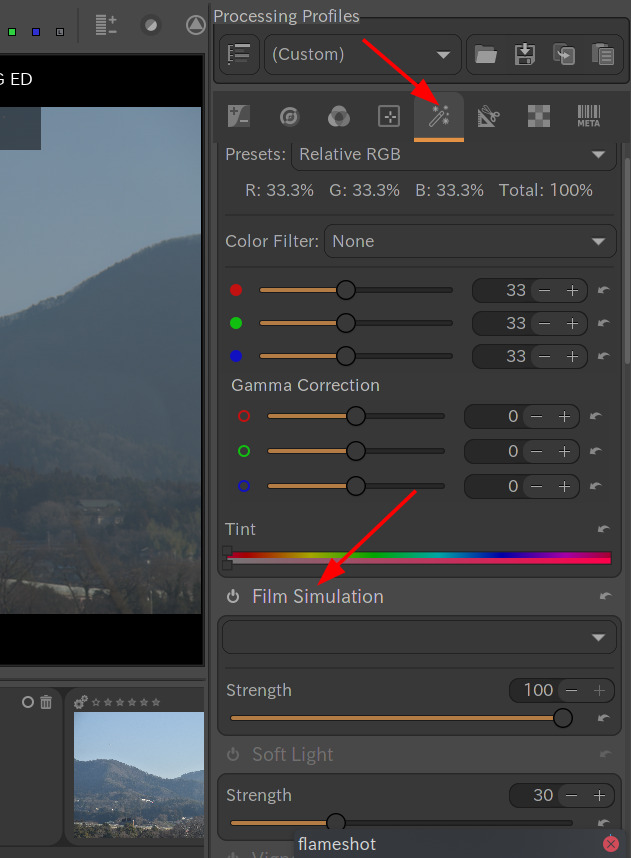
I’ve given up waiting on an update for RawTherapee as the last version, 5.12, couldn’t really recognize my Fujifilm X-E5’s raw files such that the colors rendered very differently by the software as in miles apart. I’m taking my chances on Another Raw Therapee (ART) as its latest update was released approximately two weeks ago which may fix X-E5 RAW color rendering compatibility issues. I couldn’t see the “Film Simulation” tab though as easy as the one found in RawTherapee. It’s either I’m just the one lost in translation over its user interface or there isn’t any film simulation tab found in Another Raw Therapee. Maybe anyone on this forum could provide a helping hand.
The ART version is v.14.8 and I’m using MacOS 12.5.
Much appreciated. But I have another issue—the ART software could not recognize my external drive containing those picture files (RAW + JPG). It recognizes the external disk volume but not its content. Yet the FINDER app is able to read the contents. Yes, I checked all the file extensions necessary under the ART preferences. Hoping for your wisdom for a resolution on this matter. Thank you, @yasuo .
In Linux, if user mounts external storage before using ART, ART can recognise the external storage. Unfortunately I can’t try it on Mac now. Other Mac users may help you.