I don’t know if this has been raised as a subject before (I couldn’t find any similar direct question) or if people have any interest in sharing how they manage their libraries and why. I’ve always just copied and imported and ended up with a set of uncategorised collections in order of creation, rather than setting up categorised folders on a hard drive first and using add to library. I guess also there’s also other open source DAMs like Digikam, which I haven’t investigated much. Wondering whether to do something a bit more “sophisticated.”
I am a hobbyist, and most pics are family. I organize mine chronologically with folders Decade > Year > Month
I also volunteer for a local organization and take pics of their events (3 or so a year) . Those are in a folder Organization Name > YEAR Event Name
1 Like
Assuming your library is RAW and xmp files, do you just export jpgs from DT or other software when needed?
I import raw files from SD cards into folders sorted Year/yyyymmdd-event in which yyyymmdd us the (start) date of the event. An event could be a single day (e.g. walk, party) or couple of weeks like a holiday or general pictures taken that month.
I do culling and development using Darktable and then export as needed: low-res for posting on web, 4K for sharing with family thru Google photos and full res if I want to make prints.
Specials like photos for panorama’s are in their own folder in the event folder.
1 Like
I guess there are advantages in maintaining your own set of folders on a hard drive sorted how you want and then just add to the Darktable library rather than just copying and importing as I do, even though it takes a little more work.
I have a single level of image folders:
C:\data\images\yyyymmdd_Subject-Description
I keep a subset of these on my local hard drive but periodically move them to a matching structure on my NAS to minimize storage requirements locally.
I can do that because I use ART.  For general browsing and viewing I use XnView MP.
They’re sorted by date since that’s about the only consistent attribute between them. Since there’s a clue to the content in the name, finding specific images isn’t a problem.
After I process, a sub-folder under each contains the final exports.
I also have C:\data\images\_stage where initial culling takes place before creating the final custom folder. I make sure to leave all imported images in the stage folder at least overnight so they’re backed up before culling. That way I have all images backed up but only working and keepers on active storage.
So far that’s worked well for me.
1 Like
I use yyyy/yyyy-mm for photos that don’t belong to any particular event, and yyyy/yyyy-mm-dd - event for those that do. The files themselves are named yyyy-mm-ddThh-mm-ss_filenumber.ext
1 Like
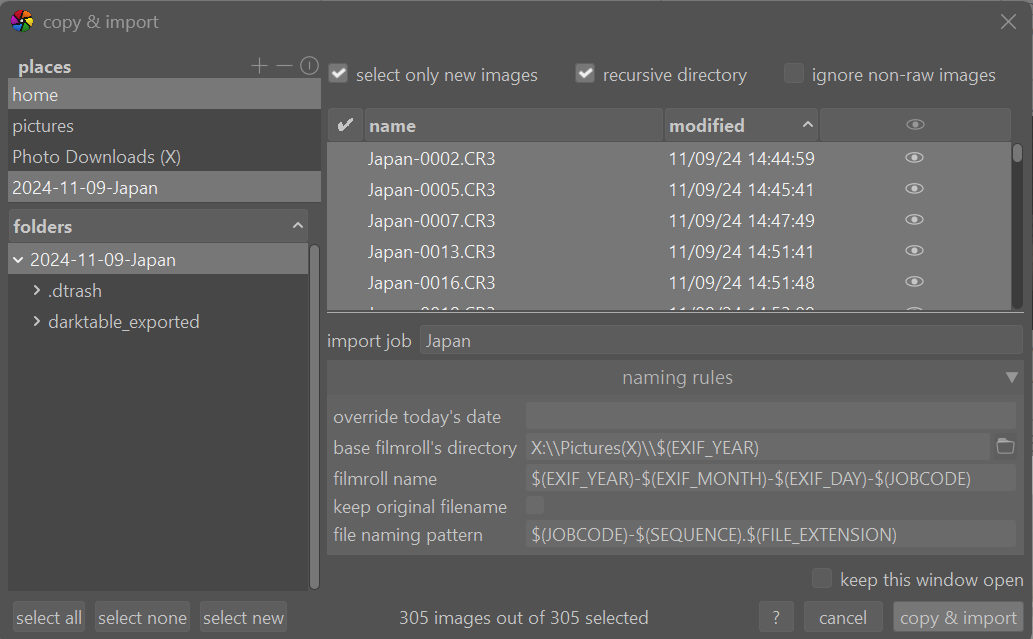
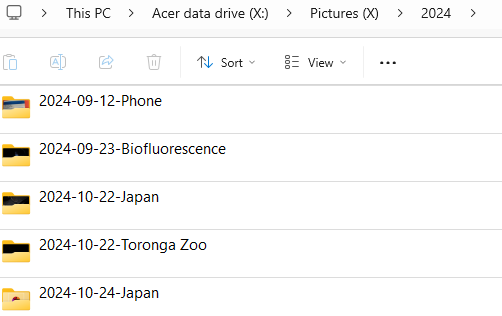
I find DT great at copying and importing images into an organised file system. In my case I have my second drive on my laptop named X and store pictures in here in a folder called Pictures(X) and have DT sort images based on capture date in various years. Then within each year I have a folder for each day I captured something. But I use a job code to help identify location of shoot such as Japan in the screenshot below. This works well for me. In the second screen shot you can see how various jobcodes help identify the subject matter quickly. In the screenshot there are pictures captured on my phone, pictures of biofluorescence, pictures in Japan, Pictures in Toronga Zoo. Works well for me.
3 Likes
I wrote and use a small Python/Tkinter program that reads from SD cards and copies into a YYYY/MM/DD tree with subfolders for RAW and IMG (e.g., jpg) files, and then import the RAWs by reference into Darktable. After having had bad past experiences with catalog structures that aren’t clearly apparent at the file system level, I wanted to avoid storing my images in a manner that was specific to particular software.
1 Like
I use what a lot of people do: a folder structure like this photos/yyyy/yyyymmdd-. I copy the pictures myself from camera to disk and organise them (i.e. rename the camera folder) in something meaningfull to me and my wife. Guess that darktable will be able to do this perfectly as well. Just was to lazy so far to find it out.
And I started using keywords a lot. Describing location, people, animals, plants, colors, moods, situation, whatever comes to my mind. Keyword are organized in a hierarchy. Together with using stars and colorlabels I mostly am able to find a specific picture in minutes - among around 200.000 picture files.
When pictures are good enough and ready I export them as jpeg to a specific folder from where they are shown to my pc’s desktop pictureshow. I have separate folders for jpeg’s of photo’s of my wife’s work - which are placed on het smartphone and tablet - and will have separate folders for a website to be made. Given the right keywords placement in a specific folder is a breeze.
2 Likes
I use a slightly different approach where I categorize by location and then date: Location YYYY-MM-DD. I also use star ratings to track editing progress and tags to quickly locate subjects.
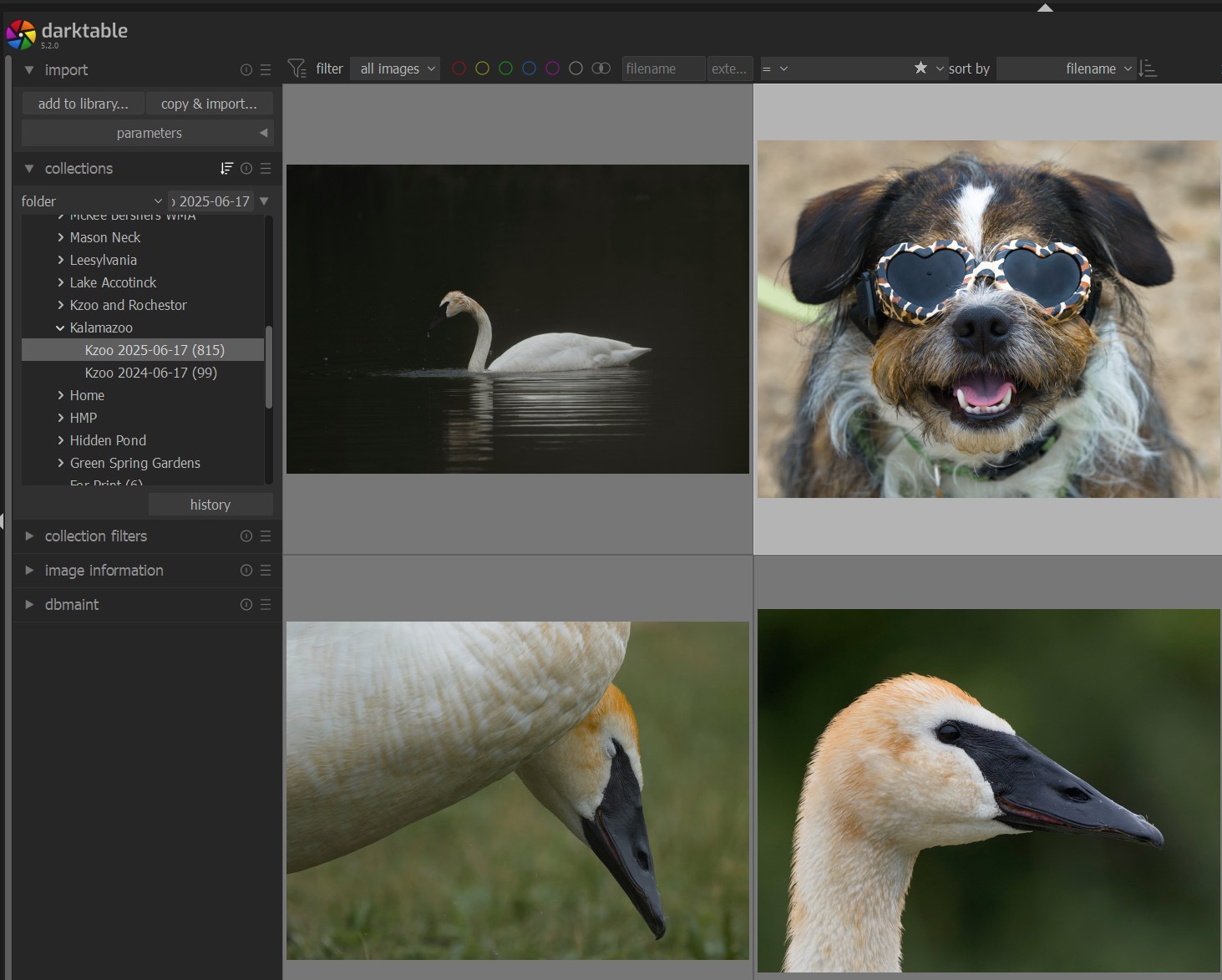
This screen shot shows photos from my recent trip to Michigan. The single star means that its a keeper and I haven’t finished the edits. Tagging might me something like bird/swan and pet/dog… painfully obvious but it works well for me.
2 Likes
Yes, this seemed like a reason to set up your own system
I import my raw files into a flat list of daily directories. This is not where I organize stuff. But I use ratings for culling and preselecting.
I export into event directories, and a catchall annual directory for event-less photos. These directories I manage and organize in DigiKam, including face tagging.
I back up the exported event-directories meticulously in multiple layers. They are one of my most sacred possessions. The RAWs are merely backed up locally.
I also do a weird thing: I don’t clear out memory cards, but instead label and collect the full ones in a little wooden box my daughter made for me. A box of memories. Thankfully, SD cards are cheap.
1 Like
Do you plug them in and read the card every once in a while? If you have some that are like… 5 plus years old, there might not be anything on those cards anymore.
2 Likes
My organization is very similar to @lphilpot 's (except it’s on Linux), and it works well for me.
I have a single level of image folders:
~/Pictures/yyyy-mm-dd_job-code_camera
Example:
~/Pictures/2025-05-05_haida-gwaii-spirit-lake-trail_X-T20
So I can locate photos by date, subject matter or camera. I use RPD to automatically load photos into this folder structure. File names contain a time stamp and the original file name from the SD card so if I ever need to reload a raw file from the SD card I can quickly find it (if I haven’t reformatted the SD card yet).
Outputs of edits are in subdirectories of these directories:
- dt
- art
- rt
- stacked
- hugin
- and so on
File names of exported edited images contain the export preset name.
I use Geeqie for culling and rating images for editing and I don’t use the darktable database, which allows me to treat all editors the same way.
The whole structure gets replicated to another computer and an external USB HDD. It might be time to spring for a NAS soon.
1 Like
I copy them into ‘~/pictures/yyyy/mm’, using format ‘yyyymmdd_hhmmss_nnn’, with subdirectories for hdr, focus stacking, special events, and a directory ‘smartphone’ with subdirectories ‘camera’ and ‘open camera’.
Edits are saved in ‘~/pictures/yyyy/mm/converted’.
Tagging and rating with digikam.
At the end of month the ‘month’ directory and the digikam dbs will be copied to two external hdds.
To handle all this copying, I wrote my own program with Lazarus/FreePascal, which gives me automation and flexibility I want in a nice GUI.
OK, I think it’s nice 
2 Likes
For importing RAWs I just import everything into Darktable into yyyy/yyyy-mm-dd folders. I don’t care to get too detailed in the file structure for RAW images.
For exporting, in theory I make judicious use of tags to annotate images with things like location, subject, or any other relevant details. A folder structure is never going to be how I always want to organize photos so I rely on meta data for viewing exactly what I want. For macro stuff I will often use generic tags on a whole import such as “macro” and “communitygarden”. Sometimes I will tag with more specific info like “ladybugs” or “bees”. I will often export photos and organize them into folders for specific events and whatnot.
In practice, I often forget to do all of that and then just export everything into one big folder that becomes a dumping ground which begins to cause me anxiety.
The new DT 5.2 multi-preset export is very helpful though. Now I will often export full size JPEGs to one folder and at the same time export 1080 JPEGs to another folder at the same time.
1 Like
My images are historically scattered all over my hard drive and I have no intention of relocating them.
So I use XnView to apply IPTC/XMP key-words to images as needed, and can find them via XnView irrespective of their location on the disk. XnView can include EXIF in searches, allowing me for example to search for “all oak trees shot with my Sigma SD9”.
1 Like
I use RawTherapee for processing, and XnView (free not FOSS). I manually copy images from my SD card to my hard drive. XnView can be configured to link raw and JPG so I can delete both with a single click.
1 Like
I too had many years of images from over 20 years spread across multiple storage devices including CDs and DVDs as well as hard drives. To combine these I found the best way to organise these was to get DT to copy and import images from all these devices onto a new large drive and organise based on date. I am not saying that you should or need to do this with your own collection but others might find this method helpful to consider.
2 Likes