I’m thinking of buying a tablet, mainly for use with DT. I’d be grateful for any comments on this. Particularly interested in my setup which is ubuntu 24.04 with plasma and X11 running the DT appimage. Also particularly interested in the new 2025 wacom intuos pro tablets. I understand support for these is not yet in the ubuntu kernel so you have to build your own kernel or us OpenTabletDriver.
Also interested in any experience with the Huion and XP-Pen tablets.
Rightly or not I see the main use for me would be painting masks for saturation, exposure, local contrast etc, so it seems to me a nice feel for pen pressure would be important, and this would be mapped to opacity.
This question about a ‘pressure sensitivity’ option came up a month ago as well. Pen tablet pressure sensitive
I do like to use my drawing tablet for Darktable regardless, it reduces strain from tweaking sliders with the mouse.
Except I can’t use the mousewheel (can’t even map the tablet macro keys to wheel up or down), so I have to switch to mouse just to change the area of influence size in things like Denoise or Contrast Equaliser.
I had similar thoughts and bought a wacom for the same purpose a few years ago. However, lack of a mouse wheel and inaccuracy of double-click (too much movement between clicks meant that it was more likely to register as two single-clicks) put an end to that pretty quickly.
Haven’t tried it for a while (I think my tablet is in a box somewhere), but with proper use of mask refinement (feathering etc.) I soon realised that I didn’t really need accurately-drawn masks any more. A rough outline plus refinement is usually more than enough.
I use darktable on a Surface tablet. It does work, but the interface mostly doesn’t recognize touch events, and doesn’t work well with the pen, either. So I just use it in laptop mode, with mouse and keyboard.
To me it looked like the ability to use pressure sensitivity was removed from Darktable because the manual refers to options about pen sensitivity that are no longer there. Maybe the code was unstable?
Anyway, I already tried the Huion Kamvas 16 Gen 3 and while you can draw masks, without the pen sensitivity it’s not really that helpful to be honest.
@elstoc , yes I see the risk, maybe mine could end up in a box too. However I’m not coming at this from a mask accuracy angle, rather being able to build up an effect gradually by painting.
Scrolling - I’m thinking of using the tablet with one hand and a mouse with scroll wheel in the other.
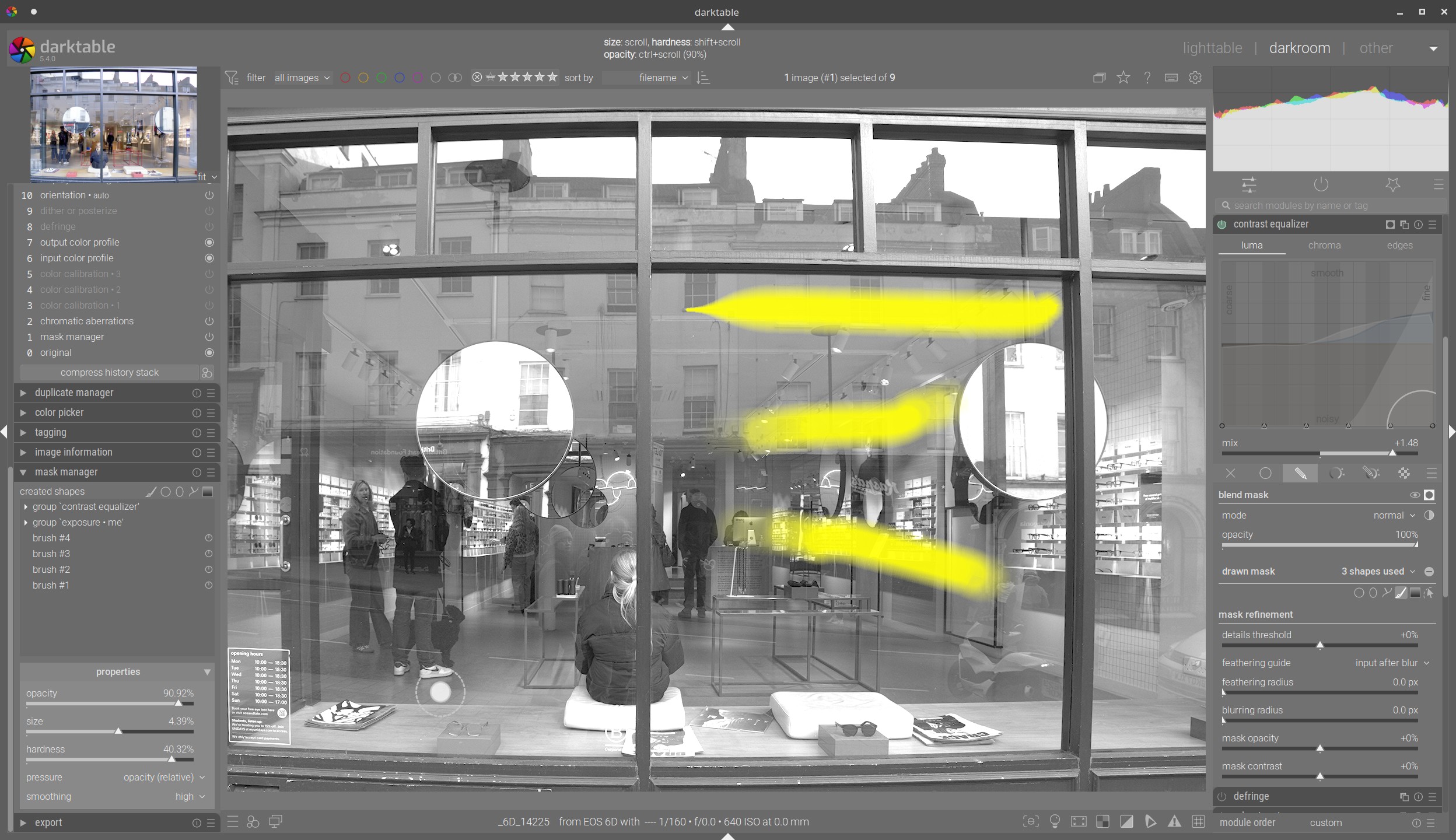
@JasonTheBirder , actually pressure control is still there in 5.4! It’s been removed from prefs and put in the mask manager. See below. Open up a drawn mask in some module, select the brush (for example), and under Properties. bottom left, you can assign pressure. It’s definitely working on my very old wacom.
I was planning something similar, but I find that a mask with lots of vector brush strokes gets a bit messy to manage and quite computationally expensive IIRC. What would be great would be the ability to paint a raster mask on the image and use brush strokes to add/remove opacity from it, but I fear this has been suggested before and found to be impractical to implement in the current pipeline.