Just curious among fellow photographers, how much you care for the clipping indicators and trying to reduce them if they appear to show clipping? i seem to be regularly editing images, that i am happy with, and look fine to my eyes, but show clipping in one of the channels, but it doesnt look like say a big block of Red, even though it indicates its blown, theres still the other channels in there that havent clipped, Green and blue. S am i right to generally not be too fussed about them showing?
I don’t use them at all. If the colors look ok I trust them to be ok. The only clipping indicator I use is the raw clipping indicator (SHIFT-O).
4 Likes
Not very often!
1 Like
Same here.
1 Like
For me, the clipping tool, when set to anything but luminance only, is almost never relevant. In “luminance only” mode it gets used frequently.
Not very often, except for photos with a a lot of white area’s like snow or with big white birds (swan’s etc)
1 Like
Never. Only lightness clipping for me.
1 Like
Shortly after being introduced to scene-referred workflow with Filmic RGB (circa late 2021), I was always trying to minimize gamut clipping in Darktable. As a result, my photos mostly looked pretty dull, so as time went by, I used it less and less. Nowadays I check it if I’m pushing the colors and adjust sliders only if there is A LOT of clipping.
I tend to check luminance clipping mainly to get my blacks somewhat right, but other than that, I just go by looks – I don’t want it to feel like a job where you’re forced to meet some criteria.
1 Like
It’s a warning, not an error. If the image is tricky, I may use them to highlight areas of concern, but only so I don’t miss things when I’m working quickly. If it looks good, it is good, they just help me know where to look.
1 Like
I never use the color clipping indicators. I simply use my eyes and how it looks on the screen. I do however, use the RAW clipping indicators to see if I have any data for DT to work with in the highlights. If I have blown out my highlights in the raw data then I would prefer to use a darker exposure. I bracket all the time so I normally have one that is dark enough.
3 Likes
Both in camera and in Darktable, I use my eyes. I often blow out things intentionally, so clipping is expected.
2 Likes
Clipping indicators? 
When I started out using RT I had no idea what I was doing (I still have very little TBH) but my processing was fun and I got results. Then I started using the gamut, highlight, shadow clipping indicators… but found that I seemed to lose the reason I was processing from my workflow; that is to try and make great images look nice. I think I became too focused on trying to hard.
So now I just use highlight clipping for general understanding to see if there are areas I can bring out some detail; similar to some posts above I guess.
Now, in RawTherapee 5.12 I set, under the Exposure tab and Highlight Reconstruction, the Colour Propagation module; from here the slider for Highlight Compression is powerful and can bring out some good detail if there are some clipped highlights in areas of importance.
Otherwise… no, not anymore.
Bonne chance!
1 Like
OK, discordant voice here. I’m a newbie, so I guess this is the reason why I check them constantly. In fact, I generally set the exposure so that there are virtually no clipped pixels at all, except for raw exposure which I sometimes accept if it comes from the sun or very bright sources of light.
True that, when I later use other modules and AgX in particular, I’m more flexible with clipped and out of gamut pixels, as long as they do not stand out too much in the final result, or when I do want a deep shadow in a very contrasted picture.
1 Like
…and of course when I want to recover the clouds in a blown out sky.
As I’m planning on using my images for laser engraving, would I be correct in thinking that these clipping indicators might be very useful for detecting flat patches and increasing the number of tones in an area that has been crushed to white or black.
Laser engraved images can suffer from the low end and top end of the power scale being under or over engraved and on top of that the material eg wood or slate will always have its own limited tonality.
So, the sunlit leading edge of a subject or object may have a length or area of highlight that is passable in a photograph because there is a lot of other colour to draw the attention, or poorly lit areas containing necessary detail that gets crushed.
I bought the full frame nikon specifically to capture as much detail and tonality as possible and shoot Raw (learn to) so I can enhance these areas that were under/over exposed at the time of taking the shot.
I know I cant find detail that isnt there but some situations may be recoverable.
I’m now using RawTherapee instead of Darktable as I found it more intuitive. Can anyone offer some examples of workflow/tools to tackle the lifting/stretching of tones.
Is the clipping indicator the best aproach to identify such area’s.
1 Like
I never look at them.
raw clipping - yes, if the highlights might be blown
luminance clipping - pretty well always
saturation/any rgb channel/full gamut clipping - very rarely, except on highly saturated images - led’s, flowers, some clothing, etc… in that case i don’t try to remove clipping completely, just the worst part of it, so gradients aren’t botched. best viewed at 100% zoom for this. can toggle the soft proof indicator to see how bad the damage is.
1 Like
I use my personal clipping indicators. I have two of them placed right in my face. I don’t need more. 
2 Likes
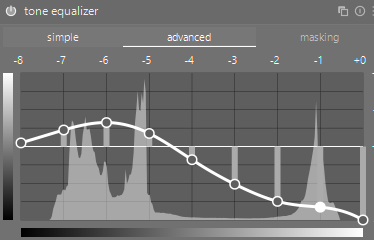
As I have already said I only use the RAW clipping indicators, but I am finding that the tone equalizer module is marvelous at recovering blown highlights and putting details back in where they seem lost. Of course the module is working in synergy with other modules to achieve but I am so impressed.
I adjust the placement of the histogram and pull down the right nodes to recover highlights, but I am careful not to turn true whites into a gluggy grey.