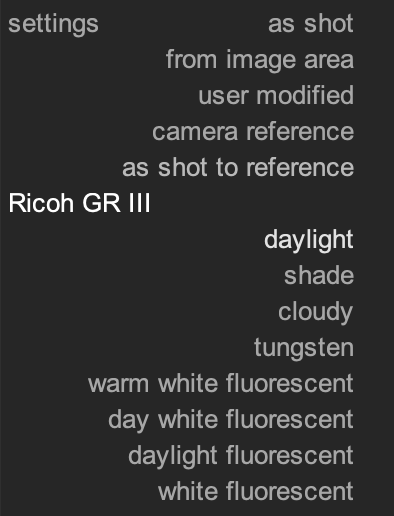
For all your new (untouched) imports: One way to do it is preferences–>processing–>“auto-apply pixel workflow defaults” : NONE
Then, WB will always be set to “as shot”.
You will need to manually apply any tone-mapper (AgX, Sigmoid, or Filmic) you wish to use. And you may (i dont remember) need to add some exposure to get things back to the kind of default state you are used too.
This will not activate the Color Calibration module at all, which is fine if you are used to setting it as “same as pipeline” afaik…if that is incorrect someone will be sure to fix my error.
Or, at least, that is how you can do it in dt 5.4.1. I don’t think any of that changed in the 5.6.x releases.
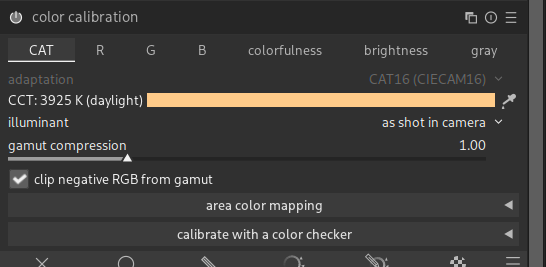
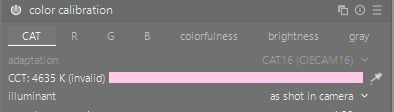
Why dont you just use the “as shot in camera” illuminant in color calibration? It is identical to what the “as shot” white balance setting is and youre not missing out on any default scene refered settings.
Anyway, this is an issue I reported in a bug recently - the settings in wb/cc modules are camera relative, different values between different models, but darktable saves the exact values - WB and Color Calibration presets save camera-specific values · Issue #22122 · darktable-org/darktable · GitHub - which means saved presets and saved styles dont work between different camera models, and re-reading your post - also between different camera white balance settings.
For whatever reason I had it in my head that Color Cal set to “as shot in camera” was not isomorphic to pipeline D50 (or off). But I do not remember the why. It might be incorrect, and your way is (indeed) better!
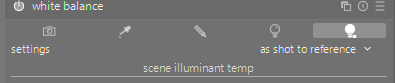
For DT 5.6 the white balance module will need to be set to as shot to reference. The color calibration module should be set to as shot in camera. Alternatively turn off color calibration and set white balance to as shot in the camera.
yes, I tried this combination: wb - as shot to ref, color cal - as shot
It gives the picture a little brighter, maybe it’s even better,
compared to combination: wb - as shot, color cal - D50
Do you remember how it worked in older versions?
“As Shot” is the same value recorded by the camera, and not applied during processing.
And for the other option, this is “User Modified”.
yes, I tried this combination: wb - as shot to ref, color cal - as shot
It gives the picture a little brighter, maybe it’s even better,
compared to combination: wb - as shot, color cal - D50
I do not remember, I “jumped the ship” and switched from Adobe produts just a couple weeks ago.
I would think that it must have worked differently in different version, just because this really feels unintuitive and broken, but I just might have been used to how CameraRaw/Lightroom works its presets and color temperatures, so…
That combination makes little sense, I think. With white balance set to as shot, the input color profile module does not switch to reference multipliers, and with D50, color calibration is not doing CAT. You still get the gamut compression, but that’s it.
I have an auto-applied preset that sets color calibration to as shot in camera, and leave white balance at its default as shot to reference.
Its funny that this works as a preset - I mean, switching the illuminant to “as shot in camera” and saving that - if you apply it on a photo shot on a different camera, or on a different picture with different camera white balance, it changes the value to reflect that, but if I save a “D (daylight)” illuminant setting as a preset, and then switch to a photo from a different camera, it now applies the Kelvin value, not the “D (daylight)” setting, therefore a wrong value (which is what I reported in the bug). I really do not understand how this works
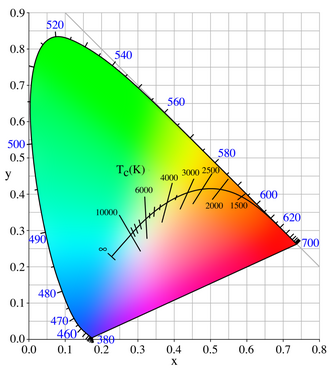
“Daylight” corresponds to a curve in colour space, hence specifications like D50 (5000K) and D65. So storing just the “daylight” isn’t enough (not a unique value), you need the temperature. The same as with the “blackbody” illuminant (compare e.g. steel at room temperature, red hot and white hot: all three give “blackbody” light, but the colors are quite different).
If I choose “D (daylight)” and save that as a preset/style, I expect it to calculate the value/temperature when I load the preset/style on a different photo from a different camera, as it would happen if I selected the illuminant option manually.
Doesnt this also contradict the “as shot in camera” illuminant preset/style setting? That saves the option, not the exact value/temperature.
I think there’s confusion between the built-in “daylight” white balance setting in-camera and what the color calibration module offers. Unlike in LR and similar software, the color calibration module does not come with the built-in WB presets from the camera. Instead, it offers its own, independent options.
When you select “D (daylight)” you’re switching the controls to the slider that goes from 3000K to 7000K following a specific curve - the daylight-calibrated curve, as opposed to the scientific Planckian curve:
However this would be using the legacy white balance approach in dt and I think there are ongoing efforts to streamline the white balance selection and it’s likely this approach will get depreciated.
I understand that the CC/illuminant options dont reflect the exact in-camera values, but they are pre-computed and profiled for individual cameras, so I would have guessed that the initial value thats set when choosing let say the “D (daylight)” is “close enough” to what in-camera daylight would be (also since it is the same between shots from the same camera).
I am gonna sound ignorant, but - none of this explains the style/preset behavior and is still in a way unnecessary info when we are talking about presets/styles saved with a cc/wb settings, they act broken if you save them on one shot with one camera and then apply it on another one (except the as shot in camera, that one does work, which, well… yeah)
For the color calibration module, they are not precalculated per camera. Only the values in the white balance module are, which is one reason that module is still in use.
In color calibration, “blackbody” describe a type of radiation : that issued by a black body, at a given temperature (that’s why you always have to specify a temperature when you select the “blackbody” illuminant). “Daylight” is more or less derived from black body radiation, and has the same need for a temperature specification.
No, they are not broken: you create a style to freeze the settings. That’s exactly what happens.
If you want a style that uses the camera white balance settings, do not include the white balance and color calibration modules: they are automatically included anyway, and the defaults do what you want… (see the manual)
CIE standard illuminant: Choose from one of the CIE standard illuminants (daylight, incandescent, fluorescent, equi-energy, or black body), or a non-standard “LED light” illuminant. These values are all pre-computed – as long as your camera sensor is properly profiled, you can just use them as-is.
I often times shoot multiple cameras and want identical starting settings (as in the example the camera specific “D (daylight)” value, not the exact Kelvin temperature, because they differ between the cameras) to be applied from one style, and, well, these two modules fight me every step of the way. Anyway, thanks for the comments, I will go through this again, though I guess I have a different concept of how this should work.