I am keen to try the new AGX module being developed by @kofa using the builds made by @priort. I have downloaded the file but before I install it I would like advice on doing a dual install of darktable on windows 11. My laptop has two drives. Drive C has DT 5.3 installed. I would like to install the AGX version on my second drive (X) and preserve the DB etc that is on my C drive. Any advice would be appreciated. I could also install the agx version of DT on an external drive if that works. Thanks in advance.
You can install the AgX version anywhere you like, I have mine at
C:\Program Files\darktable-AGX
You can run the following commands in Windows terminal to run the AgX version:
cd 'C:\Program Files\darktable-AGX\bin\'
.\darktable.exe --configdir "$env:APPDATA\darktable-test"
Of course you can change the directory and configdir however you like.
You can also create a shortcut from the exe file with the following properties:
Target:
"C:\Program Files\darktable-AGX\bin\darktable.exe" --configdir "%APPDATA%\darktable-test"
Start In:
"C:\Program Files\darktable-AGX\bin"
Thanks to others in the main AgX topic for helping me with it, but it’s buried somewhere deep in there now.
1 Like
IIRC @priort did a nice writeup on doing this.
I wrote it up a few times… heading to bed so here is a quick stream…
Basically I just install the second version in its own directory…
Then create a folder to use for the config files…
Take your current windows shortcut and copy it…then just go into the command line and adjust the paths for that new installation folder…if you just add like _AGX then that is all you will need to do there wrt editing the path name…and then just add --configdir “use the path to a new folder for config files”
So install in a unique dir and then make one more folder some where that you can use for config files and use the command line to point to it…
When ever you update the second version ie the agx one never say yes to uninstall just install over the top. The uninstall would hit your main instance of DT. And be sure that you select the second directory if you update the AGX one because if you just keep hitting yes it will use defaults.
I would turn off sidecars in the agx version to avoid mistakes and keep your test images separate…that should be all you need to do…
I do a bit extra but its not needed…
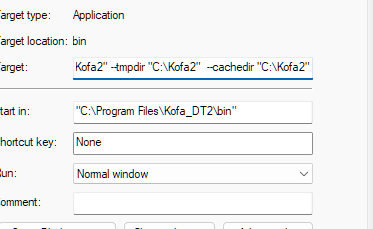
“C:\Program Files\Kofa_DT2\bin\darktable.exe” --configdir “C:\Kofa2” --tmpdir “C:\Kofa2” --cachedir “C:\Kofa2”
“C:\Program Files\Kofa_DT2\bin”
1 Like