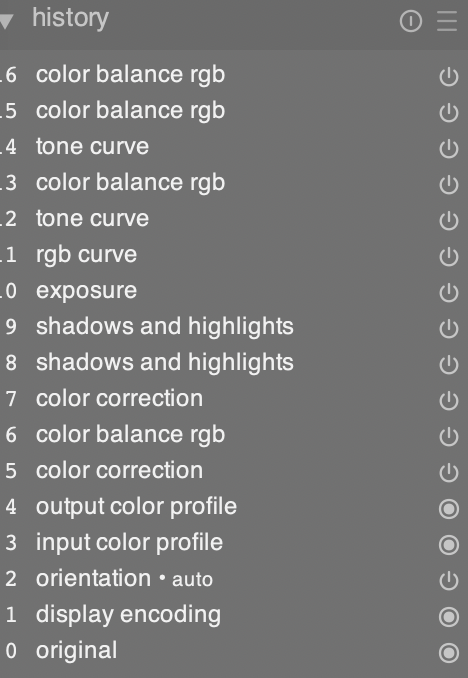
Hello everyone, I’m new to Darktable and not familiar with their logic on each editing step. As seen in the following history module, steps with same control are changed based on the previous changes. Is there any way to add a totally new control without any affects from history steps?
1 Like
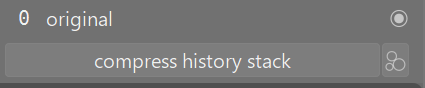
Compress the history stack and most of the duplicate entries disappear.
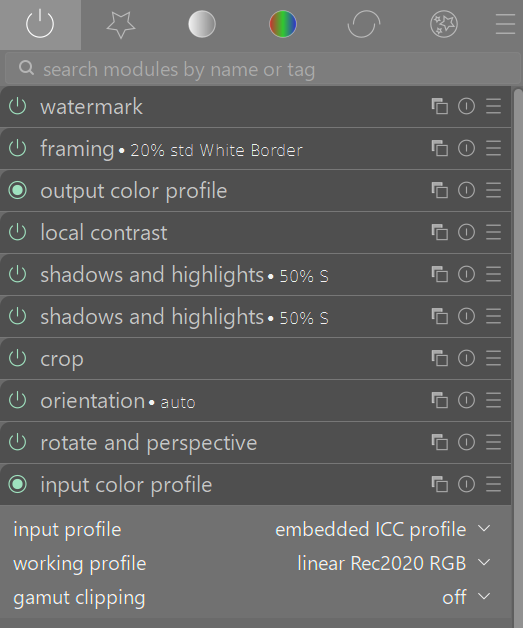
More relevant is the actual pixel pipeline that shows what steps are applied from bottom to top.
2 Likes
Welcome to the forum, @Kam!
The history view can be a bit confusing at first, but when you understand it it’s actually a pretty powerful tool.
The items in the list do not represent individual modules. They represent the order in which you interacted with the modules. If you use module A, then B, then A again, the history will show [A, B, A], but only two module instances are involved.
As @Terry suggested above, if you compress the history you will see only two entries there, one for each edited module.
Also, as @Terry already pointed out the order in which you see modules listed in the history has nothing to do with the order in which the transformations are applied to the image. The history window only shows the order in which you fiddled with the controls of the different modules (most recent on top).
The order in which the modules are applied, as @Terry already suggested, is shown in the right panel when you click on the icon that looks like a power button. This is stateful: if you click it once it will show all the available modules, if you click it again it will only show the active ones.
I hope that clarifies things a bit.
Have fun with darktable!
4 Likes
I don’t quite understand your question, but I’ll still have a go at answering it. Maybe my answer will include something useful, maybe not.
The History is just a log of what you have done, in the order (latest first) in which you did. If you have made repeated visits to, say, the Colour Balance RGB module, it will occur multiple times in the history, But there is still only one Colour Balance RGB module, and, each time, you are going back to, and changing or adding to, what you did before. You will always find it as it was the last time you changed some part of it.
Unless
You create another instance of the module.
(NB… I think that what you are calling “controls” are, in dt, called modules.)
You can create another instance of a module. (you can either duplicate it or create a new module with no alterations).
Please note that the preceding module is still there, and still doing what you told it to do. Your new module will alter the image as it finds it, ie, as changed by previous modules.
You can always goo back to a module, in the right-hand column, and make alterations. But you cannot do that via a History column entry. Unless you want to discard subsequent actions.
Multiple module instances, maybe combined with masking (which is easier than it looks!), is part of the power of darktable
I don’t know if this was your question or if it is a useful answer. Anyway, Welcome!
1 Like
I am also unable to understand the question. My recommendation is to at least read the introductory chapters in the manual, regarding your question specifically the chapters concerning “the pixelpipe.”
1 Like
1 Like
What problem are you trying to solve?
1 Like
@Masterpiga I feel you have presented a nice clear explanation for the OP and it is what I was hinting at, but you have clarified it well. I hope this answers his question.
2 Likes
After parsing the title more carefully, maybe the OP is just asking how to add new module instances?
In which case, here you go:
3 Likes
Thanks Masterpiga! I used other tools like Snapseed and Gimp (each step are changing the current picture looks), and I will try to get used to Darktable (seems each control are changing the original picture, then the orders are not a matter)! It is powerful. I use it more often to deal with my photos.
1 Like
Thanks Terry! I will try to compress steps to make controls look more clear.
Thanks Thad_E_Ginathom! Yes, I’m calling wrong name of the module. Your detailed answer helps me to clarify what I want to ask. As it is less information about Darktable in my lanuage, I felt it hard even to ask a proper question.
1 Like
Thanks perhar! I will check about the pixelpipe!
@Kam FYI, you can reply to several messages in a single reply.
Just highlight the text that you want to quote from any of the messages in the conversation, select “Quote” and the quotation will be added to your reply. You can do that as many times as you want, and you can quote from different messages in the thread.
1 Like
Thanks again Masterpiga, I will check multiple instances.
The recent problem I met for example is in dealing with the negative film. I used “negadoctor”, and then tried to adujst as normal photos. Then I found the exposure or white balance are all based on the original negative pictures, which means they are inversed color for the current pictures look (just adjusted by “negadoctor”).
Thanks Masterpiga! It’s another useful message for me again! I now love the forum so much!  People are so friendly!!!
2 Likes
There was this thread recently documenting a whole workflow based on negadoctor, you may find it useful:
1 Like
Hello mino, I’m trying to find a way that each time I adjust a module is with an original state. I now guess it could be solved by “multiple instances”, and I will check^ ^
Thanks! It really helps! I could learn so much from this just one question! Thanks agrain for this warm forum 
1 Like
I am not sure multiple instances are the solution you are looking for. Can you describe a problem with an image you are trying to solve? When opening raws for the first time modules are always on the “original state” / either defined by the selected workflow (e.g. Scene referred sigmoid) or by customized, automatically applied presets.
1 Like