@Tamas_Papp thanks for the wall of text which I understood just enough to get the gist of what you were getting at. @hannoschwalm thanks for capture sharpening. it is impressive and very simple to use. I like the contrast mask and wonder if the same concept of a contrast mask could be included along with drawn and parametric masks for all modules? I presume it is different to just a the details threshold slider masking.
2 Likes
Agree! But… this is way too difficult / way out of line for the average user…
Consider a separate manual / or per page a separate section for the starters.
Otherwise darktable blows starters/do-ers away with a hurricane of - for them - unusable (uninteresting) knowledge.
2 Likes
Thanks a lot for your reply! Though I’ve very well found my way in darktable, I keep on searching and learning how to do things easier / better. Or to learn more ways to handle more different situations.
I learned darktable during the end of the ‘DorS-storm’ and forgot more or less about the contrast equalizer. Now making up for that.
Lovely and agree very much to this!
I have overlooked the contrast equalizer although there was a time I used it a lot and create my own clarity preset and various denoising approached. I should revisit this module and appreciate it for it capabilities.
I think I can more or less use the available tools to get a certain amount of sharpness in the darkroom. My process is very empirical: I just move the sliders until I get a somewhat pleasing result.
However, I have a hard time dealing with low resolution exports. Images that look nicely sharp in the darkroom generally are very soft when I export them at, say, 1024px.
Are there any rules of thumb that people use to somewhat automate the process?
I think you might search for ‘output sharpening’. Not yet I’ve looked into that.
darktable “output sharpening” site:discuss.pixls.us
There is a LUA script called RL-out_sharp you might dive into…
1 Like
Enable high-quality processing in the darkroom as well as high-quality resampling in the export module.
You may want to change the interpolation algorithms under preferences / processing. Sharper algorithms (e.g. Lánczos) may create artefacts, though. (Interestingly, the filter is not named after its inventor, Claude Duchon: he gave the glory to Lánczos (Lőwy) Kornél, who invented the underlying approximation method.)
3 Likes
Thanks, both high-quality options are on already. Will try using different interpolation.
I use a touch of convolution sharpness on my downsized exports. At this point all capture resolution is lost, and what you’re doing is introducing the illusion of sharpness by putting some contrast into those now-coarse edges.
I now use a relatively low-resolution (low for Nikkor, that is) superzoom for a lot of my informal work, so I probably should investigate some introduction of capture sharpness to mitigate its performance.
IMHO chasing sharpness is akin to chasing color, where we tussle not only with what the scene presents but with the coarseness of the mechanics that do the capture and our imperfect perceptual recall…
3 Likes
While some seem to be asking for a comparison of the actions of Local Contrast and Diffuse or Sharpen, note that there are some presets within DorS for Local Contrast.
1 Like
This conversation has been fascinating. I just use diffuse or sharpen presets without thinking about it too much, but I’d like to think about it more, I suppose. I’ve tried using contrast equalizer for sharpening but haven’t really figured out how to get satisfactory results.
I do have some images I could share in a play raw that might be good for this sort of comparison. Certain insect eyes have a lot of geometry and detail in them where just the right amount of sharpening can do wonders, but too much can make them look very bad.
4 Likes
That would be a very nice proposal - hopefully one of the pictures comes with lots of detail and noise as well!
@nwinspeare Nicolas has a very nice walk through the module if I recall…
I wonder what would be a good test image for this… For me I find that when you happen to land on the right combination of settings for DorS it can take a really blurry image and recover something amazing. Visually it can be as if you are watching manual focussing get dialed in. So first thoughs seeing that would be okay well I can just use this and dial it back with opacity or iterations and maybe implement the details masking, however the next image comes along and it can be lackluster and if I understood you above (and its what I often see) it can actually introduce some undersirable artifacts…
I have over time come up with about 6-8 presets that I will tweak the odd time with iterations but usually first with the edge sensitivity and threshold sliders and then maybe opacity.
I often find myself tying almost all of them on a per image basis… One usually be a great fit but its not obvious which one will work though I sort of know the general characteristics of them…
I think you hit the nail on the head here about the settings … If there was a way to some how auto-optimize or simplify those settings to dial in the effect the module would be much more widely used.
Thanks for your summary and breakdown…
This is so nicely explained and summarizes my own experiences with it, even though I don’t understand the maths and science behind it. I feel somewhat reassured that even someone who has a good grasp of the process struggles with the module because essentially “you are on your own” trying to figure out what you need to do.
I feel like the best you can really hope for is to gain a vague idea of what each slider will do. But reliably predicting the effect you can produce is beyond most people’s grasp, especially because of the interplay with the many sliders.
On the other hand, I know what to expect when I move the left-most node or right-most node in Contrast Equalizer. It’s predictable and I understand at a fundamental level what is happening inside the module, even though I can’t read the code or understand the maths.
And a huge thanks for that!
1 Like
I have always used bicubic because for no other reason than I saw in many videos that Aurelien had it set that way. You might find that if you set the HQR off for your exports that they could actually look sharper and more contrasted but I think factors in displays and the scaling aligo that you use might impact the extent to which you see something…
Because of this thread I have reintroduced contrast equalizer to my workflow. What I noticed in my first experiment last night was I could lift contrast in coarser details which replaced the need for local contrast module. However, at the same time I could slightly lower the contrast in the noise details which de-emphasised the noise. I will continue to play with this module.
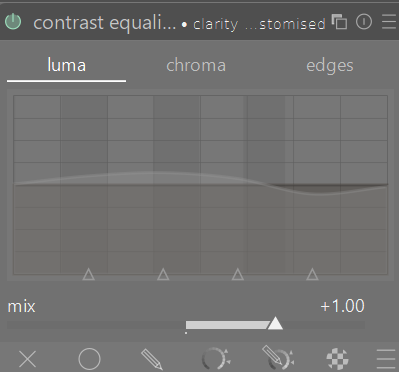
7 Likes
You can also raise the lower edge of that shaded area for noise suppression.
2 Likes