Hi! I don’t know much about colors, cameras or photography,
I need to apply some color profiles to .cr2/.cr3 raw images.
I originally got these profiles as .dcp files, which I converted to .json with dcamprof, this is all I got:
{
  "UniqueCameraModel": "Canon EOS 250D",
  "ProfileName": "Canon EOS 250D",
  "ProfileEmbedPolicy": "Allow copying",
  "CalibrationIlluminant1": "D55",
  "ColorMatrix1": [
    [  0.781000, -0.093400, -0.099900 ],
    [ -0.429400,  1.180100,  0.283500 ],
    [ -0.119200,  0.253000,  0.567200 ]
  ]
}
{
  "UniqueCameraModel": "Canon EOS 200D",
  "ProfileName": "Canon SL2 CPL",
  "ProfileEmbedPolicy": "Allow copying",
  "CalibrationIlluminant1": "D65",
  "ColorMatrix1": [
    [  0.657600,  0.003800, -0.087900 ],
    [ -0.519800,  1.259700,  0.292800 ],
    [ -0.156800,  0.285600,  0.569400 ]
  ]
}
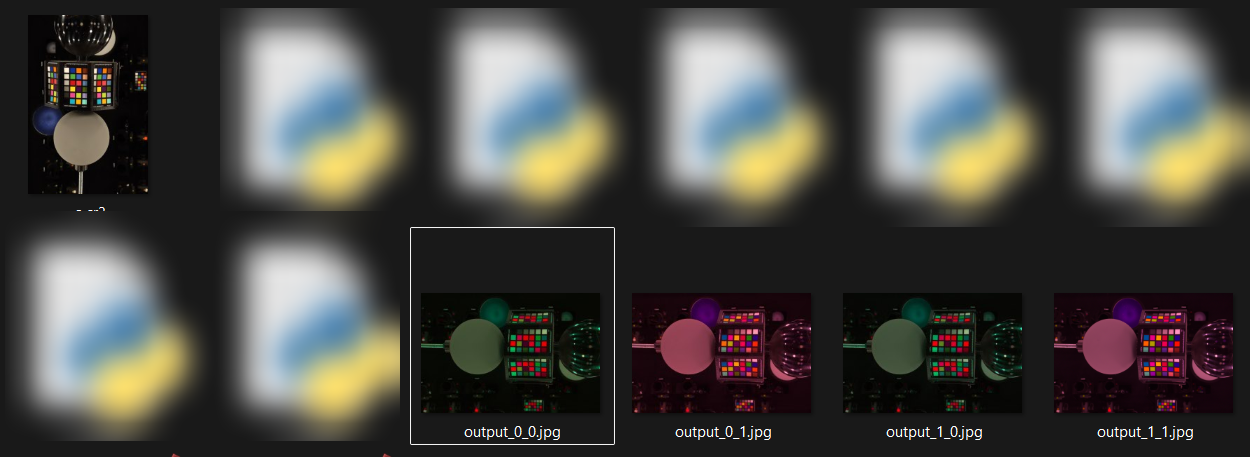
I’m then trying to use this data to apply it via python, I’ve tried both profiles, applying the inverse and not inverse Matrix, all the results I got either have a red or a green tint, which I assume is not correct.
profile_a = {
    "CalibrationIlluminant1": "D65",
    "ColorMatrix1": [
        [0.657600, 0.003800, -0.087900],
        [-0.519800, 1.259700, 0.292800],
        [-0.156800, 0.285600, 0.569400],
    ],
}

profile_b = {
    "CalibrationIlluminant1": "D55",
    "ColorMatrix1": [
        [0.781000, -0.093400, -0.099900],
        [-0.429400, 1.180100, 0.283500],
        [-0.119200, 0.253000, 0.567200],
    ],
}

profiles = [profile_a, profile_b]

with rawpy.imread("a.cr3") as raw:
    rgb_cam = raw.postprocess(
        output_bps=16,
        no_auto_bright=True,
        use_camera_wb=True,
        gamma=(1, 1),
        user_flip=0,
    )

rgb_cam = rgb_cam.astype(np.float32) / 65535.0
for i, profile in enumerate(profiles):
    illuminant = profile["CalibrationIlluminant1"]

    M = profile["ColorMatrix1"]
    M_inv = np.linalg.inv(M)

    matrices = [M, M_inv]

    for j, matrix in enumerate(matrices):
        h, w, _ = rgb_cam.shape

        matrix = np.array(matrix)
        xyz = rgb_cam.reshape(-1, 3) @ matrix.T
        xyz = xyz.reshape(h, w, 3)

        srgb = colour.XYZ_to_sRGB(
            xyz,
            illuminant=colour.CCS_ILLUMINANTS["CIE 1931 2 Degree Standard Observer"][illuminant],
        )

        srgb = np.clip(srgb, 0, 1)
        imageio.imwrite(f"output_{i}_{j}.jpg", (srgb * 255).astype(np.uint8))
Any idea what might be wrong? Thanks