Hi,
I have found the way to use numpy in Python scripts or Python-fu console in GIMP.
Prerequest: uv is already installed
Steps:
1. Confirm the version of Python which your GIMP uses.
You can confirm it with Python-fu console.
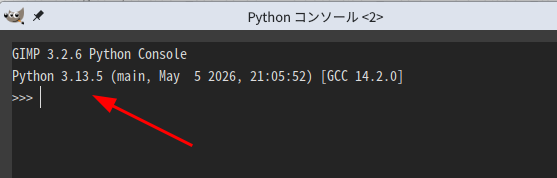
2. Make virtual environment in appropriate directory with uv and install numpy in the venv.
In following explanation I use ~/scripts/gimp as venv installed directory. However you can use your favorit directory name. If you use a different directory name, please substitute it for this name.
In home directory
$ mkdir -p scripts/gimp (In Windows > mkdir scripts\gimp)
Make directory to install vertual environment.
$ cd scripts/gimp
Change the current directory to gimp
$ uv venv --python 3.13
Make vertual environment with uv specifying the version number.
3.13 must be the same number as Python version number GIMP uses.
$ source .venv/bin/activate (In Windows: > .venv\scripts\activate)
Activate vertual environment.
(.venv)$ uv pip install numpy
Install numpy
(.venv)$ deactivate
numpy is installed under the directory below.
~/scripts/gimp/.venv/lib/python3.13/site-packages
3. Add numpy installed directory as reference path in a Python script or Python-fu console.
Add following commands.
import sys
sys.path.insert(0, “/home/username/scripts/gimp/.venv/lib/python3.13/site-packages”)
(In Mac OS: the directory name will be like “/Users/username/scripts/gimp/.venv/lib/python3.13/site-packages”)
(In Windows: the directory name will be like “C:\\Users\\username\\scripts\\gimp\\.venv\\lib\\python3.13\\site-packages”)
import numpy as np
4. Use numpy.
You can confirm if the numpy usable with the command below.
print(np.__version__)
If you see the version number of numpy with this command, you can use numpy.