Hello,
I have been sorting out my library in darktable and have come across a function that seems to be missing and that would save quite a lot of hassle. Maybe it exists but I don’t know about it.
I have an image that I like and I remember that I had some similar images to it taken at the same time. The collection showing is selected by a tag : landscapes for example. I would like to go to the folder containing all the images in the same folder as the selected image. My (long) method is to look at “image information” to see which folder it is and then in collections to manually change from tag to folder and then select the correct subfolder.
I tried to generate a lua script with chatgpt (I know next to nothing about lua but I code a little in python so I can read a script). ChatGPT informs me that I cannot control the collections module from lua…
Is there a method to do this, would other people find it useful ?
Thanks,
Nicolas
Hi Nicolas, there’s an existing LUA script OpenInExplorer in the contrib section which would do what you need, I guess.
On my Linux box, I associated F9 shortcut to this script and it works like a charm. When I have selected a photo in the light table, pressing F9 then opens the file manager (Nautilus to name it) in the directory where the photo is stored.
But maybe it’s not what you meant, this script opens the folder in an external file manager, to the folder where the photo is stored, not in dt…
Just realised I can enter the folder name in collections filter to save a bit of time.
A “return to previous collection” would be useful too!
There is a module for recent collections. You can also save a preset.
I believe the “collections helper” lua script has exactly what you want. I have used it for the use case you describe.
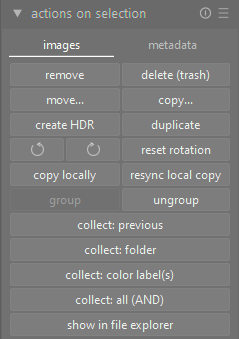
It adds those additional buttons to the “actions on selection” area in the library.
If you have your collection filters set up to show every “landscape” image in your entire library, you can then click on one image to select it and then click the “collect: folder” button. That will change the collection (but not collection filters) to the folder for the selected image.
I am confused. I don’t see a module or are you referring to the history option in collections? The history option is certainly very convenient to get bak to recent collections.
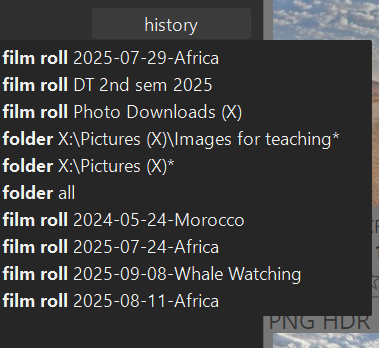
This is what I’m talking about darktable user manual - recently used collections
Does the recently used collections module have any advantage over the history button?
You can leave it open so its 1 less click to get there.
Ctrl+Shift+k does this for me
Thanks, I hadn’t realised that there were some options to tick in lua preferences so I had tried this script quickly and abandoned it.
Cmd + shift + k works well, I didn’t know this shortcut.
darktable is truly a deep study, thanks for your help !!