When I open my .CR3 files they show as monochrome and I can’t find a setting in Darktable 4.2.1 to shift to a color view
Thanks in advance for any help.
When I open my .CR3 files they show as monochrome and I can’t find a setting in Darktable 4.2.1 to shift to a color view
Thanks in advance for any help.
When you open them in the darkroom view to edit them?
Could you supply one image that behaves this way please.
Also checked demosaic?
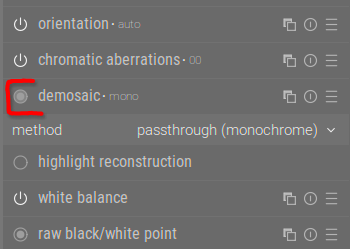
Looks like my error: the image I chose was not brightly colored and only appeared to be B&W, but it threw me and I spent hours trying to figure out what was wrong before I selected a more colorful image and things look OK now.