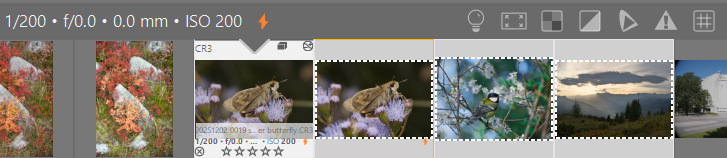
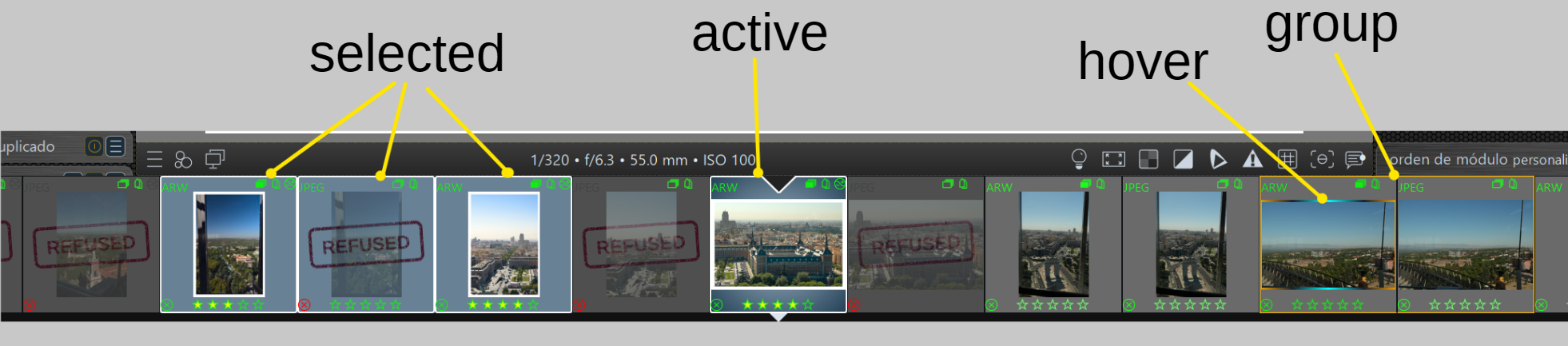
To me the darkrooms filmstrip is hard to decipher. The shading between inactive, selected and hovered is not easily discernable to me. I hacked up some CSS to help me visualize things better:
/* Base: darken the filmstrip background and border of every filmstrip thumbnail */
#thumbtable-filmstrip #thumb-back {
  background-color: shade(@thumbnail_bg_color, 0.7);
  border-color: shade(@lighttable_bg_color, 0.75);
}

/* Restore the theme's group-indicator border color on the specific edge(s)
   of thumbnails belonging to a duplicate/group, which the base border
   color above would otherwise overwrite */
#thumbtable-filmstrip .dt_group_left #thumb-back   { border-left-color:   @group_indicator_color; }
#thumbtable-filmstrip .dt_group_top #thumb-back    { border-top-color:    @group_indicator_color; }
#thumbtable-filmstrip .dt_group_right #thumb-back  { border-right-color:  @group_indicator_color; }
#thumbtable-filmstrip .dt_group_bottom #thumb-back { border-bottom-color: @group_indicator_color;
}
css for the selection with borders
/* Selected, not hovered: keep the base background color */
#thumbtable-filmstrip #thumb-main:selected:not(:active):not(:hover) #thumb-back {
  background-color: shade(@thumbnail_bg_color, 0.7);
}

/* Selected: gold border, regardless of active/hover state */
#thumbtable-filmstrip #thumb-main:selected #thumb-back {
  border-color: #FFD700;
}
Note: This conceptualy interferes with the markings for grouped images, which receive a joint golden border. I am in fact not using the golden borders atm.
While fiddeling around with this I discovered an neat fact about the hovering I didn’t know: When the mouse is over the canvas the active image is in effect hovered, the filmstrip reflects this by brightening the active image.
This part of the change is now part of the grey theme in master.
I fiddled some more with it for my setup. To help me understand which images are selected vs active I added a small golden border around selected images themselves, which doesn’t interfere with the golden boxes around grouped images:
I changed it to 2px dotted white to look more like an image editor region selection, and it highlights some really odd behavior. When I have the first image of duplicates ("siblings) opened and select the other sibling, the opened image shows as selected, and it shows as selected or deselected depending on which other images are selected, whether it’s one or multiple, and whether its sibling (the duplicate).
I experimented by rating the images and seeing what changes (with the cursor over the selection), and it turns out the currently open image really is being selected and deselected for unintuitive reasons.
This has been a pain point of mine for several years. I still reject, rate and paste edits onto images I don’t mean to because I haven’t noticed that multiple files are selected. So thanks for this!
Thank you for your kind comment.
In the screenshot I attached, the active element was also selected.
I’ve generated a specific code version for you to try in the gray theme, and I just tested it in version 5.7.0+980. I think it looks quite good.
Select/Deselect with Ctrl+click. Deselect everything with Ctrl+Shift+A.
/* border for all selected images on the film strip */
#thumbtable-filmstrip #thumb-main:selected #thumb-back {
    border: 2px solid white;
    border-radius: 8px;
}

/* active image deselected */
#thumbtable-filmstrip #thumb-main:active:not(:selected) #thumb-back {
    background: radial-gradient(circle at center, @grey_50 50%, @grey_80  100%);
}

/* active and selected image */
#thumbtable-filmstrip #thumb-main:active:selected #thumb-back {
    background: radial-gradient(circle at center, @grey_50 50%, @grey_90 100%);
    border: 2px solid white;
    border-radius: 4px;
}

/* hover over the images in the film strip */
#thumbtable-filmstrip #thumb-main:hover #thumb-image {
    border: 4px solid;
    border-image: linear-gradient(to right, orange 0%, @grey_10 25%, cyan 50%,  @grey_10 75%, orange 100%) 6 6 6 6 / 3px 1px 3px 1px;
}

/* We fixed the background inherited from the theme when performing the previous hover.*/
#thumbtable-filmstrip #thumb-main:hover #thumb-back {
    background-color: @grey_60;
}
Unfortunately, I believe DT is still unreliable for this functionality.
There are visual glitches that become apparent when applying any contrasting theme.
For example: In the darkroom, I activate the first image of a long strip (let’s say 30 or 40 images), and I scroll to the end with the mouse wheel. Then I scroll back; without any further action, the previous definition of “active image” is no longer displayed. It only appears as selected. I have to double-click for it to reload and display correctly. The program even closed several times during these tests.
I’ve also seen another instance in X|Y mode where two active images were displayed until the mouse hovered over something and refreshed.
That looks pretty interesting! I’m gonna play with it for a few days to see how it feels. I love the rounded white border.
I noticed the hover effect is always on for the loaded image unless a different thumbnail is hovered. Move the mouse anywhere except over a thumbnail–the hover effect still shows on the main image. This strikes me as something that can’t be fixed in CSS.
I don’t love that hovering on a selected image makes the border darker, but I also think this is not something you can fix because the mental model of selection in darktable is strange. This is broken for ctrl+x but working for ratings, but operations only act on the selection if it is moused over. (My setting is to prioritize hovered images over the selection.) The way I’d expect this to manifest visually is that the target glows brightest. So if the mouse isn’t over the selection, it’s not that bright. But the whole selection should light up when hovered. The thumbnail directly under the mouse could be slightly brighter, but the effect should be subtle. The main thing is that the target glows.
Unfortunately this behavior is broken, it’s dependent on user settings, and I don’t think we can write a CSS selector to say “this is a selected element and this or any other selected element is hovered”. It would need a code change so the whole selection is rendered as hovered when any element is hovered. Again, the reason for this is that the selection doesn’t really matter unless it is hovered. Or if the setting that uses the hovered image as the target is disabled.
Yes. It seems to be a program error; it doesn’t detect when the pointer moves out of the central image. When the mouse enters the film strip area, it starts working properly again.
I don’t see any dark borders within this layout (darkroom/elegant gray theme).
In any case, the important thing is to create enough contrast to make the element stand out.
I do see, in the official themes, a dark border (which I don’t like) around the central images on the light table, which disappear or change when I hover the mouse over them. I’m not sure if that’s what you’re referring to.
Those borders can be minimized with something like this: