Either via some preference I have somehow overlooked, or possibly a Lua script, is there any way to either turn off, or delay, the styles preview in the lighttable view? Delayed in darkroom would be nice too.
1 Like
I don’t believe so. I hovered the hamburger menu in styles and it appears there are no preferences to configure (at least nothing happened when I clicked it.). Also checked preferences and there’s nothing there.
Probably need to raise a feature request.
1 Like
Will do. Thanks for double checking, Bill.
2 Likes
@EmerS Have you already created a feature request?
I played around with the code a little bit and came up with a proposal to add this:
On the styles UI a checkbox could be added, where you can switch off the preview.
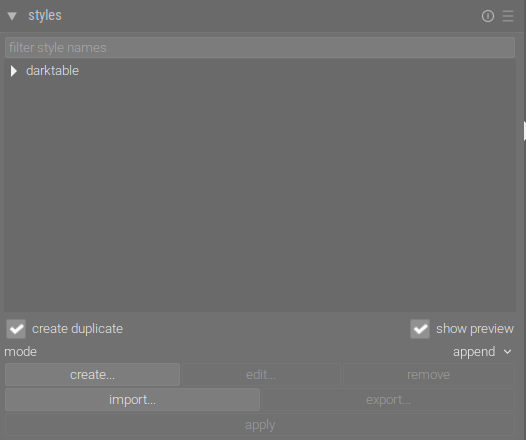
I understand that this could also be in the preferences, but I can image that you want to switch based on the image or the style.
1 Like
@deekay I have not yet created a request. Thank you for taking the time to do that!
My main issue is that sometimes when moving over the styles to get to a certain style, I hesitate momentarily over a style before getting to the one I want, but the preview pops up and I have to wait for it to render before moving on to the style I actually want. The older I get the longer those micro pauses get.
About half the time I use styles I don’t need to see the preview because I know what it does since I always use it. Or it has modules that get activated with no settings so I can tweak it later so the preview would be identical to the current image anyhow. So having the ability to turn off previews for certain styles only would be excellent for that use case.
The other times I would like to see a preview so having a slightly longer delay before popup would be nice too, because sometimes I do want to actually see a preview.
So either the ability to have that preview activated/deactivated by a keystroke or the ability to set the delay for slightly longer, would be my nirvana. Since I’m not a coder I have no idea the feasibility of either of those options.
1 Like
I have exactly the same issue. When moving the mouse around I sometimes get stuck by the preview, especially on my laptop without a GPU.
If you don’t mind I will then create an issue/feature request on Github.
1 Like
I am traveling and have been using only my laptop with just the mouse pad for the last week or so, and that’s what finally made me ask here in PIXLS.
Yes, please do create that issue/feature. Thank you so much!!
1 Like
You can disable it by hiding the pop-up help (Shift + T).
That’s a bit hammer-to-crack-a-nut. Most tooltips aren’t computationally expensive to display. I can see the argument for just wanting to remove the styles preview