It definitely looks like a black level issue, but it’s curious that raw refinery works fine apparently.
I pushed 0.2.4 which removes the duplicate, but it is a black level issue that I can’t directly fix in rawforge otherwise.
I could add in an optional black level subtract tag as a fix if that would help. Then you could manually supply the black level
Sorry, my answer hasn’t been totaly correct…I mixed up some things:
Yes, the camera was R6M3, and the image I used with rawforge was cr3, but I convert the images to dng before using rawrefinery.
rawforge works fine with dng! I will keep the step ‘convert images to dng before denoising’ in my workflow - it’s already a step in my automation.
(I’ll try to have my breakfast before answering next time, at least my pot of coffee!!).
But thank you for removing the duplicates. And I also noticed, that I can leave out the step of copying the exif from the original to the denoised image. And don’t care about black levels of unsupported cameras!
1 Like
Yes for RawRefinery, I only missed the python3-devel package. But very slow for “cpu” and “light” compiled on a Fedora 44 box (AMD Ryzen™ 7 6800H with Radeon™ Graphics with 32 Go of RAM). . Thanks
No for RawForge installed in an other venv. The DNG created with normal progress bar is saved but unreadable. His properties shows an width of 3 pixels ! Tested with ARW and cr2 files.
I noticed that rawforge now writes something like ‘{“shape”: [4638, 6958]}’ into exif ‘image description’? Is this necessary? I’d like to have this empty.
It currently appears that the folder selection option on Linux is limited to folders in the Home partition. This implies copying images from the source drives to the Home partition, apply denoise and then having to copy or move the denoised images to the image source drive. Like many others, my images are stored on other dedicated drives, either internal or external.
The ability to select a folder with images located on another drive other than the Linux Home partition/drive would be great.
I’m currently running Zorin OS 18.1 with KDE DE, it installed easily and is executing well and the results are good.
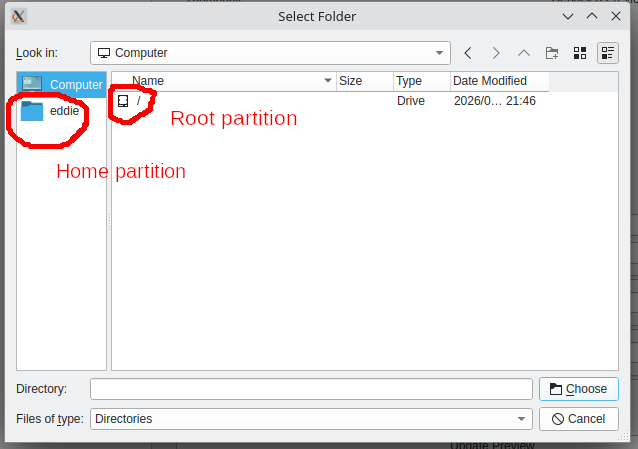
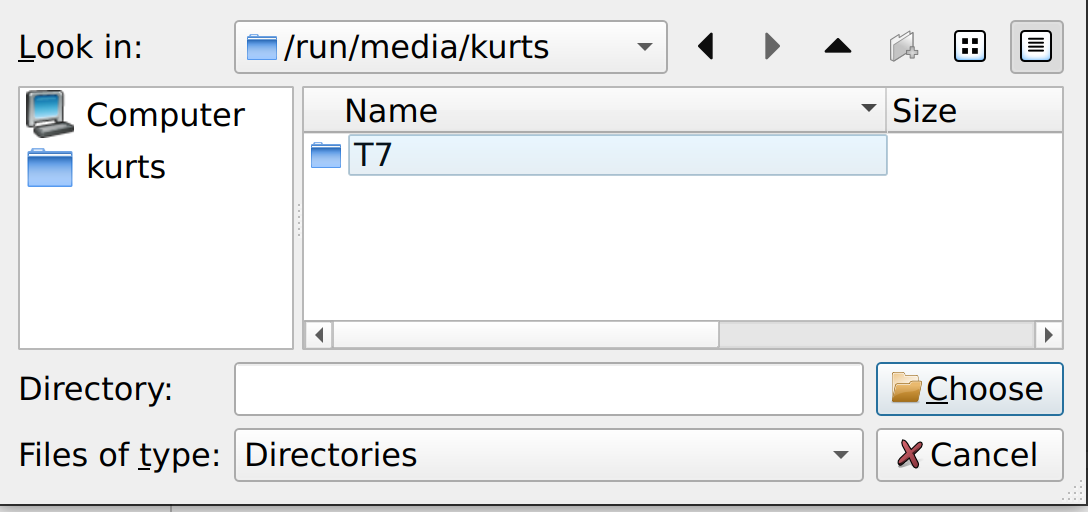
You can find other drives in
/run/media/username:
Or, open a terminal, enter lsblk and the drives and their mountpoints are listed:

1 Like
Thanks for this.
Rawrefinery is installed with venv. The drives are defined in /etc/fstab but still not viewable or accessible from Rawrefinery. Neither can one enter the drive details via the Rawrefinery tab.
This is my understanding of the /run directory or partition on Linux:
The /run partition is a temporary, in-memory filesystem (typically tmpfs ) used by modern Linux systems to store volatile runtime data such as process IDs, socket files, and logs. Because it resides in RAM, it is not stored on the physical hard drive and its contents are lost upon reboot
You can access the drives via the mountpoints - which are stored in run, not the data of your drive (and run ain’t a partition, it’s a directory); take a look at my snapshot of lsblk.
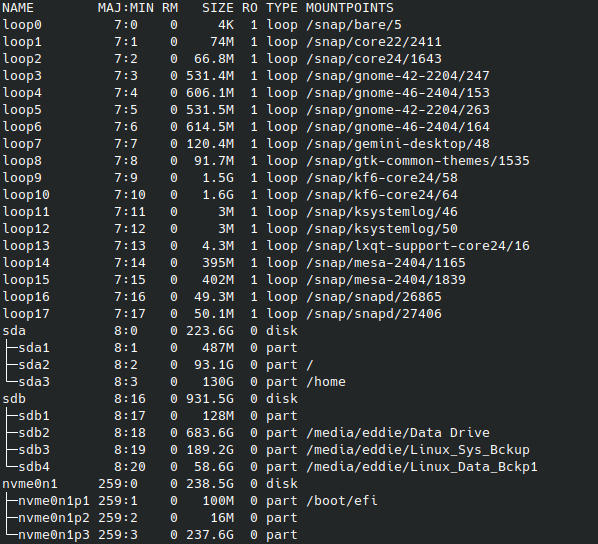
OK, I see you use Zorin OS. It looks like it’s storing the mountpoints in ‘/media’, there is
- /eddie/Data Drive
- /eddie/Linux_Sys_Bckup
- /eddie/Linux_Data_Bckp1
Similar to mine, but without the run directory as first level.
You should navigate to ‘/media/eddie/Data Drive’.
Yes, I’m using Zorin OS which does not support a /RUN directory. In addition to the drives listed, I also have 2 drives containing my images. All drives are auto-mounted by the OS. To me it appears that RawRefinery only accesses/lists the directories “belonging” to the OS.
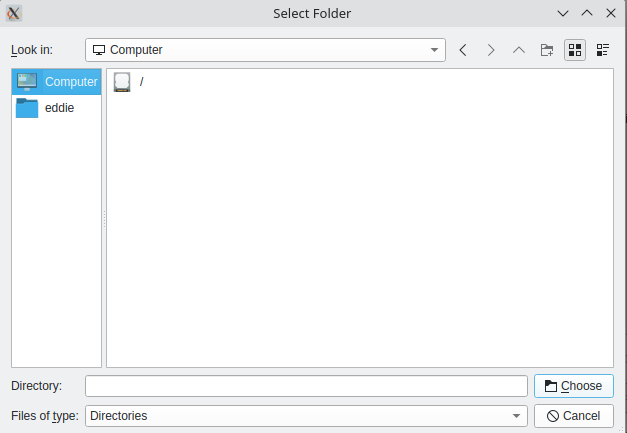
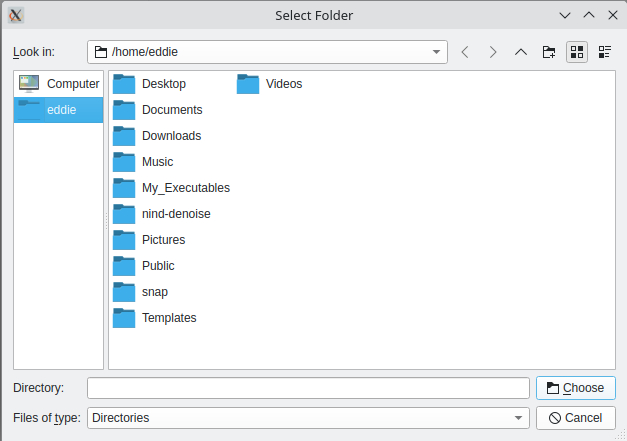
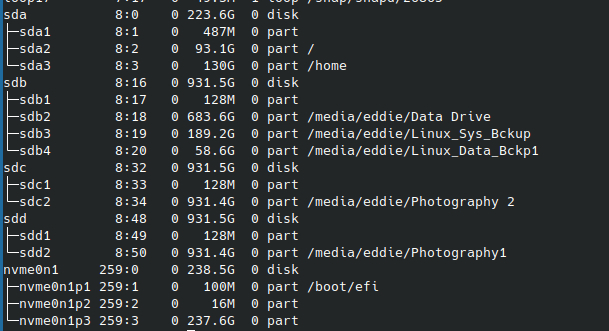
You should find ‘media’ under ‘Computer’, not under ‘eddie’.
This is independent from RR or other software - it’s the way how linux works.
1 Like
Thanks a lot. Managed to navigate it now.
Hi, Ryan
I updated rawforge with following command on Kubuntu.
$ pip install rawforge
However I encountered error messages below.
(rawforge) yohnishi@yohnishi-kubuntu-01:~/scripts/rawforge$ rawforge TreeNetDenoiseSuperLight TEST.NEF test.dng --cfa
Traceback (most recent call last):
  File "/home/yohnishi/scripts/rawforge/.venv/bin/rawforge", line 10, in <module>
    sys.exit(main())
             ~~~~^^
  File "/home/yohnishi/scripts/rawforge/.venv/lib/python3.13/site-packages/RawForge/main.py", line 209, in main
    run_pipeline(
    ~~~~~~~~~~~~^
        model_names=args.model,
        ^^^^^^^^^^^^^^^^^^^^^^^
    ...<16 lines>...
        exiftools=args.disable_exiftools,
        ^^^^^^^^^^^^^^^^^^^^^^^^^^^^^^^^^
    )
    ^
  File "/home/yohnishi/scripts/rawforge/.venv/lib/python3.13/site-packages/RawForge/main.py", line 120, in run_pipeline
    output = process_img(models, image_RGB, conditioning_str, iso, disable_tqdm, tile_size, tile_overlap, batch_size, verbose, use_onnx, device,
                         lumi, chroma, clip_highlights, affine, progress_callback, rh)
  File "/home/yohnishi/scripts/rawforge/.venv/lib/python3.13/site-packages/RawForge/main.py", line 41, in process_img
    ModelHandler, Backend, runtime = get_backend(use_onnx, verbose)
                                     ~~~~~~~~~~~^^^^^^^^^^^^^^^^^^^
  File "/home/yohnishi/scripts/rawforge/.venv/lib/python3.13/site-packages/RawForge/application/helpers/get_backend.py", line 16, in get_backend
    raise RuntimeError("Must have either ONNX or Torch backends installed.")
RuntimeError: Must have either ONNX or Torch backends installed.
There may be some bugs and I would appreciate if you fix these bugs.