Wow. Thank you Timon, for sharing this here!
I am seriously impressed over how quickly you have put this together and how smooth the experience is, but I have a few thoughts as well.
To give you a little context, I’m a long time darktable user but not a developer in any way. I follow developments with keen interest but the maths usually go right over my head 
I’ve installed the windows build on my Win11 laptop last night and have been playing with it.
I hope it’s ok if I share my feedback here? I know you want to keep issue tracking on Github. but these are mostly feedback/suggestions. Also, I want to make it clear that I am not trying to detract in the slightest from what I see as an incredible achievement, I just hope that perhaps my thoughts might help in some small way to make it even better.
I love the minimal controls that yet have almost everything needed for day-to-day processing.
Need to spend more time with it, but on a first try the AI subject masking is excellent.
A.
I am interested in what I know in darktable as the pipeline order - I get the feeling most operations take place after a display transform (or base curve) is applied to the linear RAW image?
An issue for me seems based on this, but may be due to my not fully understanding the best workflow.
The file is unclipped, with data in both highlights and shadows.
I raised the exposure, then applied a linear mask to drop the exposure of the sky. Notice that although the brightness has lowered, no detail has been recovered in the brightest area, due to it being clipped in the curve or transform.
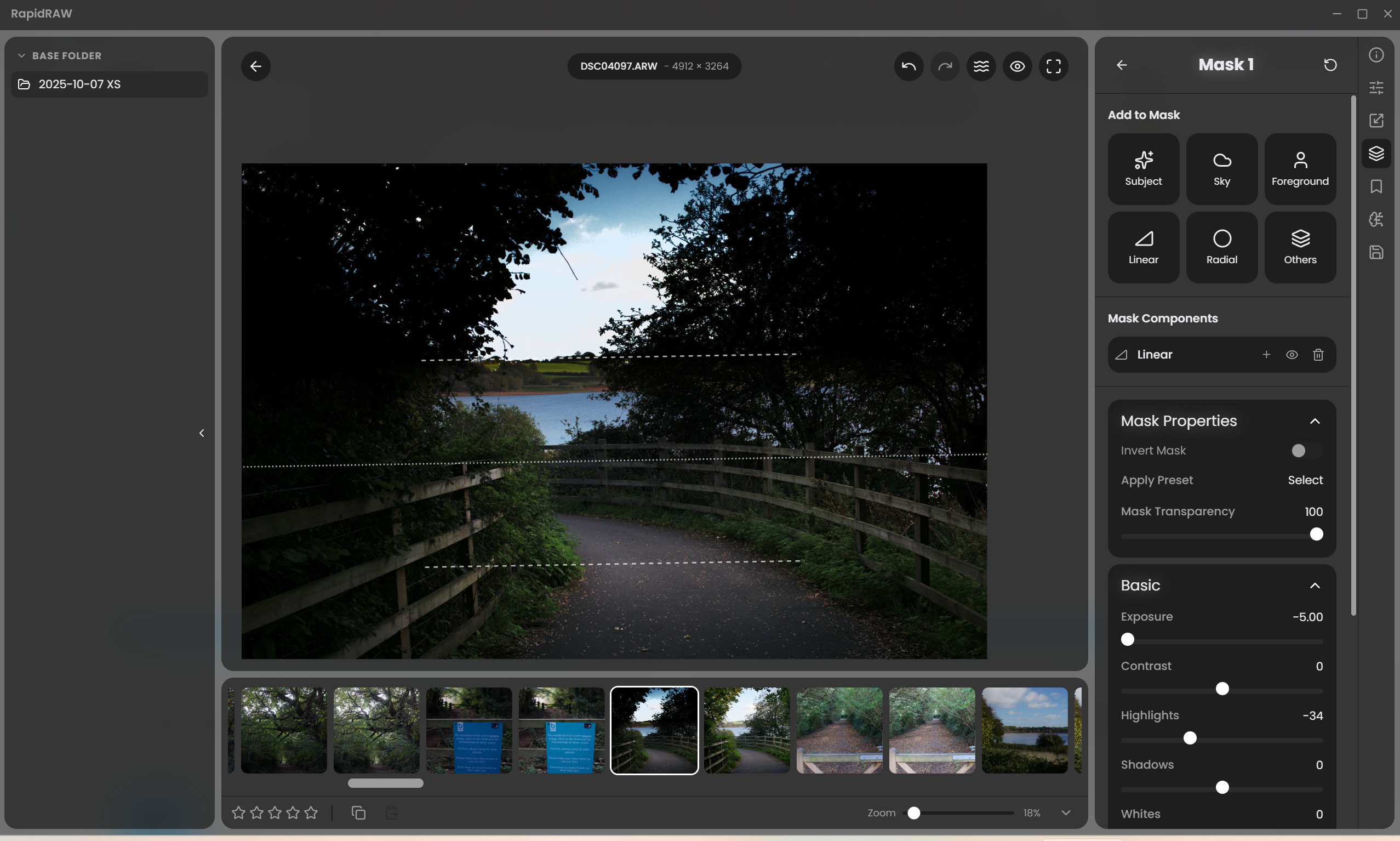
If I instead drop the exposure globally, then invert the mask and use it increase exposure on the foreground, no issue arises, but (to me) it seems unexpected behavior for a RAW editor.
Bear in mind that I may have been spoilt by darktable’s (unconventional?) linear pipeline ending in the display transform  which makes ‘order of operations’ irrelevant.
I notice the same behavior in the vignette controls - the brightness drops, but unlike actual lens vignetting, it pulls clipped whites to grey instead of a linear brightness drop.
B. Related - why does the exposure control affect saturation? I expect there’s a good reason for this but it seems very unintuitive. (to this particular human)
C. I am finding that the Clarity, Texture and Sharpening controls have an extremely subtle effect - is this intentional or a bug on my machine? (edit: they are working - feel free to disregard)
D. I applied a whole image mask and was pleased to see the Lr-style color calibration controls, as it is essentially a channel mixer, but they appear to have no effect on the image - am I misunderstanding anything?
If you would like me to elaborate further on any of this, I’m more than happy to!
The software is already excellent which is no mean feat to do single handedly in the time you have - it’s the fact that it is so good that has prompted my feedback.
Honestly, I could see myself using this for most of my editing, but I would really like better highlight handling/response. If this had a linear pipeline ending in a darktable Sigmoid or Blender AgX style display transform it would be unbelievable 
P.S. the free but sadly not open source Android app Saulala has a nice minimal version of AgX with (to me) lovely handling of dynamic range - if you are interested you might like to have a play with it for inspiration.