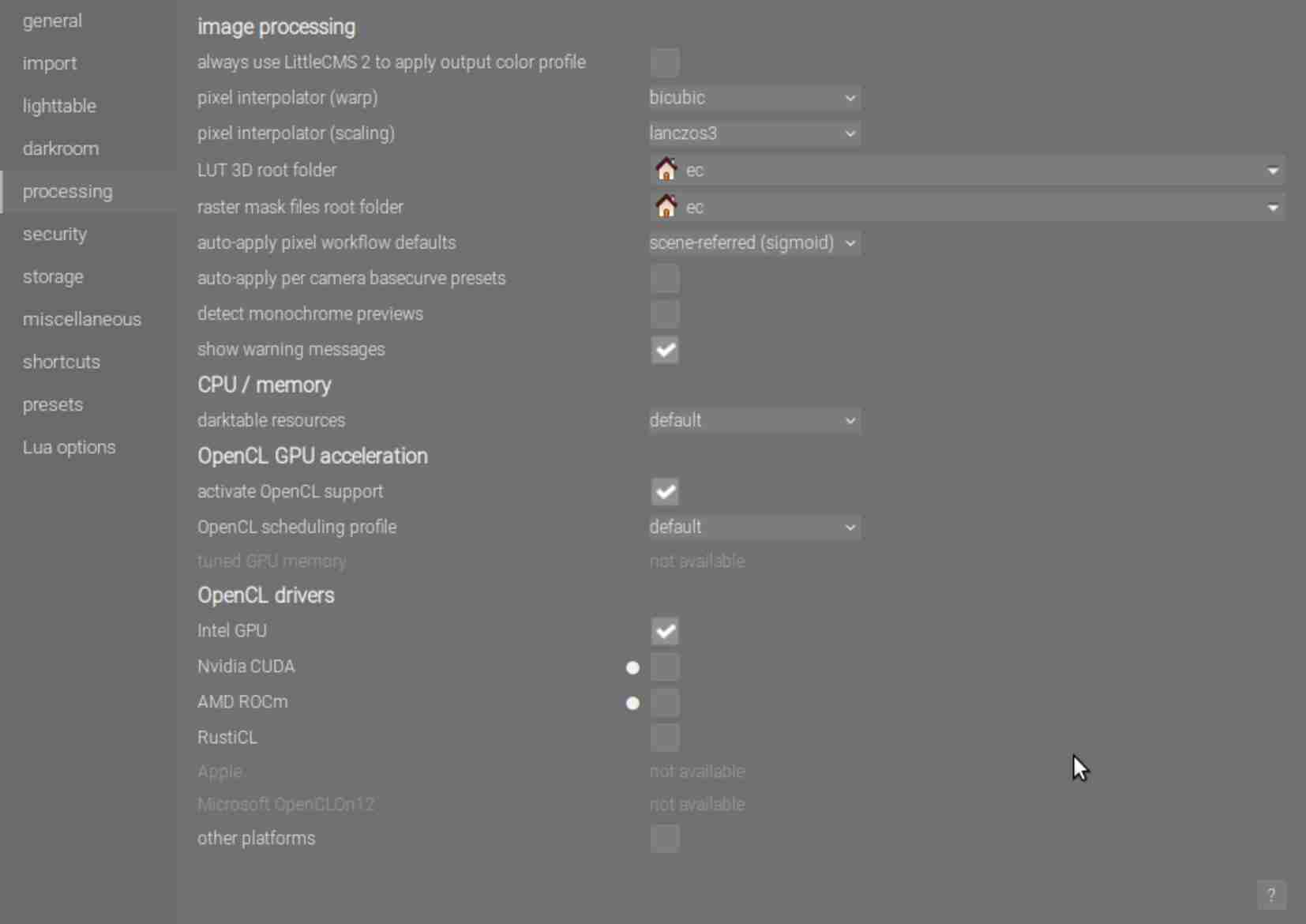
I am playing with darktable 5.4 and an old notebook.
I see:
OpenCL -> ENABLED
and
[opencl_init] FINALLY: opencl PREFERENCE=OFF is NOT AVAILABLE and NOT ENABLED.
Since I cannot enable it in the dt-settings, I assume the card is blacklisted. Does it make sense to enable it, as I did with another pc and another Intel-card?
Of course, but it looks the age of the cpu is very important too.
$ darktable-cli setubal.orf setubal.orf.xmp setubal.jpg --core -d perf -d opencl
output file already exists, it will get renamed
darktable 5.4.0

  OpenCL                 -> ENABLED

     0,1547 [opencl_init] FINALLY: opencl PREFERENCE=OFF is NOT AVAILABLE and NOT ENABLED.

    13,1916 [dev_process_export] pixel pipeline processing took 11,153 secs (145,900 CPU)
    13,9985 [export_job] exported to `setubal_02.jpg'
In comparison, this is a lot faster, although no opencl too.
$ clinfo -a | grep -i 'name\|vendor\|version\|profile'
  Platform Name                                   Intel(R) OpenCL Graphics
  Platform Vendor                                 Intel(R) Corporation
  Platform Version                                OpenCL 3.0
  Platform Profile                                FULL_PROFILE
  Platform Extensions with Version                cl_khr_byte_addressable_store                                    0x400000 (1.0.0)
  Platform Numeric Version                        0xc00000 (3.0.0)
  Platform Name                                   Intel(R) OpenCL Graphics
  Device Name                                     Intel(R) HD Graphics 5500
  Device Vendor                                   Intel(R) Corporation
  Device Vendor ID                                0x8086
  Device Version                                  OpenCL 3.0 NEO
  Device Numeric Version                          0xc00000 (3.0.0)
  Driver Version                                  24.35.030872
  Device OpenCL C Version                         OpenCL C 1.2
  Device OpenCL C all versions                    OpenCL C                                                         0x400000 (1.0.0)
  Device Profile                                  FULL_PROFILE
    IL version                                    SPIR-V_1.3 SPIR-V_1.2 SPIR-V_1.1 SPIR-V_1.0
    ILs with version                              SPIR-V                                                           0x403000 (1.3.0)
    SPIR versions                                 1.2
  Built-in kernels with version                   (n/a)
  Motion Estimation accelerator version (Intel)   0
    Device-side AVC Motion Estimation version     0
  Device Extensions with Version                  cl_khr_byte_addressable_store                                    0x400000 (1.0.0)
  clGetPlatformInfo(NULL, CL_PLATFORM_NAME, ...)  Intel(R) OpenCL Graphics
    Platform Name                                 Intel(R) OpenCL Graphics
    Device Name                                   Intel(R) HD Graphics 5500
    Platform Name                                 Intel(R) OpenCL Graphics
    Device Name                                   Intel(R) HD Graphics 5500
    Platform Name                                 Intel(R) OpenCL Graphics
    Device Name                                   Intel(R) HD Graphics 5500
  ICD loader Name                                 OpenCL ICD Loader
  ICD loader Vendor                               OCL Icd free software
  ICD loader Version                              2.3.3
  ICD loader Profile                              OpenCL 3.0
[opencl_init] OpenCL successfully initialized. internal numbers and names of available devices:
[opencl_init]		0	'Intel(R) OpenCL Graphics Intel(R) HD Graphics 5500'
     0.1922 [opencl_init] FINALLY: opencl PREFERENCE=ON is AVAILABLE and ENABLED.
It took over 6min for 1 setubal-test-photo.
   380.0186 [dev_process_export] pixel pipeline processing took 375.652 secs (539.241 CPU)
   382.7302 [export_job] exported to `setubal_04.jpg'
 [opencl_summary_statistics] device 'Intel(R) OpenCL Graphics Intel(R) HD Graphics 5500' id=0: 20 out of 32 events were successful and 0 events lost. max event=31, clmem runtime problem
So the first time with about 80sec was really fast, compared.
I see again and again:
CL_OUT_OF_RESOURCES
Please check the attached log. Maybe you have a configuration advice.
Don’t understand what you are looking for. BUT as mentioned, you have shared memory and your OS plus other apps running plus dt require system memory, the very minimum being 4GB - we suggest 8GB.
Opencl memory requires to be at least 2GB so you could set that , i don’t know how you did your system settings at all. BUT honestly it’s simply not worth it. the 5500 opencl was very slow and overall the decreased system memory leads to more processing on CPU so there will be no advantage. Sorry
You cant change max mem alloc, thats what the driver defines.
the global mem is somewhat surprising to me. any bios setting tuned.
If you are further trying to “tune” on your system i guess you should get more familiar with opencl in general. This is not a dt problem at all. I myself have such an old notebook and stopped using opencl as it is simply not worth it.
Ok, that I didn’t know. I am giving this notebook away as a present and it should be configured correctly. It is fine for browsing and office-typing.
Good idea to check this. I am pretty sure it has default settings after a firmware update. Maybe there is something like “gaming” and “max. power safe” which influences the dt result.
I agree with you. I exchanged the notebook with a minipc.
The new user wouldn’t use the noetebook for dt normally, but sometimes it coud be.