Woh!!! I didn’t get back to this post for a while and I’m surprised by the multiple responders here that it has overwhelmed me. I’ll read them one by one.
BUT, I do plan to stay with Raw Therapee since I’ve gotten used to my simple workflow with it. My only issue right now is that I couldn’t get consistent image rendering since the Fujifilm X-E5 is not yet supported. So I may shift back to Fujifilm’s “X-Raw Studio” for a while until RT finally releases X-E5 RAW support.
However, @bastibe , you mentioned that I only “Needed to edit camerasupport.xml (IIRC) to make it work.” If that’s the case, could you teach me how to do it?
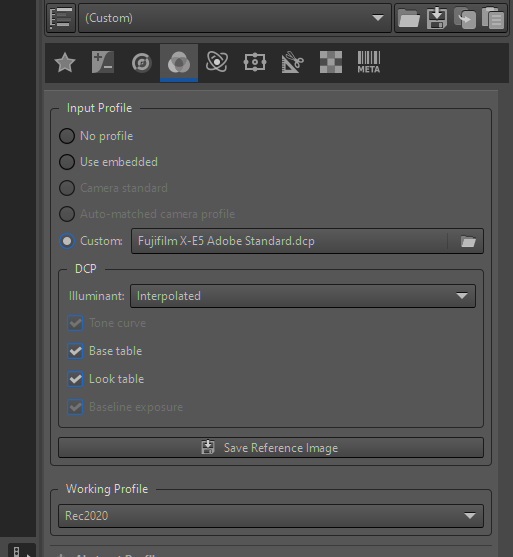
no need to edit just use a custom profile in the camera profile part of the program and point it to the dcp…then you can decide if you use the whole profile…ie the tone curve, the base table and look table or if you maybe disable the tone curve and just use the color bits of the profile and then use the automatch or whatever other RT workflow you use…
Oh. Hmmm, the thing is, for now, I apply “film simulation PRESETS” (LUTs) only for the Fuji RAW images. There’s a big difference in color rendering between the Fujifilm X100vi (RAW Supported) and the XE5 (RAW Not Supported).
Since you posted an image where I could make images render consistently, I’ll give it a try.
Ya I cant speak to how you will manage the interplay with your luts but for now you could disable the RT tone curve that is applied by default and use the Adobe DCP and enable everything and I think this would give you the standard Adobe look…just for reference to see where you are starting from… I don’t have the most recent RT but it opens a X-E5 test image and has a camera standard profile. Also you can use the Adobe DCP but the tone curve option seems disabled so you can just compare the two with the standard RT tone curve setup…There was a difference in color for sure between the profiles…
I have been using RT and DT for several years. I really like RT, and if RT offered masking tools as good as DT, I wouldn’t bother with any other program.
I find RT to be a much simpler program that delivers great results without taking up too much time.
Therefore, if I feel like experimenting or need to make a mask, I use Darktable, but I usually edit my photos in Rawthwrapee because it allows me to quickly and easily edit photos using excellent Adobe DCP profiles.
My hardware consists of an NVIDIA 1030 graphics card, an i5 processor, and 16 GB of RAM. Rawtherapee runs much faster for me than DT.
When using the tone curve from the DCP profile, it is necessary to reset the basic tone curve, otherwise the curves will overlap and the image will be distorted.
Yes for sure…the profile from adobe for this camera has the tone curve option disabled…it doesn’t appear to be added to the profile so in this case with that profile you are correct its best to use one or the other…
By the way, @priort , how do I get the Fujifilm X-E5 Adobe Standard.dcp file? Can you share a link where I can download it? I can’t seem to find it on my MacbookAir. When I choose Custom, there’s no option for this certain .dcp file. Thank you.
@priort , Update: I found the folder where the dcpprofiles are under RawTherapee but it doesn’t have the one for the X-E5. I’m using RawTherapee version 5.12. In addition, shockingly, I thought that the X100vi is supported and I couldn’t find the .dcp profile for that one either.
Macintosh HD>Applications>RawTherapee>Contents>Resources>share>dcpprofiles
@priort , also, it appears that to apply the dcp profiles, one has to do it one by one on the images and not implement the profile to all images with just one click? Or there’s a way to incorporate the profile with just one click to all images? (It’s because I don’t have the convenience of time always). Thank you.
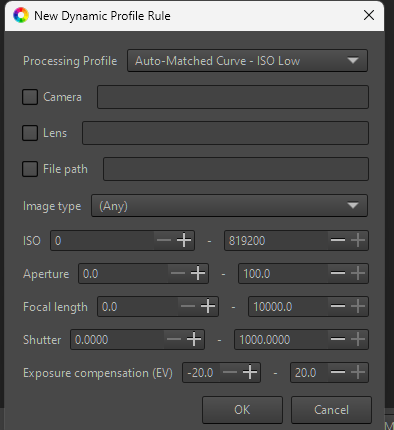
you can use dynamic profiles I think or just use a custom profile that has tha option…THe dcp profile comes from Adobe…just download dng convertor and you will have all the adobe camera profiles…THis is how and where you get the latest DCP profiles…
I’m not a RT power user at all so others will help you but you can create a set of custom settings either from scratch or by modifying one of the supplied ones and then using dymanic profiles …specify some criteria to say when and where that should be added…
I think this is blaming the user. Math does not “break”, that module (like many others in Darktable) simply uses an interpolation that introduces spurious oscillations into the actual curve, unexpected by the user.
The cleanest approach would be replacing these interpolations with monotonic ones, which are in accordance with user expectations.
A quick fix would be a visual warning when oscillations happen (eg like AgX highlighting parts of the curve in yellow when convexity expectations are violated, eg shoulder being concave).
I don’t know RawTherapee, so I can’t compare and I highly recommend to use the tool that you work best with. In the end the question “what camera” or “what post-prod program” is just the same as “what hammer” or “what drill”. It’s about the photo, the image, not the tools you use to make it.
BUT (in capital letters)
dt allows you to apply any module to your standard image import, meaning: once I open a file, a small black border, my signature, a tad more contrast, lens correction, dead pixel mapping, monochrome and denoising are applied automagically with values I have chosen, because I have checked the “apply to all images” box in these modules. This makes my workflow extremely fast and effective,
I get it. It takes a weekend to find the modules you (!) want or need to apply, but once that’s decided, 99% of post-prod are done the moment you open a file. Even better: I can export this and apply “my” standard settings to any dt installation (example: future new PC).
If you work well with RT or C1 ot LR or … whatever: stick to it. No need to change the tool if you get the results you want, if you can manipulate your file to the point that the image on the screen looks like the one in your mind. But if you want to swing over to dt, don’t let “steep learning curve” stop you from doing it. The basic settings need about one weekend - from there on it’s all smooth sailing.