Hello everyone, I’m trying to find a way to expand folders in the Collections module without actually selecting it and loading every photo recursively within the whole directory.
I have a ton of photos and it takes forever to load whenever I try to navigate down the directory because it keeps loading every photo every time I open a “layer”. Darktable often hangs trying to load everything at once.
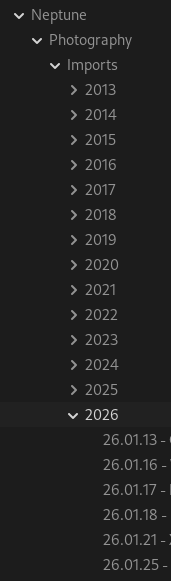
For example, say I want to open the “26.01.13” folder on the image above.
I would have to click on “Neptune” [loads every photo in that directory],
then click on “Photography” [loads again],
then click on “Import” [loads],
then click on “2026” [loads AGAIN]
then finally on “26.01.13”
I want to be able to expand folders without selecting them by clicking the arrow and only actually select the folder when I click on the folder name. Is there a way to do this currently? I’ve looked everywhere but haven’t found it.
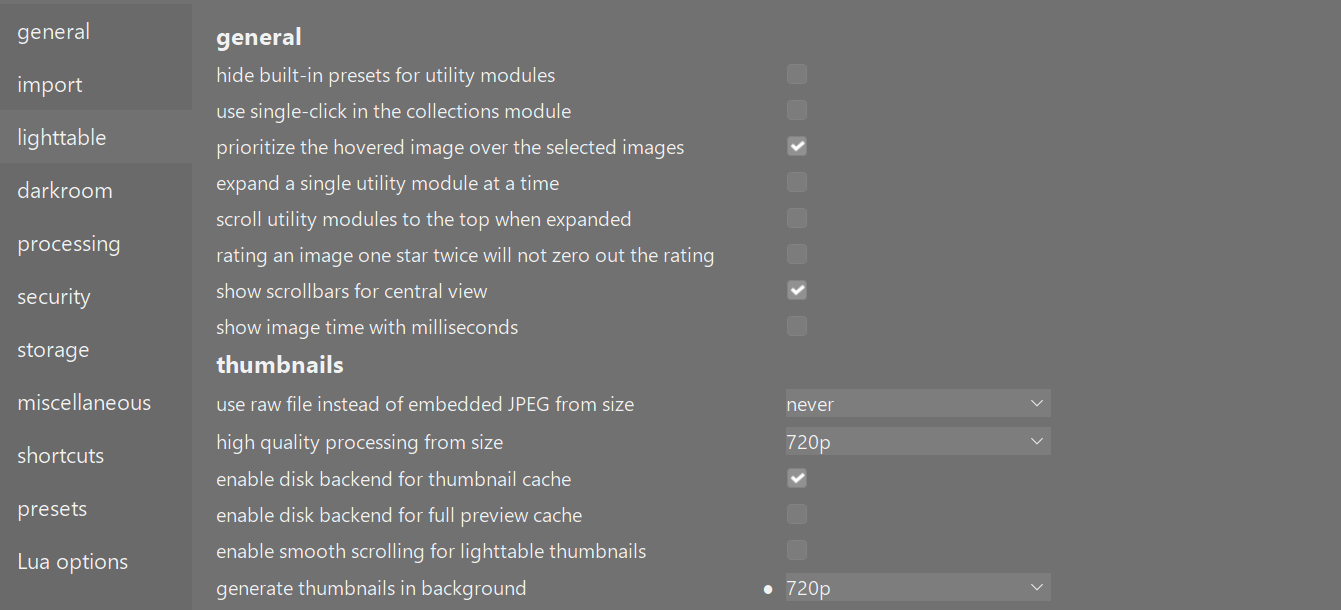
I am on windows 11 DT 5.4 and navigation is super quick through the folder structure. I wonder if your system is trying to generate new thumbnails each time. It might be worth checking your preferences for thumbnails. I am not an expert of this forum and will defer to more knowledgeable people, but just suggesting what idea pops into my head after testing on my system.
For me, a folder isn’t loaded unless I use a double click. Single clicks allow navigation through the folder tree without loading (or showing) any images. Probably a matter of configuration (system or dt).
I still think that clicking on the arrow shouldn’t automatically load the folder even with single click enabled, it would be a nice little UX update. But with this setting at least it doesn’t hang anymore. Thanks again for the help.
I changed that setting some time ago because I didn’t want to double click on folders, but I didn’t know it affected the behavior when expanding folders. I don’t think it should, a click on the arrow and a click anywhere else on the folder should be treated differently.