I’m on Kubuntu 25.10, using Wayland.
First issue: colour management
If I run colormgr get-devices, my screen is not listed.
If I run darktable-cmstest:
$ darktable-master/bin/darktable-cmstest
darktable-cmstest version 5.5.0+4~g4a1f7b7d62
this executable was built with colord support enabled
darktable itself was built with colord support enabled

primary CRTC is at CRTC 0

DP-2    the X atom and colord returned the same profile
        X atom: _ICC_PROFILE (0 bytes)
                description: (none)
        colord: "(none)"
                description: (file not found)

Better check your system setup
 - some monitors lacked a profile
You may experience inconsistent color rendition between color managed applications
I have a shell script to launch darktable, which loads the display profile ICC file via dispwin -I '/oldhome/shared_data/media/digicam/colour-management-profiles/dispcalGUI/storage/U2720Q #1 2024-07-13 10-06 D6500 S XYZLUT+MTX/U2720Q #1 2024-07-13 10-06 D6500 S XYZLUT+MTX.icc
That results in:
$ darktable-master/bin/darktable-cmstest
darktable-cmstest version 5.5.0+4~g4a1f7b7d62
this executable was built with colord support enabled
darktable itself was built with colord support enabled

primary CRTC is at CRTC 0

DP-2    the X atom and colord returned different profiles
        X atom: _ICC_PROFILE (969640 bytes)
                description: U2720Q #1 2024-07-13 10-06 D6500 S XYZLUT+MTX
        colord: "(none)"
                description: (file not found)

Better check your system setup
 - some monitors reported different profiles
You may experience inconsistent color rendition between color managed applications
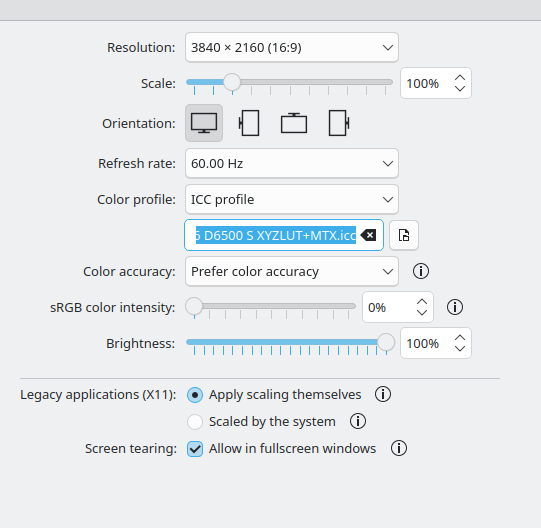
In KDE, my display settings are (the profile shown there is the same ICC file I used with dispwin):
In the logs, there are some strange entries regarding colord (note that it does not get disabled immediately after startup):
2025-12-23T10:42:55.108035+01:00 eagle dbus-daemon[1432]: [system] Activating via systemd: service name='org.freedesktop.ColorManager' unit='colord.service' requested by ':1.18' (uid=0 pid=5284 comm="/usr/sbin/cupsd -l" label="/usr/sbin/cupsd (enforce)")
2025-12-23T10:42:55.120710+01:00 eagle systemd[1]: Starting colord.service - Manage, Install and Generate Color Profiles...
2025-12-23T10:42:55.147669+01:00 eagle systemd[1]: Started colord.service - Manage, Install and Generate Color Profiles.
2025-12-23T10:49:19.724588+01:00 eagle kded6[62204]: colord: X11 not detect disabling
2025-12-23T10:55:23.542029+01:00 eagle kded6[102400]: colord: X11 not detect disabling
2025-12-23T10:59:44.649745+01:00 eagle kded6[132450]: colord: X11 not detect disabling
2025-12-23T12:42:43.641756+01:00 eagle systemd[1]: Stopping colord.service - Manage, Install and Generate Color Profiles...
2025-12-23T12:42:43.657504+01:00 eagle systemd[1]: colord.service: Deactivated successfully.
2025-12-23T12:42:43.657814+01:00 eagle systemd[1]: Stopped colord.service - Manage, Install and Generate Color Profiles.
2025-12-23T12:42:43.657892+01:00 eagle systemd[1]: colord.service: Consumed 718ms CPU time, 236.3M memory peak.
2025-12-23T12:43:29.000601+01:00 eagle dbus-daemon[1436]: [system] Activating via systemd: service name='org.freedesktop.ColorManager' unit='colord.service' requested by ':1.18' (uid=0 pid=5287 comm="/usr/sbin/cupsd -l" label="/usr/sbin/cupsd (enforce)")
2025-12-23T12:43:29.018204+01:00 eagle systemd[1]: Starting colord.service - Manage, Install and Generate Color Profiles...
2025-12-23T12:43:29.045355+01:00 eagle systemd[1]: Started colord.service - Manage, Install and Generate Color Profiles.
2025-12-23T12:43:45.737540+01:00 eagle kded6[5973]: colord: X11 not detect disabling
I can switch darktable to use the X atom.
Regarding scaling: with 100%, everything is too small, browser etc. all have tiny letters and icons. At 150%, it looks OK, but how does darktable handle scaling? Ideally, only the text should be enlarged, a 1:1 view should in the darkroom should result in a pixel-to-pixel mapping. Is that so? Should I use ‘legacy applications (X11) - apply scaling themselves’ or ‘scaled by the system’? Or it’s irrelevant, darktable works with Wayland natively now?