I’m looking for any tips or tricks for managing bracketed images in darktable. I can tell from the EXIF data which images are bracketed, but I can’t figure out how to filter for those bracketed shots in the lighttable view:
> exiftool -if '$DriveMode =~/Bracketing/' -p '$directory/$filename - $DriveMode' -q  -r . | sort -n | head -10
./P7260271.ORF - AE Auto Bracketing, Shot 1; Electronic shutter
./P7260272.ORF - AE Auto Bracketing, Shot 2; Electronic shutter
./P7260273.ORF - AE Auto Bracketing, Shot 3; Electronic shutter
./P7260274.ORF - AE Auto Bracketing, Shot 4; Electronic shutter
./P7260275.ORF - AE Auto Bracketing, Shot 5; Electronic shutter
./P7260276.ORF - AE Auto Bracketing, Shot 1; Electronic shutter
./P7260277.ORF - AE Auto Bracketing, Shot 2; Electronic shutter
./P7260278.ORF - AE Auto Bracketing, Shot 3; Electronic shutter
./P7260279.ORF - AE Auto Bracketing, Shot 4; Electronic shutter
./P7260280.ORF - AE Auto Bracketing, Shot 5; Electronic shutter
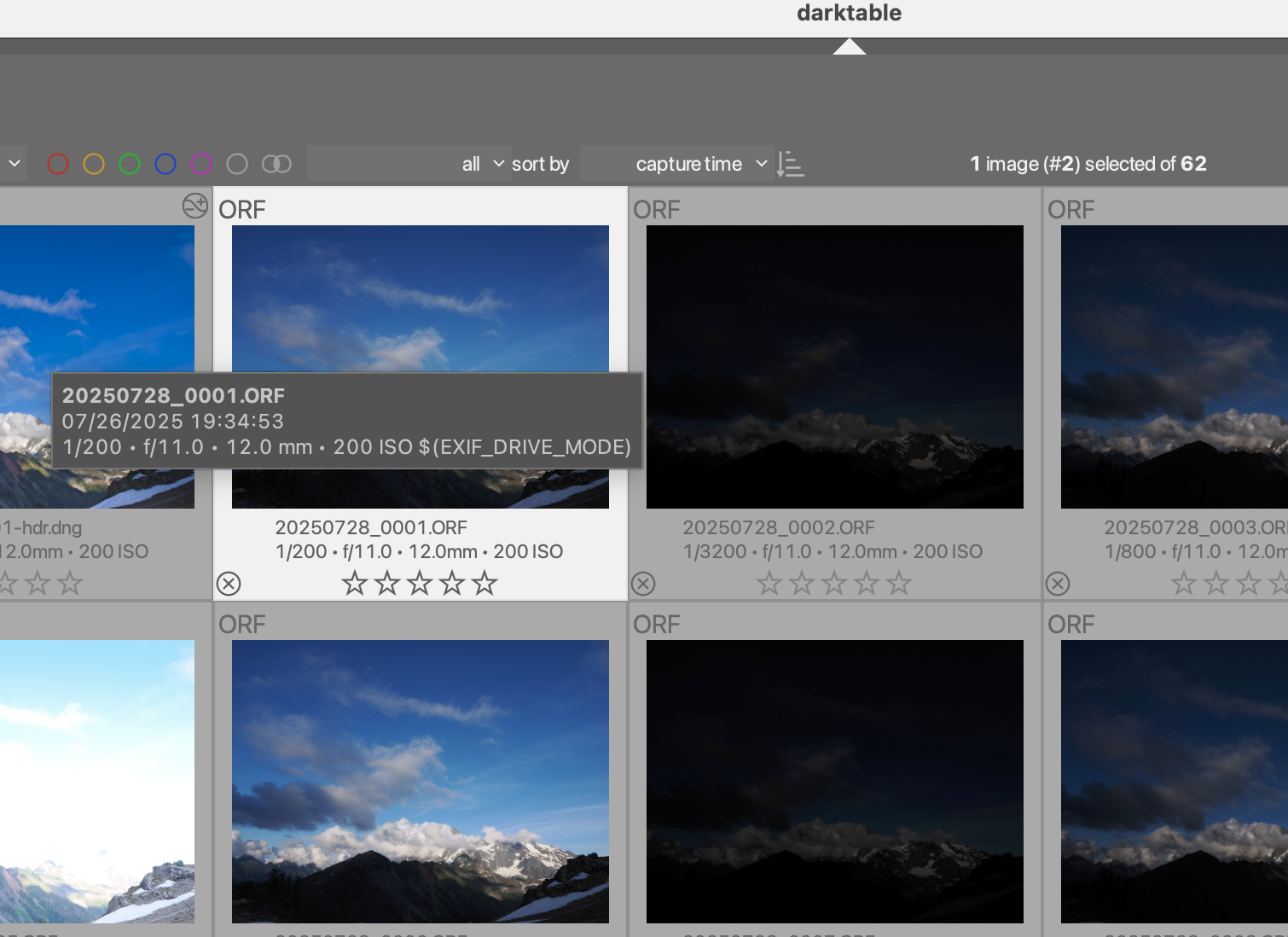
It doesn’t seem like there are any options in the collections module to filter by EXIF data (though I could just be missing it). I tried adding drive mode to the image tool tip, but that doesn’t seem to work:
Does anyone have any tips or tricks for managing bracketed shots? One thing I was thinking is to try merging them to a dng before importing, but I’m not sure if that’s the best idea.
I had the same problem. First solution is, giving the same color mark every shot of a bracketed series. Next series next color mark, and so on. Second solution was putting every series in a separate folder of your filesystem.
Thanks. I guess both of these solutions would work. I’m not thrilled with putting everything in a separate folder, but it seems that would be easier to navigate in the collections tab. I usually do “copy & import” though, so changing folders might be a bit cumbersome.
I don’t know for sure, but I’m guessing bracketing information in EXIF data isn’t standardized so there’s probably no general way for darktable to handle this. I feel like I could write a script to color mark bracketed photos after they’ve been imported though.
Write a lua-script to run after an import is complete. Check the EXIF data of the imported images (with exiftool or exiv2) and group the bracketed images together in one group per bracket. Using another lua script, which I’ve already written, I could then toggle lighttable to display just one bracket group at a time…
A simple but not ideal solution would be to use tags. You could give them all a generic tag, “bracketed” or something. Or you could use hierarchies and go as crazy as you want, like “bracketed|location|group 1”.
Under the collection rules module add a new rule for “search”. You can search for tags here, for example searching “bracketed|location|group 1” would give you exactly that bracket group.
I wouldn’t mind giving @wpferguson’s lua script suggestion a shot if that’s not something you’re interested trying yourself.
Awesome! Is this script also for us available to download? (I searched in the available scripts and I cannot find something similar …)
I would love to try it! Thanks!
I use a similar approach for my focus stacks. But instead of individual tags for each stack I use a general tag and put a short description/name of the stack into the title field in the metadata editor.
I don’t know if this is the “right” way to do this, but I put together a lua script to group all of my bracketed images automatically.
Note, it’s my first time writing Lua, my first time scripting Darktable, and also it’s specific to OM System cameras (because of the exif info), but I want to share in case it’s helpful to anyone.
darktable = require "darktable"

darktable.register_event("group bracketed photos","shortcut",
  function(event,shortcut)
    local images = darktable.gui.action_images
    local drive_modes = {};
    local tmpname = os.tmpname()
    -- Extract the "Drive mode" from the EXIF data.
    -- This is specific to OM System cameras
    local handle = io.popen("exiftool -p '$filename,$DriveMode' -q -@ - > " .. tmpname, "w")

    for i,v in pairs(images) do
      local full_file = v.path .. "/" .. v.filename
      handle:write(full_file .. "\n")
    end

    handle:close()

    local line_number = 1
    for line in io.lines(tmpname) do
      line = string.gsub(line, "\n$", "")
      -- Find the first bracketed shot
      if string.find(line, "Auto Bracketing, Shot 1;") then
        -- Make it the group leader
        images[line_number]:make_group_leader()
      else
        if string.find(line, "Auto Bracketing, Shot") then
          -- Add subsequent bracketed shots
          images[line_number]:group_with(images[line_number - 1].group_leader)
        end
      end
      line_number = line_number + 1
    end

  end,"Group together bracketed photos")
Basically I assigned the script to a shortcut, selected all photos in the film roll, then hit the shortcut. I know where bracketed photos start and end due to the grouping, and I can create an HDR from them. I might try automating the HDR creation too (if that is possible), and also automatically tagging, but this script worked for my latest photo session.
Ah nice. Thanks for the feedback, I appreciate it. I was actually looking for a way to work with the whole collection, and I guess I missed that option. This will make it a lot easier. I think I’ve also left an unnecessary gsub in there.
Not that I could find. There was some exif metadata, but not the drive mode information I needed. I was looking at the description of dt_lua_image_t.
AFAICT, DT only does exif info extraction on image import, and then you can only access the specific exif info it extracted at that time. It kind of makes sense since I guess not all exif fields are standardized (from what I can tell).
The Lua API only exposes a few fields and those are part of the dt_lua_image_t datatype. The exposed fields are the information stored in the database.
Extra data fields, especially camera specific, aren’t extracted or stored. For instance Canon just recently added roll and pitch data in the last firmware update for my camera, so I use exiftool to extract that and auto straighten my images.

 .
.