I’m using DT 4.2.0 to process jpg images not raw. Can the module order default to v3 for jpg not RAW, to save me manually changing this for each image individually??
hello @sga
Welcome to the forum!
I see the same thing using development git master source (darktable 4.3).
My main flow is RAW → darktable → 16 bit TIFF → GIMP/“Other apps” for post processing. However, when I sometimes re–import TIFF into darktable, or do darkroom -> history -> reset to use darktable as post processing tool, for tiff or jpg, then I get v3.0 RAW module order stated in lower right hand corner of darkroom window.
EDIT: There is already an issue labeled v4.4 milestone here: JPG module order is not used by default when editing a JPG... · Issue #14023 · darktable-org/darktable · GitHub, reported by @priort.
Thanks for the welcome Karl. Yes you get the same RAW module order notice that I do but can’t find a way to have it default to jpeg order.
The link you sent in your EDIT leads me to hope that this matter will be addressed in the next release of DT
For now, one can create auto-applied presets:
- select the raw preset
- save it as raw-auto, select to apply it to raw images;
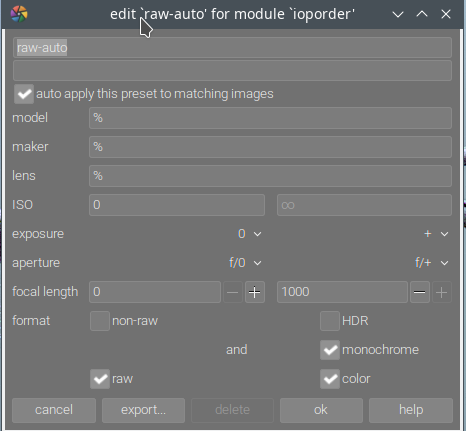
- do the same for non-raw.
Edit: as pointed out to me in a private message, this only works with the master (development) version, not with 4.2 or 4.2.1. Sorry about that - and thanks to @Jade_NL for pointing that out (no need for a PM to correct me when I’m wrong, though  ).
).
Thank you kofa, it’s good to know that this issue has been worked on and will be fixed for the next release of DT.
Works for me in git master: darktable 4.3.0+2106~g88a3af4c39 Add support for format in lib preset. by TurboGit · Pull Request #14378 · darktable-org/darktable · GitHub.
The jpg/tiff and raw files now get v3.0 jpg and v3.0 raw module order by default.
2 Likes