Hi, this is my first post here. I have been using Darktable for a year or so now, and previously was a Lightroom user. I work as a software engineer and have built multiple modular systems (because I love modular stuff).
One of the most confusing parts of darktable for me is the style and preset system. I think it is probably my fault for not understanding, but I am genuinely trying.
Specifically, I do not understand what the “Reset all module parameters to their default value” setting is for. My brain thinks of a module preset as a way to save my current settings for the module so that I can apply it to other pictures that need a similar adjustment (e.g. grain presets, generic sharpening with the contrast equalizer module, etc.)
Why would I create a module preset for default settings? Couldn’t I enable the module on any photo in order to get the default settings and save myself one click?
Now, I understand that maybe this setting is only meant to be used for presets that are auto-applied, but in that case, it seems that we are complicating the concept of module presets by entangling them with the concept of when to apply/enable modules and their presets(which feels like it should be handled somewhere else).
I think auto-applied modules are a fine and good feature, but including those settings inside the module preset creation dialog is confusing. In my understanding, the module preset creation dialog should be used for configuring how the preset will store and recall its current settings, not WHEN darktable will enable and load that preset.
Are there other times I would want to enable that setting? Do I fundamentally misunderstand the use of this setting? Please let me know. I really like darktable, and I want to be able to use it effectively.
Certain modules depend on the image data to achieve the correct settings. When you save a preset, it saves the exact settings of the module.
For instance you use the lens correction module. You save a preset and it’s set to f/4 50m focus distance, etc…
Then you apply that preset to a different image that has different aperture and focus distance. Because of the preset system, those will get changed to the preset values and not the “real” values.
Modules that should be reset (off the top of my head):
lens correction
raw black/white point
white balance
I think there might be 1 or 2 more, but I can’t think of them right now
Actually presets don’t have to be auto applied. You can create a preset, then assign a keyboard shortcut to it.
I configure denoise profiled to be applied when the ISO is greater than some value. That may differ between cameras, so I can set a preset for each.
darktable has the Lua scripting language embedded in it for when you reach the limits of styles and presets. Using Lua you can apply complex logic and control individual settings of the modules.
So the only reason for the “Reset all module parameters to their default value” setting is to be able to create a module preset that is the exact same as the default way that that module would initialize on any given photo? It feels like the only possible usecase is for auto-applied module presets, because creating and then manually applying the default auto-detect preset is actually just inefficient (just click the module reset button).
But even auto-applied presets are not a good reason for this setting to exist, since those auto-detect presets already exist! They are built into Darktable to begin with (every time we click the module reset button, we are “loading” that “default” preset). Instead, darktable should just allow us to select which modules are auto-applied to which kinds of photos based on hardware/metadata.
I guess I am just frustrated that it feels like the existence of this setting is a very weird workaround for something that could be simple and even more powerful if properly implemented.
P.S. I love darktable. It is super awesome to have such a powerful photo editing application for free. I hope to be able to contribute to this project in the future somehow.
Yes, but the use case is in a style when you overwrite the current style with a new one. Then the auto applied modules can set themselves to the appropriate values for the current image, not the image the style was created from.
So if I apply a style to a photo, Darkroom then applies all auto-apply modules to that photo? So if the user meant to save the style with specific lens correction module settings, but they also have an auto-apply module preset for lens corrections, their style won’t be fully applied?
Doesn’t this seem like a convoluted way to handle things? This seems like it would lead to a lot of confusion for users. Styles and Module presets should be easy to understand.
It would be better for the style’s settings to be applied no matter what. If the user doesn’t want to have the lens corrections applied to another photo, they should just NOT select the lens correction module to be a part of the style.
I appreciate your help in understanding. Hopefully, future updates can streamline the style/preset system. Right now it feels a little clumsy.
I respectfully disagree. Presets are easy to understand and there would be no sense in creating a preset that is default values, because as soon as it it activated it is activated to default values. So presets are only selected to move adjustments away from default values.
However, I wonder if the confusion here is that you are referring to styles and not presets.
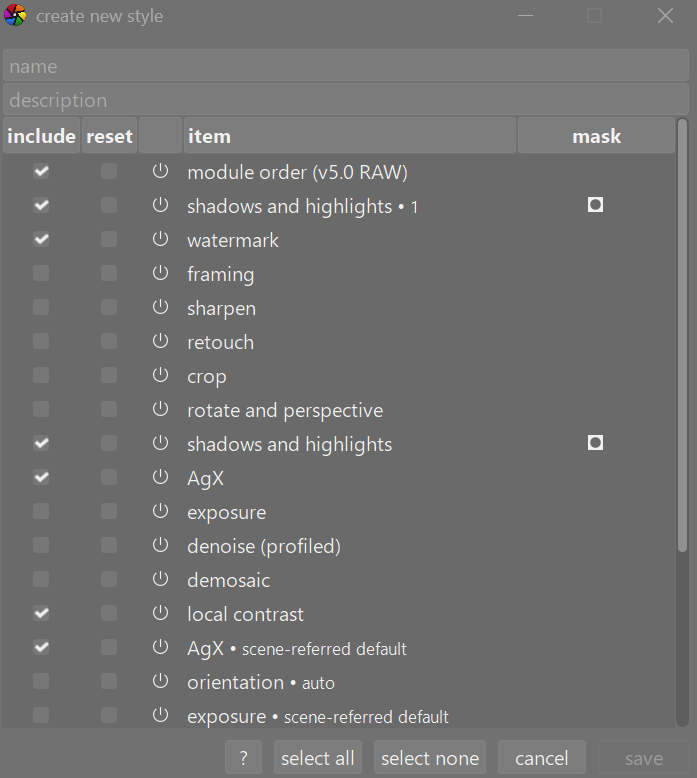
When you create a style you are given two options to include the module or to reset the module. If you choose to “reset” that module’s parameters – this will cause the module to be included in the style but with all controls set to their initial (default) state and this would usually be a good idea for modules such as lens correction which needs to adjust to specific lens settings in use. However, if the style includes a module that affects color or contrast then resetting that module would be a mistake. You want to copy that modules custom settings to be applied as part of the style.
Selecting “Reset all module parameters to default values” during module preset creation does create a module preset that is default values, which is exactly what I am saying is wierd and only slightly useful (auto-applied presets).
I agree with you that presets should be for actually modifying a modules settings beyond defaults,which is why I am trying to understand the logic behind this setting and to see if I am wrong. I have tested creating modules with this setting on /off and have confirmed that enabling it causes the preset to act the exact same as defaults for whatever image it is applied to.
I understand styles. I am talking about module presets right now, hence the title of the topic. I think styles could be improved but mainly through a more easy to understand usage system, but that is a different topic.
you open an image in darkroom, which applies auto presets
you apply a style
In other words, the style is applied after the autopresets, and thus modules in the style will supersede the auto-applied presets (if there are several copies of a module with the same name, only the last added will be used).
Maybe outline your expectations, your workflow and how you configured module presets.
Styles and presets are completely independent.
Presets of a module doesn’t care about styles, that might be applied. Also for presets you marked as autoapply - these are applied if the conditions are met on initial edit of a raw file.
So if you apply a style in lighttable to a new raw file then there ere two steps:
initial step: apply initial edit (as done on first openig it in darkroom)
→ all autoapply presets are also applied depending on the parameters
apply style (overwrite/append) mode
→ if a module is marked as “reset” the module initialized in step 1 with autoapplied setting is resetted to defult values
in case of lens correction:
“reset” in the style definition resets any parameters
“reset all module parameters to their default values” just resets parameters that are determined from exif data - but not the other parameters
If you don’t have a use case, where you need to apply same parameters indepently of exif related data, then you don’t need this setting; a simple reset is sufficient
Keep in mind that this options on defining a preset are generic: if there aren’t any exiv related parameters then you don’t need this when defining a preset.
Except, you may want to enable a module, such as lens correction, c which you use all the time, but not with some saved settings, specific to a given camera, lens and focal length, but with defaults selected based on the lens.
@kofa This is my understanding, as well. But are you sure it works?
I just created a preset for one of my lenses without setting the reset flag. But when I choose this preset for an image taken with another lens, it actually shows the this lens, not the one it was created with.
Is this some special logic for lens correction?
What I mean is, I cannot force the “wrong” lens. I expected that when creating the preset from an image taken with, let’s say, a 200mm lens without ticking the reset box, it will use the 200mm lens also on an image taken with a 85mm lens. But it seems to me, that always the actual lens is determined independent of the reset setting. Then, for this particular parameter the “reset all parameters…” is also not needed.
I am aware that for lens correction it probably does not make sense to force a different lens, but I am wondering if there is a bug or I am missing something.
Then it works as expected. Thanks for the hint! I wonder if there should be an indication of a manual change to such a parameter on the UI (but that is a different topic).
I create a lens correction module preset and set the corrections parameter to “only distortions”, and then save the preset with “Reset all module…” enabled. Note that the settings of the original lens correction module do not all get reset.
I apply my preset to another photo’s copy of lens correction module: This causes all settings to be reverted to default (which generally means nothing changes because the lens correction module was already using defaults). This includes the corrections parameter that has the default value of “all”.
This means that it is all parameters that get reset, not just parameters that use exif data.
My understanding could be wrong, since there are always edge cases that slip through testing.
In my opinion, it would be an improvement to rename this setting to “Exclude auto-detect parameters” so that when you apply the preset, the module will NOT overwrite auto-detect parameters but will load regular parameters.
Reset all module parameters is something you will most likely never use until one day you try and create a style and it doesn’t work until you use that, and then you will think “now I understand”.
I created a negadoctor workflow style in another thread. It used a custom module order to put the modules in a sequence where you could work from the bottom up, realizing that in part of the pipe you’re working with a negative image and part of the pipe you’re using a positive image. Since it’s a complete workflow the style gets applied in overwrite mode because I don’t want the auto applied modules to interfere. When I tested it I got bad colors in the negative (created using a copy stand and camera) because I forgot to set the raw black/white point module to reset and it was applying the raw black/white point for the camera that was used when I created the style and not the camera that took the negative of the image I opened.
Ok I have a question about this. In this situation, how did you set up the “reset all…” module prest for black/white point module to influence the special style?
Did you create an auto apply preset for black/white point module after realizing the error? This fix could allow photos to apply their auto apply black/white, therefore fixing the issue? Wait, do styles apply after the auto apply presets, or before?
Or is there some way that you modified the style to now use that black/white point modules “reset all…” preset? I didn’t think that styles were built from module presets or were aware of the module presets currently applied to the photo but maybe that is how it works.
O would love to know how you used the module preset to fix how your style worked.
Your explanation shows a very reasonable use case for the “reset all…” Setting in module presets. Although I do feel like it would make sense for styles to handle that scenario since styles and presets are distinct from each other as far as I know.
Thanks!
Coincidentally, I finally decided to create some auto-applied presets for my non-manual lenses, for chromatic aberrations and lens correction. I have been applying these modules for all images taken with those lenses, unless I (ahem) forget. For my lenses at least, they help. All I was aiming to do is to auto-apply these two modules for the relevant lenses; in other words I wanted to automatically turn these two modules on so I never forget.
The documentation for “reset all module parameters to their default values” says (my bolding):
Selecting this option will cause all module parameters to be reset to their default values (as if you had simply enabled the module on a new image or clicked the module reset button). This can be used to automatically set certain modules (color calibration, exposure, filmic) based on the Exif properties of the current image rather than setting to hard-coded parameters.
I found that it’s important to turn the module on before creating the preset. Otherwise, if the preset is auto-applied and then the module is subsequently turned on, strange things happen that I can’t properly describe yet.
From the above quote, is “certain modules” intended to refer to only color calibration, exposure and filmic, or are they intended to be examples?