I downloaded and compiled Darktable 5.4.0 today on my Fedora 42 system. One of my cameras is a Fujifilm X-E5, and I had been experimenting with 10 bit HEIC support. I needed to compile Darktable because, by default, Fedora doesn’t enable HEIC. That all worked fine, and I can open HEIC files in Darkroom.
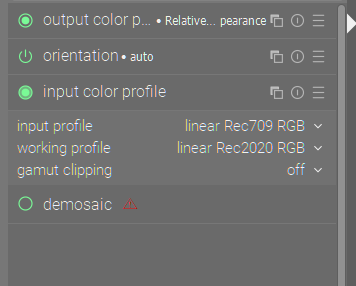
I’m seeing one thing that’s puzzling me, however. If I open a JPEG file and clear it’s history, the active modules I see are:
output color profile
orientation
input color profile
That is what I’d expect. However, if I open an HEIC file, I see:
output color profile
color balance rgb
sharpen
exposure
orientation
chromatic aberrations
lens correction
denoise
input color profile
demosaic
hot pixels
In this case, the “color balance rgb” preset has a preset, but the preset is set to ONLY apply to raw images. It shouldn’t be turning on for this one!
Basically, it looks like Darktable is treating the Fujifilm 10-bit HEIC files as if they were raw files, at least in some cases.
Am I missing some setting, confused, or is this a bug?
I’ve attached a low-resolution version of a file in both HEIC and JPEG formats, along with their XMP files, and have confirmed the above behaviour with both files.
I saw the same thing from your file…but compressing the history stack removed it all …so no idea why it loads that way…Ah I see you had the xmp in there… so if I just load the file without that xmp in the same directory I get this…
Same if I compress you xmp…so I am not sure how you ended up with those module…try copying your file to a new location and then import it and see if the issue goes away…
Yes, that’s where I got the HEIC modules. But the darktable cmake checks for their existence, and only enables support of they are there at compile time, so HEIC support was not available in the RPM I downloaded from the OBS site despite the fact that I had the libraries installed. At least that’s what the OBS log files seemed to indicate.
As for turning on modules by default for 10 bit HEIC images, it doesn’t make sense to me. Yes, I should be able to do more (which is why I find HEIC 10 bit interesting), but those images are already processed and shouldn’t require default processing, and they certainly don’t need demosaicing or lens correction! Worse, with the automatically turned on modules the results look terrible!
No, dt build only checks for libheif at compile time (not any HEIC specific codecs), which is present and already enabled in the default RPM package. You can convince yourself of this by checking the output of darktable -version. Adding libheif-freeworld from RPMFusion for the extras suffices.
And btw, not talking about OBS packages for Fedora - those are poorly maintained IMHO (case in point), stick to official Fedora repo ones. Yes, it does mean perhaps waiting an extra couple of days for the latest to appear (or enable the testing repo).
Re modules, agreed demosaic and lens correction shouldn’t be there.
And… when I start darktable with a temporary config dir, I don’t see the issue. I assume, therefore, that something in my preferences got screwed up when I installed the new version.
As a next step, I backed up then deleted my “.config/darktable” directory, then copied the library.db file back. After rebuilding the image caches things look good, and I was able to imported the test files without issue.
So, if anyone else sees this, it looks like the library was OK, but that something else in the “.config/darktable” directory got confused.