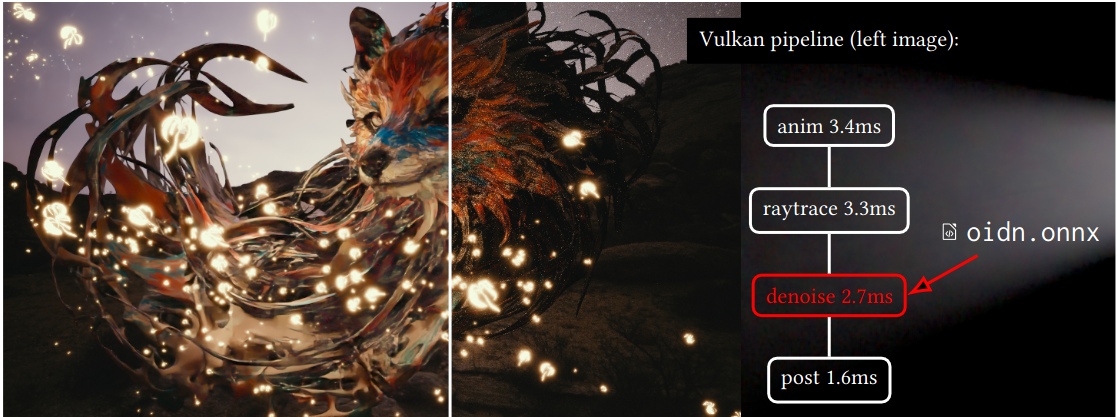
as you might have seen, vkdt uses an external compiler to generate performant spir-v and a gpu dispatch schedule from onnx to implement fast inferencing. this is used in the joint demosaicing and denoising module, jddcnn. this one runs in 45ms on a 100MP bayer image/10ms for 16MP xtrans on an RTX4080S.
there is now also the open image denoise, oidn module. this is a direct implementation of attila afra’s excellent denoising system, currently using the sdr rgb → rgb model (i.e. no sidecar channels, low dynamic range, and no mosaic/raw data).
so far, vkdt shipped with optimised schedules for my nvidia gpu, but the compiler has now been released, so it’s now possible to create fast schedules for your own gpu!
I was trying to compile them for my RTX 3080. The ./compile-dnx.sh runs without problems after I compiled denox, but in the compile-vkdt.sh script it uses the vkdt-denox executable. Where can I find this? AFAIK it is not included in the regular vkdt build?
if you manage to compile the module for the RTX 3080 i’d be curious to hear whether it’s any faster than the version currently checked into git as “nvidia”. this one i built for an RTX4080S and from what denox query-device-info can tell it’s equivalent to an RTX3080. so speed differences might be due to maybe memory bandwidth? don’t know whether the register file/shared memory grew between architectures. you can read out latencies with vkdt -d perf.
…if that is not a 100MP image the numbers look a bit on the slow side to me. how does it compare to master?
you’d need to install the weights files too, did you? the *.dat that can be found in bin/data/ after running compile-vkdt.sh need to go into ~/.config/vkdt/data/.
yay, more like it! this is with your custom compile? how does the upstream vkdt/master version compare to that? (the weights should be in the release files for codeberg/vkdt-nn)
I had to increase the required fmt version to 11 (before I always got /app/vkdt-denox/codegen/compute_graph.cpp:6:10: fatal error: 'fmt/base.h' file not found) and remove the reweight step because it failed for byrn and xtrn.
I don’t understand the details but the LLM that guided me through this claims that “coop matrix commands are now used for everything”.
I couldn’t test the results yet, though. If it worked I could repeat this for my RX6600 (if 8GB VRAM are enough tu run this at all)
with the aim of integrating inferencing directly into vulkan dispatches, without bloaty integration layers or external dependencies. this enables direct use of the engine’s resource management (can alias memory so it doesn’t cost like 4G extra, can directly use barriers in the command buffer instead of wacky semaphore constructs etc).
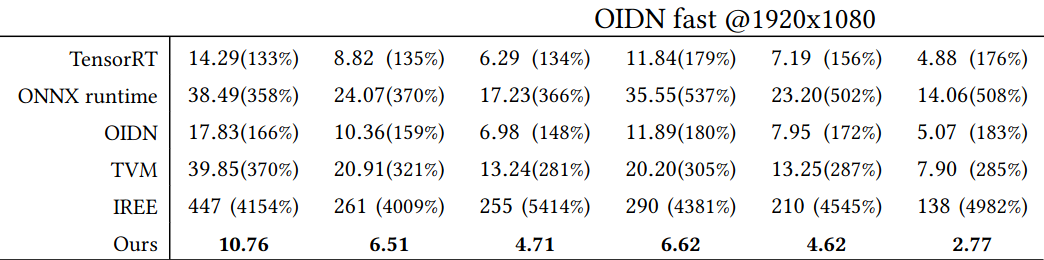
due to built-in autotuning, the inferencing is also faster than some alternatives, the notable exception is hand-optimised code on intel. some existing libraries/runtimes have shocking perf in this scenario (timings for various gpus in milliseconds, from table 2 in the paper):
as a side note: the teaser image above is tonemapped with spektrafilm portra 400, that’s included in the 1.6ms post processing
the vkdt neural demosaicing networks are straight forward variations of the OIDN network evaluated above (use bayer/xtrans input instead of dense rgb).
I didn’t get it running yet. Using the weights files from the vkdt-nn repo (release 0.0.1 or 2.0), I get a very “red” picture when I select arch “auto” and glitch art for every other arch.
But the weights files are .dat files, how do I get to that from the files that I compiled?
(jddcnn-byrc-RX7900XTX.dnx jddcnn-byrn-RX7900XTX.dnx jddcnn-xtrc-RX7900XTX.dnx jddcnn-xtrn-RX7900XTX.dnx oidn-ldr-RX7900XTX.dnx oidn-ldrs-RX7900XTX.dnx)
you’d need to run the codegen vkdt-denox on the dnx files, see the script in the vkdt-nn repo. it’ll create bin/data/*.dat to be copied to your local ~/.config/vkdt/data. but in this case you’d also need to generate the code and recompile vkdt/the module. if you want i can do that part (provide me with the dnx).
what was that about the reweighting that didn’t work? are we sure all the .dnx files are good?