New ZWO Seestar script and tutorial

We are pleased to announce the release of a script and tutorial dedicated to Zwo’s new All-in-One telescope, Seestar.

The tutorial explains step-by-step how to use the script, and then how to process the stacked image. The proposed script has been designed to automatically pre-process the raw images recorded by the Seestar and give the best image, automatically.

We hope it will meet your expectations. To find out how, click here . The link to download the script is in the tutorial.


This is a companion discussion topic for the original entry at https://siril.org/2024/03/new-zwo-seestar-script-and-tutorial/

Good afternoon, I have a question. You may have already answered it, but I’m trying to download the script for ZWO, and when I go to the tutorial page, I can’t find the link. Can someone explain how to do it?
I appreciate it.
Regards.
Juan Ignacio

If you read our release notes for the beta version, you’ll see how to easily get the script, without external download.

I must be stupid because I can’t find the Script and I read through the entire tutorial.

Continuing the discussion from New ZWO Seestar script and tutorial:

I couldn’t find either, but you can download it from here
https://gitlab.com/free-astro/siril-scripts/-/blob/main/preprocessing/Seestar_Preprocessing.ssf?ref_type=heads

You don’t have to manually download.
This is done with the Siril UI.

1 Like

It didn’t automatically download. I had to manually do it. Siril is running on Ubuntu Linux as the OS. Maybe that’s why.

Absolutely not. I’m developing it on Linux. How do you tried to get it t first?

2 Likes

Hi,

Unless I’m misreading the tutorial on siril.org, I just select preferences->scripts and it should be on the list. However the list is empty. Screenshot attached.
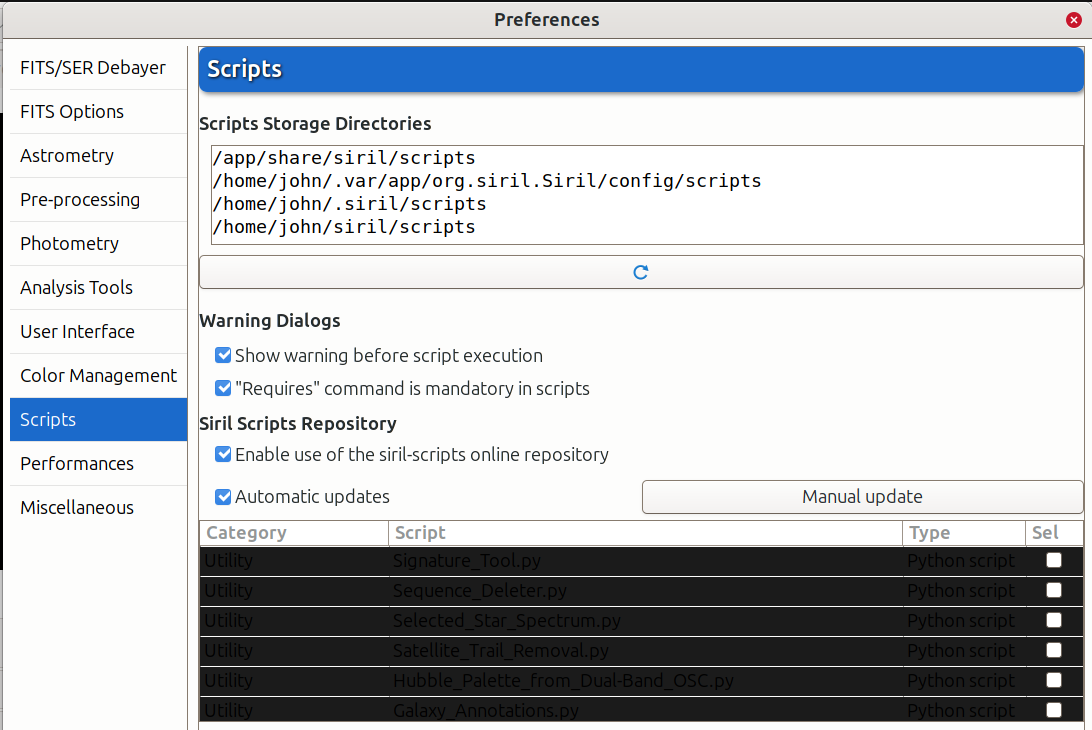
Thanks,

John

You have an issue with your theme. Go to user interface in Siril preferences and change dark to light.

Yep, that fixed it. Thanks.

1 Like