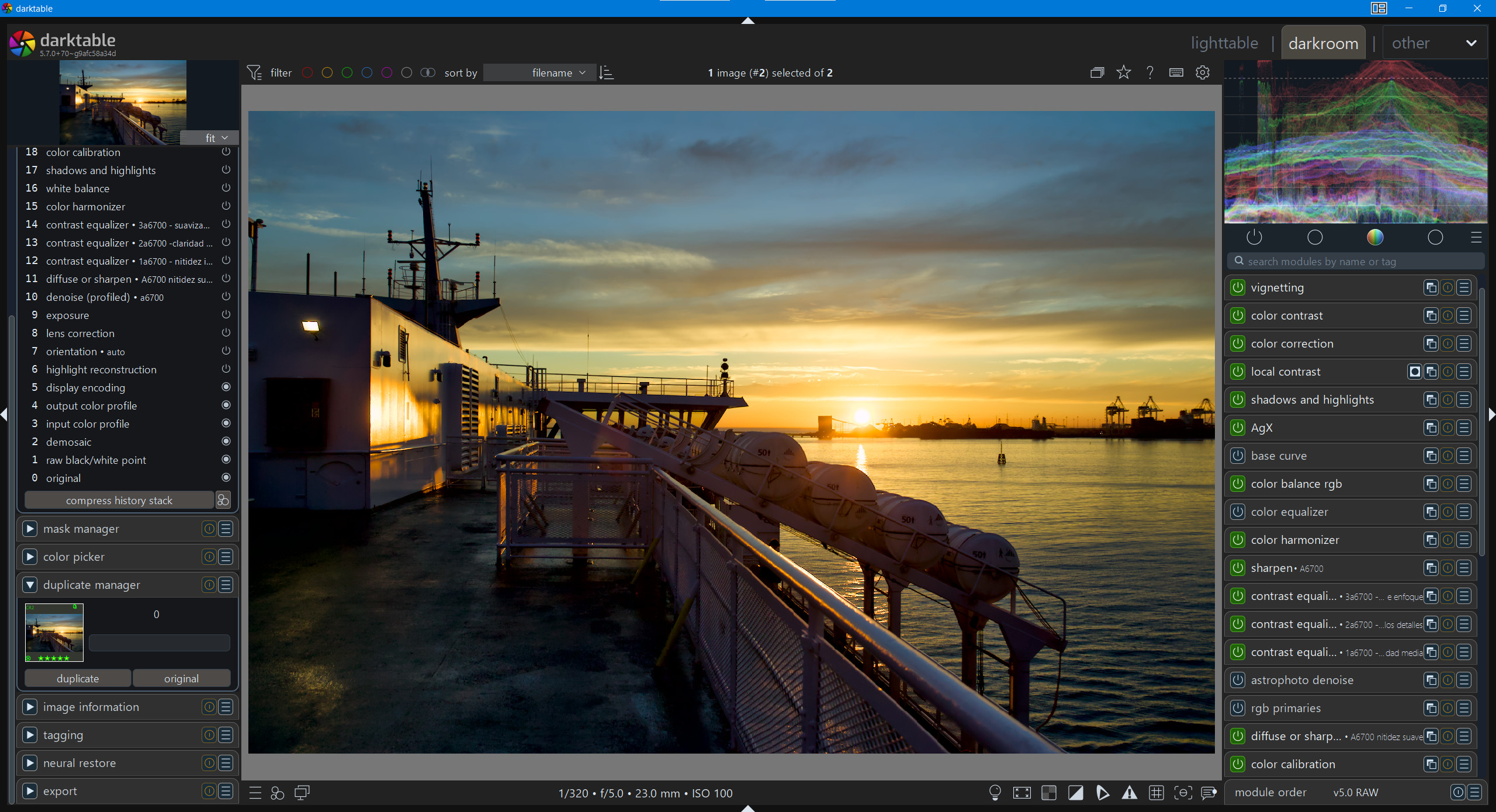
I’m sorry, but I don’t understand your questions.
I think everything is explained sufficiently in the link.
Download it, enjoy it, and if you’re polite, leave a “thank you.”
That’s all.
Anyway… I like it and I started using it a while ago. However, I might be weird but I prefer the “elegant grey” that many people loath. It works well both for light and dark theme desktops. Whether it’s also better for assessing colours, I don’t know.
So I have altered the theme trying to restore the elegant grey, as much as possible, which forced me to change other things as the font colours and other things. So my customised version is a bit messed up.
I like how clear it is that a module is activated. I personally would subdue the green color a little. I feel it just needs to be a hint of color to differentiate it. But thanks for the effort of putting this together and sharing.
With that nice little border on the button and how it makes the inactive ones look you could even make the green a solid light gray and it would likely be clear as well and not quite the neon distraction that some might object to…
No from a license / copyright perspective this is not enough. Because this is too vague. There are at least two aspect not covered.
Can it be used commercially? Or not? ‘Download it, enjoy it’, can be interpreted that way, but it is not explicitly stated.
Can it be redistributed? ‘Enjoy it’ can be interpreted that way.
Suppose I start selling the theme (on Etsy or so) and make a lot of money out of it… I can tell you that, that fits my bank account’s definition of ‘enjoy it’ perfectly. But I am not sure this was your intention by sharing.
Have said this, thanks for sharing! And indeed are you open that I can pull it out the central darktable store I am building at the moment?
If you: please take one minute and determine a license, you can you this tool: Chooser - Creative Commons
Thank you! What about adding it to a repository or collection of darktable themes (crediting you as the author) where other people can download it? That will help people find it in the future, but we can only do it if you say yes.
If that’s okay, is it also okay if people make changed versions (also attributing you as the original author)? (Note: the link above is better than my questions.)
That link it shared to the Creative Commons choser, helps you exactly to answer those questions and gives you the that CC… thing @finestructure is talking about
I’m sorry, but this whole thing is getting harder and harder for me.
I’m a private user who took the “darktable.css” file from the official darktable distribution and modified/rewrote it for myself. Since I thought the result might be useful to others, I shared it altruistically.
Now, if legal questions arise, two things can happen: legal experts accept that it inherits the same license as darktable itself. It indicates GNU v3. Or, I can simply delete it, stop sharing it, and move on.
This certainly makes me not want to share my effort again only to cause me headaches.
I am sorry to make this harder for you! That is certainly not the intent!!
Actually, it is the other way around. We want to make sure that we don’t use any of your stuff, the way you did not intent!
We honour and value your work very much! And we want to make sure that others know what they can do with your work! The questions I ask are to ensure that I values and your work, the way you want.
Thanks again for sharing. But you make a valid point the header of the themes file says GPL-3, so I take it as GPL-3.
You hope you will keep sharing your work. I am again I am sorry you feel burdened by us.
why reasoning so much?
if permissions aren’t explicitly granted, ten handle it as not permitted.
So if you want to distribute, then look out for the word distribute - and if you don’t find that, than you need to ask before instead of offending the one who shares with license requirements to meet your expectations